


chadt96841013
Inspiring
July 5, 2017
Answered

Selection tool doesn't select stamps and comments in Acrobat DC?

  • July 5, 2017
  • 1 reply
  • 5139 views

Hello all,

My company just upgraded our computers and we now have installed Acrobat Standard DC (previously working with Acrobat X). We are in the construction consulting business and 99% of our projects are submiited to us as PDF for our review against contract documents. To that end, it has been commonplace for us to utilize the comment tools in version X to insert text callouts, lines, dimensions, text boxes, as well as our review stamp. We have always been able to use the selection tool to "batch copy" multiple combination of comments, lines, stamps...CTRL+C,  paste onto another page via CTRL+V.

We cannot get the DC version to do this. What are we missing? I surely hope Adobe didn't remove this function and that its just a setting somewhere.

P.S. Just for troubleshooting purposes, i temporarily downloaded the DC Pro version and no luck in the Pro version either.

Additional Info:

Dell Precision PC's

Windows 10 x64

Thanks for the assistance!

Chad
This topic has been closed for replies.
Correct answer chadt96841013

Use the Hand tool. Hold down Ctrl to select multiple items.

I would recommend you convert this entire thing into a single dynamic stamp, though. It's much easier and faster to use than what you've described... If you're interested I could develop this stamp for you for a reasonable price. Feel free to contact me privately at try6767 at gmail.com.


Hey, appreciate the offer but the stamp is only a small part of the picture so to speak.

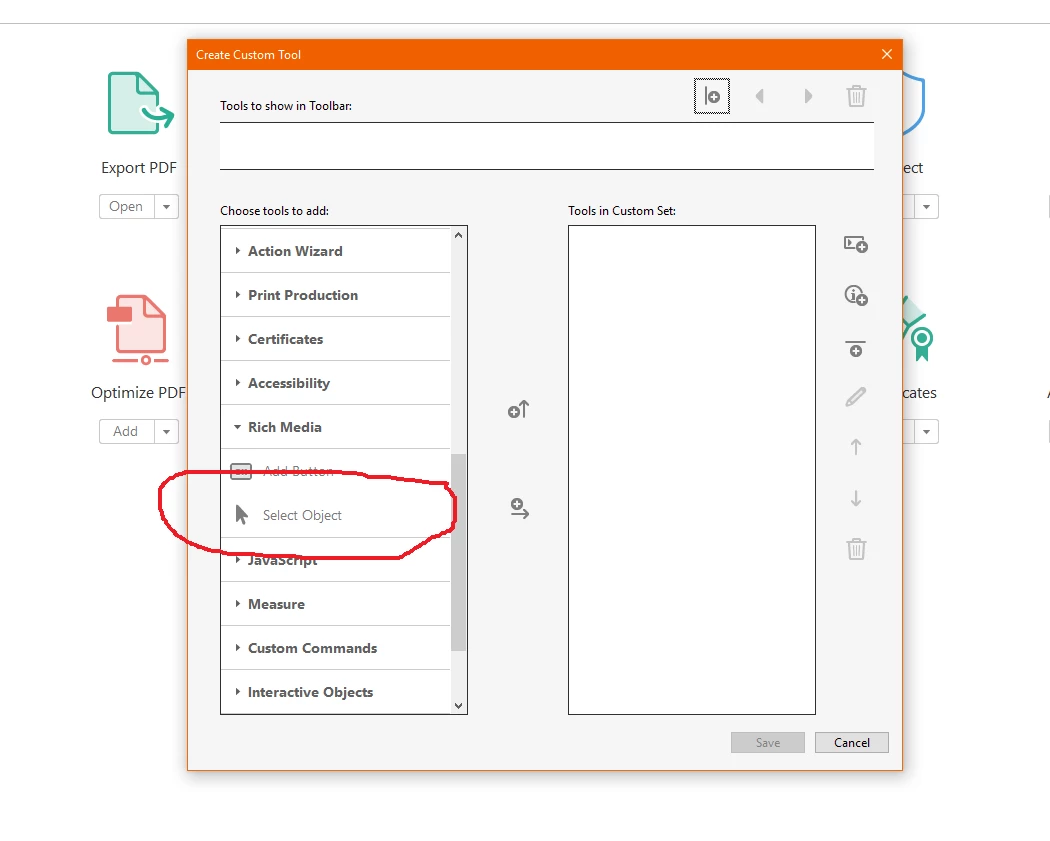
Regardless, after alot of frustrating digging, I finally stumbled onto what I am looking for. I am going to call it the "old" select tool. It specifically selects comments in the PDF file. For anyone reading...go to create custom tool>Rich Media>Select Object. Add it to whatever toolbar you want to add it. It may be found somewhere else but this is how I cam upon it. See screenshot below:

So the selection tool shown in the standard tool bars is for text and images imbedded in the PDF. The one above is for selecting objects such as comments.

Thanks!

Chad

1 reply

chadt96841013
Inspiring
July 5, 2017

I feel I need to clarify..should have proof-read better. The selection tool will not select any stamp or comments we place into the file - something we did everyday in the previous X version.

Chad

try67
Community Expert
July 5, 2017

Do you see the stamps/comments in the Comments List section of the Comment panel on the right? What happens when you try to select them from there?

try67
Community Expert
July 5, 2017

They show up in the comment panel and can be selected from there. Unfortunately, some of our reviews look like we bleed on the pages so sifting through a list would become a very tedious and time consuming task vs being able to select directly from the page itself via the selection tool as we were previously able to do.

Just an additional clarification: 90% of the PDF file we mark-up are full size construction drawings - I have had as many as 50 comments on a single page before.

Thanks!


OK, so what exactly happens when you click them using the page using the Hand tool?

Also, what exact version of Acrobat are you using?