

Participant
October 16, 2019
Answered

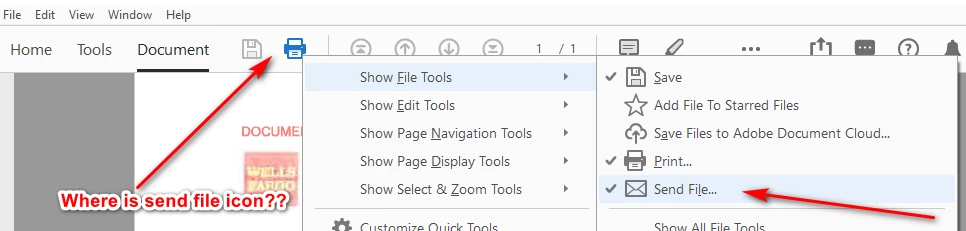
send file icon not displaying on file tools toolbar Acrobat Pro 2019.021.20047 since 10/15/2019

  • October 16, 2019
  • 5 replies
  • 11960 views

How come send file icon not displaying anymore on file tools toolbar Acrobat Pro 2019.021.20047 since 10/15/2019 update even if I select it?

 

This topic has been closed for replies.
Correct answer arvindy

Hi,

Adobe Acrobat and Reader official update (19.021.20049) containing the fix for this issue is now available. This update will be automatically pushed to all existing installations of Acrobat and Reader. You may also manually trigger the update early by opening the application and going to Help > Check for Updates.

More information about this release is here: https://helpx.adobe.com/acrobat/release-note/release-notes-acrobat-reader.html

Please try it out and let us know your feedback!

Thanks for your patience and support!


Regards,

Arvind

5 replies

Inspiring
October 31, 2019

Thank you. It works now. We can see the Send To button.

Adobe Employee
October 17, 2019

Hi FredhPCM,

Apologies for the inconvenience caused!

We are also able to reproduce the issue locally, this happens only when multitab Preference in Acrobat is not enabled.

We are looking into it and let you know once we plan to deliver the fix. Meanwhile, could you please enable multitab Preference in Acrobat as a workaround.

You need to follow the steps:

-Launch Acrobat, Open Preferences

-Select "General" from left pane and tick the checkbox "Open documents as new tabs in the same window"

-Click OK to save and close Preferences dialog. Relaunch Acrobat and try your workflow.


Regards,

Arvind

Participant
October 17, 2019
Thanks but I do not like multitab. I did enable it to test and the email icon was back. I switched back to multitab disabled. I now use the keyboard short cut. ALT FL.
Adobe Employee
October 24, 2019

Hi

Adobe Acrobat and Reader official update (19.021.20049) containing the fix for this issue is now available. This update will be automatically pushed to all existing installations of Acrobat and Reader. You may also manually trigger the update early by opening the application and going to Help > Check for Updates.

More information about this release is here: https://helpx.adobe.com/acrobat/release-note/release-notes-acrobat-reader.html

Please try it out and let us know your feedback!

Thanks for your patience and support!


Regards,

Arvind

Meenakshi Negi
Community Manager
Community Manager
October 16, 2019

Hi FredhPCM,


Thank you for reporting this.


Please try once to repair the installation of the application. In the applicaiton, go to Help > Reapir Installation.

Reset the application preferences using the steps provided here https://forums.adobe.com/docs/DOC-8511 and reboot the machine.

Check if that helps.


If the icon still not available, please share the OS version on the machine.

Also, let us know if you are using the application on your personal machine or on the work machine.


We will be waiting for your response.


Regards,

Meenakshi


michaela15141015
Participant
October 18, 2019

When opening a PDF in the browser viewer (IE / Edge) the "Send file as email" - button is missing even though its actived in the menu bar. 


Having some clients still running version 2019.012.20036 the button is still there. 

Problem happens on clients with 2019.021.20047 / .20048. 


(Windows 10 1903 / Office 2016)


Meenakshi Negi
Community Manager
Community Manager
October 18, 2019

Hi Michaela,


Thank you for reaching out.


We are aware about of this issue and has beend reported to the team. They are currently working on the fix.

We do appreciate your patience.


Regards,

Meenakshi


Participant
October 16, 2019

I need this icon back. No time to waste going around the menus to e-mail a file. Please fix or I will find PDF alternative

Bernd Alheit
Community Expert
Community Expert
October 16, 2019

Looks like that this icon was removed.