
Participant
April 2, 2021
Answered

Send for Signatures hangs at 72% (still)

  • April 2, 2021
  • 21 replies
  • 57913 views

We are still having issues where Adobe Acrobat Pro DC 2021.001.20145  hangs at 72% when sending for signatures regardless of repair, updates, uninstall and reinstall.  I need a fix for this!

I'm attaching the System Report for review.  
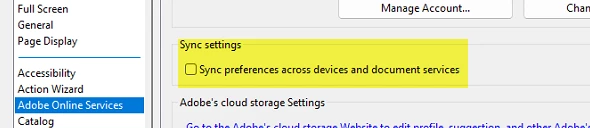
Correct answer LCAadmin

Turned this settting off, fixed my issues for useres.


21 replies

Participant
October 7, 2022

Adobe, this is absolutely ridiculous and unprofessional- we need a solution here and you are deliberately avoiding responding to posts after people try your fixes and they don't work.

Participant
August 26, 2022

I have the same issue. Stopped at 72%. Using home pc and home internet. It worked the first 4 times I used it. Now all of a sudden it no longer works. Tried every single workaround on this thread. The only reason I subscribe to DC Pro, is for the signature feature. Please fix it. 

Amal.
Community Manager
Community Manager
August 30, 2022

Hi @Carlos Baltodano 


We are sorry to hear that. What happens when you try to request signatures via document cloud https://acrobat.adobe.com/link/home/ ?


Regards

Amal

Participant
June 1, 2022


I'm still having problems. At 72 %, the e signatire request hangs 

I have a paid Enterprice account, and this issue has caused a major roadblock in a time-sensitive project. Adobe is doing nothing to assist.


Please

Participant
July 29, 2022

29 July 2022, I have the same issue.  It worked before but now just stuck on 72%. Impacting on my productivity. 


Amal.
Community Manager
Community Manager
August 1, 2022

Hi there


We are sorry to hear that.


Please logout of the application and reboot the computer once and re-login with the same Adobe ID and check if that works. You may also request signatures via the document cloud link https://acrobat.adobe.com/link/home/


~Amal

Participant
March 25, 2022

Adobe, you only seem to acknowledge replies to the initial post, so here it is:

Today is March 25, 2022 and I'm having this issue AGAIN/STILL.

It seems to work fine sometimes. But other times, when I "Specify Where To Sign," the upload gets hung up at 72% with no end in sight.

What is the current status of your solution to this problem?

Please do not offer me the online tool. Please do not suggest I reboot/restart Acrobat/uninstall/resinstall/any of your other suggestions that have not resolved this problem. Please, just fix the problem.

Amal.
Community Manager
Community Manager
March 28, 2022

Hi there,


We are sorry to hear that the issue still exists.


Are you on a private network or using the work/company network? Please try to change your network and see if that works.


Also, try to log out of the application, reboot the computer once and re-login with the same credentials, and check.  Also, make sure you have the recent version 22.1.20085 installed. Go to Help > Check for updates and reboot the computer once.


For testing purposes only, please try to request signatures via the Document Cloud link https://acrobat.adobe.com/link/home/ and see if you are able to request signatures.


Regards

Amal

Participant
February 11, 2022

Apparently if you're using the online version (browser) you have to clear cookies and caches, sign out & in. I did that and it worked.


If you're using the desktop version, sign out and sign back in. Supposedly that works. 

Support also gave me this link, open in a incognito or private browser:

Adobe Sign Login: https://secure.echosign.com/public/login#sa_src=web-messaging

sign in and it worked for me. If it works on the incognito/private browser the problem is "cookies & caches".


Participating Frequently
February 3, 2022

For our organization, the security team had to adjust something called Zscaler to not inspect the SSL traffic returned from Adobe Sign. That's all I got... I interpret that as when a user is in Adobe, selects "get signature" or whatever it's called, and the document uploads to the Adobe cloud, at that moment that it's trying to render back on the user's system with the ability to add signature fields etc, that it got stopped or blocked by this Zscaler system. Our team had to ensure that specific traffic was allowed back into our environment by presumably telling Zscaler to not scan that specific URL maybe. They didn't give me any more info, but when they adjusted that system, we could use the signing function as intended. 

The best way to determine if it's your security system is to take your computer off VPN or network and just try to have a document signed. If it works fine, then it's someone on the VPN or network security.

Participant
January 27, 2022

Just tried to set up a request for signature for the 1st time and had this issue at 72% loading.  It's 1/27/2022.  Adobe?

Amal.
Community Manager
Community Manager
January 28, 2022

Hi Chris


Hope you are doing well and sorry for the trouble. Would you mind sharing the version of the Adobe Acrobat DC you are using? To check the version go to Help > Abpout Acrobat and make sure you have the recent version 21.11.20039 installed. Go to Help > Check for updates and reboot.


Are you on a personal network or company network? Please try to switch the network and check if that helps. Also try to logout of the application and reboot the computer once and religion with the same Adobe ID and check.


You may also try to request signature via document cloud and check if that works for you https://acrobat.adobe.com/link/home/


Regards

Amal

Participant
January 28, 2022

I wont speak for anyone else but I was told to do the same thing when i contacted support, it doesnt help. I am on the most up to date version, i have rebooted, i switched networks. I personally do not want work arounds, i want a solution for the problem with the app. I personally do not want to use the clolud online version. Please update on the status of a solution.

Participant
January 17, 2022

I am surprised that i am looking at this thread in january 2022 and this issue is not resolved. i still am having the same issue. I have adobe acrobat pro and constantly am stuck on the 72% and it does not allow me to send it just stays on 72% i could leave it there for an hour and it wont change. I have tried restarting and updating not just adobe but my whole computer and the issue remains. Is there a solution to this problem yet?

Amal.
Community Manager
Community Manager
January 18, 2022

Hi there


We are sorry to hear that. Have you tried to send the document for signature via Adobe Document Cloud https://acrobat.adobe.com/link/home/ ?


Also, please try to create a new test user profile with full admin rights in Windows or enable the root account in MAC and try using the application there and check.


Regards

Amal

Participant
March 9, 2022

It is 2022 and no fixes. I have pretty much given up on this issue.


hi, 

I managed to fix the problem. 

the issue was the actual registration to your Adobe account. 

before anything when the acrobat is opened, go to "preference" and go to "adobe online services" click on "manage account" and login to your adobe account. this will link the desktop version with the online. 


then just press "OK" and do the "Request signing". this will pass the 72% and will upload the file to your account. 


good luck. 


Participating Frequently
December 17, 2021

FIXED -

If you use Zscaler, ensure it's not doing SSL Inspection on the Adobe sites.


Participant
December 20, 2021

Is it possible for you to ellabroate on SSL Inspection on the Adobe sites.

Participating Frequently
December 21, 2021

It's outside of my knowledge, but I was told that "the signing tool did not like that Zscaler was inspecting the traffic".

Participating Frequently
November 4, 2021

Our organization also has this issue. I have an open ticket with Adobe and they have seen the issue. I don't think anyone has a solution because so far we've been instructed to try several things from reinstalling to rolling back to earlier versions. One fix seemed to work, but only for a day and that was to go to Preferences/Signatures/Creation & Appearance and uncheck "Use modern user interface...". It seemed to work, but after a reboot or the next day, even with it still unchecked, the system didn't work like it should, getting hung up at the 72% mark.

Participating Frequently
November 30, 2021

I opened a ticket with Adobe and over the past month have had several meetings. They continue to work on a solution, having us try new build increments, but so far none have fixed the issue.