


Participant
March 4, 2014
Answered

Set Default Font Formatting for "Add Text" Content Editing Tool (Adobe Acrobat Standard XI)

  • March 4, 2014
  • 14 replies
  • 67958 views

We recently upgraded to Adobe Acrobat Standard XI.

Our users take system generated PDFs and customize them by adding additional text and images. They generally always use specific font formatting options when adding their text.

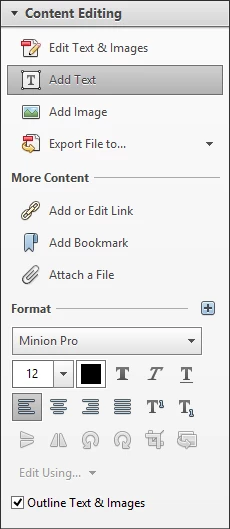
Unfortunately, we haven't been able to figure out a way to set the default font formatting options when using the "Add Text" Content Editing Tool. You are always stuck with the Minion Pro font at 12 point.

Therefore, each time the user adds new text, they must select the text that they just added, and then change the font formatting options from within the Content Editing tools pane. It would be really useful to be able to set the default font formatting options once and all new text added would use those settings.
Correct answer AnkitBal

AnkitBal — The Acrobat DC behavior is very strange. It does not seem to remember when I set the font, and in fact, when I add text near other text, it seems to want to use the nearest font. For example, I opened a pdf with a title in Chiller, and when I went to add text, it automatically set the font to Chiller. We are looking for a way to set a default across every document and regardless of other fonts in the document.


Hi,

We have added the functionality in Acrobat DC to pick up the nearest font of the neighbor during "Add Text", as a user would be adding text that would be in style with the existing content, and that manually replicating existing values is a tedious exercise. However, once the user changes the font or its size, Acrobat remembers the changes for the rest of the edit session for the document. Does that work out for you?

You have also requested for a default font and size setting across all documents and Acrobat sessions, set manually by the user. Is that correct? If so, unfortunately, that is not possible presently, but we can take this in as your feedback and evaluate it for our future releases.

Regards,

-Ankit Bal

14 replies

Adobe Employee
December 10, 2014

Hi,

Unfortunately, it is not possible to change the default font option. I would suggest you to fill our feature request form, which will be sent directly to our development team:-

https://www.adobe.com/cfusion/mmform/index.cfm?name=wishform&loc=en

Regards,

Nakul

AnkitBal
Adobe Employee
Adobe Employee
June 25, 2015

Hi,

Have you tried Acrobat DC? Changes have been made to the "Add Text" behavior where it remembers the changes to the font and its properties, in the context of the document.

Please try it out and let us know of your feedback.

Regards,

-Ankit Bal

Participating Frequently
June 29, 2015

AnkitBal — The Acrobat DC behavior is very strange. It does not seem to remember when I set the font, and in fact, when I add text near other text, it seems to want to use the nearest font. For example, I opened a pdf with a title in Chiller, and when I went to add text, it automatically set the font to Chiller. We are looking for a way to set a default across every document and regardless of other fonts in the document.

Participant
September 19, 2014

I have noticed the same impediment.  However, Adobe InDesign CC has a method for changing default font for "character".  Open an empty screen, select a font.  Close InDesign.  The next time InDesign is opened, the new selected font appears.  So, Adobe does have an InDesign method.  Perhaps in the next edition Acrobat XII will have this InDesign method.

Participant
September 8, 2014

Does anyone has an answer to this?

Participant
April 4, 2014

This is absolutely a necessary feature.  Has anyone found a work around?

Participant
May 13, 2014

Ditto - need this feature now