


DJcohn
New Participant
August 5, 2016
Answered

Setting a form field to auto fill based on another field

  • August 5, 2016
  • 20 replies
  • 151144 views

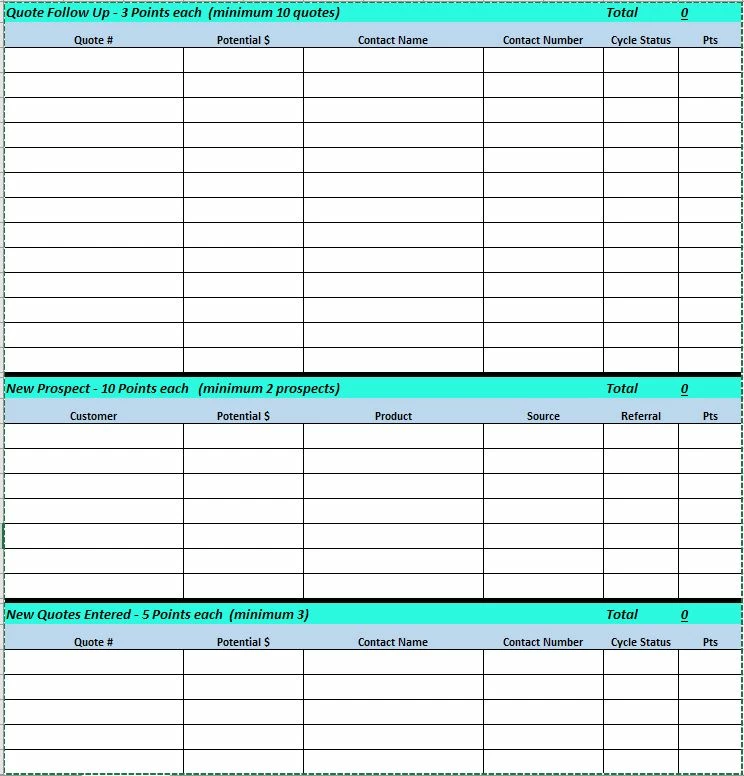
I am creating a scorecard to be used by my companies inside sales group.

I need to set the form so that if data is entered into one field, a specified number will automatically populate in another field.

Example:

IF a "Follow-Up Quote #" field is filled in THEN a 3 will automatically be entered in the corresponding "Pts" fiield

IF a "New Prospect - Customer" field is filled in THEN a 10 will automatically be entered in the corresponding "Pts" field

IF a "New Quote #" field is filled in THEN a 5 will automatically be entered in the correspondng "Pts" field

Sample Form below for visual
This topic has been closed for replies.
Correct answer try67

You can use something like this as the custom calculation script of the Pts field:

event.value = (this.getField("NameOfOtherField").valueAsString=="") ? "" : 3;

20 replies

Inspiring
August 21, 2018

This thread sound close to what I'm looking.  If anyone could help I'd be super grateful

I created a drop down list called 'Employee List' to auto populate to 2 different text fields, 'Employee Name/ID1' and 'Employee Status1', that part I've got.

When picking from the 'Employee List' and 'Regular' auto populates to the 'Employee Status1' the number '1' will auto populate to another text field named 'PayTypeStatus1'.  If 'Temp' auto populates to 'Employee Status' the no '2' will auto populate to 'PayTypeStatus2' etc

The other step involves a separate drop down list called 'Acting Rate'.  If an acting rate is picked it will need to override the Regular or Temp Status auto populated from 'Employee List' to say 'Acting', then 'Acting' will auto populate the number'11' to the 'PayTypeStatus' text field.

One more thing, if 'Auxiliary' auto populates to 'Employee Status' from the 'Employee List' the number 3 will auto populate to 'PayTypeStatus' BUT if an acting rate is chosen the status needs to stay '3', not '11' as described above.

New Participant
May 8, 2018

I am trying to write some script for a field in a PDF.  I would like the information in several fields to all populate into one field all together. 

I would like the Text 32 box to automatically start with a U and then the information that is entered in the fundcode, dept, projectgrants, program to all populate together after the U.  For the Account box I would like that entry to equal a letter and enter that at the end of the string in the Text32 box.  Ex.  if 1005 is entered in the account box, the letter S would populate at the end of the string in the Text 32 box. 

Would someone be able to guide me?

New Participant
March 12, 2018

I have a time sheet that i'm attempting to customize.  i have a document JavaScript that auto populates the shift for two weeks depending on the employee selection in the drop down box.  What i would also like to do is if any data is in the SICK column it would automatically put the word SICK in the Shift column.  I did get this to work by adding this custom calculation to the SHIFTSUN field.

event.value = (this.getField("SICKSUN").valueAsString=="") ? "" : "SICK";   

My issue is this custom calculation overrides the Document level Javascript and if that custom calculation is behind that field the field is blank regardless if anything is in the SICK field or not.. 

Incidently i would also like to do the same thing for the Vacation, Personal, Wellness fields, if any data is in those fields the Shift field would show  VAC, PERS, WELL.  but i'm not sure how to do this without one overriding the other.  I attempted to add a line for VAC in the same custom calculation field as the above code, but that just overrode the SICK code and it didn't work.  

I admit that i'm extremely new to this and i hope i explained this ok.

i will include a couple of screen shots if those help at all.

This is after i add that SICK custom calculation in the shift field.

When i put the -8 under the sick column it does change the shift field to SICK.

try67
Community Expert
Community Expert
March 12, 2018

You need to change the field calculation order so that the "SHIFTSUN" field is calculated after the "SICKSUN" field.

New Participant
March 12, 2018

I'm sorry, but i'm still learning.  How do i do that?  currently the SHIFTSUN field is populated from a Document JavaScript.

Participating Frequently
March 7, 2018

hi,

what if i need the Text field to be populated with a letter related to what was chosen in a dropdown field?

Ex

helicopter1          =  A

helicopter2          = B

helicopter3          = C

try67
Community Expert
Community Expert
March 7, 2018

Put the letter as the export value of each option and then you could use a simple script to do it.

Participating Frequently
March 7, 2018

what would that script be?

New Participant
September 11, 2017

I have a similar question with a text field document in InDesign. Instead of going through and changing the name on every page, I was hoping there was a form I could fill in and the names and information in the document would change depending on what I typed into the form. The names and information would change with new customers etc so this isn't something I could set up as a mail merge.

Also having trouble about where to put the code etc? Thanks!

New Participant
August 18, 2017

I am trying to make a form so that when a user types in their name in a preliminary field, it is auto-populated to a read only field below (the typed name before the signature line).  I know you can duplicate a field result by naming the subsequent field the same as the original, but if I choose "read only" on the second field it also alters the properties of the first field and I cannot enter the info in the first place.

I am also trying to make this second field "not look like a fillable field" (i.e. no box outline and shading) but still fill in when the original field is completed.


Any thoughts?

try67
Community Expert
Community Expert
August 18, 2017

Let's say you want to copy the value of field A to field B. Use this code as the custom calculation script of B:

event.value = this.getField("A").valueAsString;

You can then set field B to be read-only and any other appearance properties you want, as it's not "bound" to field A.

New Participant
August 18, 2017

Perfect-

Thank you.  I was trying to discern that from earlier comments above but I didn't include the ".valueAsString."

Appreciate the help!

New Participant
July 26, 2017

I'm trying to populate something based on the value of a previous field. I've been reviewing the previous answers and I can't seem to work out the proper custom calculation script to work.

Field 1 - can be value of A, B or C

Field 2 - value X

Field 3 - value Y

Field 4 - value based on previous fields

What I am trying to get is to populate Field 4 based on the following criteria: If Field 1 is A, then populate value from Field 2. If Field 1 is B or C, then populate value from Field 3.

try67
Community Expert
Community Expert
July 26, 2017

var field1 = this.getField("Field 1").valueAsString;

if (field1=="A") event.value = this.getField("Field 2").value;

else if (field1=="B" || field1=="C") event.value = this.getField("Field 3").value;

else event.value = "";

New Participant
August 9, 2017

try67,

I am working on a form and this is my very first time.  I created the pdf from excel.  I have a field that I want to calculate the average value (overall rating) of a number of other required fields (individual ratings).  I then have a field that I would like to show the rating description based on the overall rating score.  I have no clue how to create the calculation field or the "if/then" field.  Am I too green for your help :-)

Rating Descriptions formula from excel

=IF(Q14<1, "Not Met",IF(Q14<1.75, "Approaching",IF(Q14<2.75, "Solid Performance",IF(Q14<3.75, "Exceeds Expectations"))))

Thank you

dradams89
New Participant
July 20, 2017

So I am hoping to pick your brain and do not know if this calculation will work with my problem.  I have an evaluation rubric where I would like the form to automatically place an "X" in the "Satisfactory_Score" cell If the "TOTAL_pts" cell ranges between 70-89.  How would I do this?  Thank you for any help you can provide me.

try67
Community Expert
Community Expert
July 20, 2017

Custom calculation script for the Score field:

var v = Number(this.getField("TOTAL_pts").value);

event.value = (v>=70 && v<=89) ? "X" : "";

dradams89
New Participant
July 20, 2017

I tried to provide feedback by clicking correct on your reply but could not find the correct link.  Your assistance was awesome, and it worked perfectly.  Thank you very much.

monicac58505423
New Participant
August 27, 2016

I need a variation on this.

In filling out a registration form, sometimes there is one person, sometimes there are 2.  They are entered on separate lines.

Currently I have the form auto-fill the date into both boxes, expecting the form user to delete the unused one.  They never do, and I have to cross it out.  Of course if I take out the second date auto-fill, then they don't enter the date at all and I have to fill it in by hand.  I would like to set it up so if text is entered into the 2nd "Seller's Name" box THEN the current date auto-fills the 2nd date box.  Is this possible?

try67
Community Expert
Community Expert
August 27, 2016

Yes, that's possible. Use something like this as the custom validation script of the second seller's name field:

if (event.value) this.getField("Date2").value = this.getField("Date1").value;

monicac58505423
New Participant
December 17, 2016

I finally had time to get back to messing with my form.  Your code worked.  Thank you! 

Can you tell me what to add to make sure the date field stays blank if nothing gets entered in the first box?  I noticed if I type in the box, the date fills, but if I remove what I typed, the date box stays populated unless I manually delete it.

try67
Community Expert
try67Community ExpertCorrect answer
Community Expert
August 5, 2016

You can use something like this as the custom calculation script of the Pts field:

event.value = (this.getField("NameOfOtherField").valueAsString=="") ? "" : 3;

DJcohn
DJcohnAuthor
New Participant
August 5, 2016

Thank you -- this is exactly what I needed