


Participating Frequently
October 7, 2022
Answered

Sign-in Issue, Script Error

  • October 7, 2022
  • 8 replies
  • 11299 views

We are having a problem signing into Adobe accounts from Acrobat. When we try, we get the following error message:
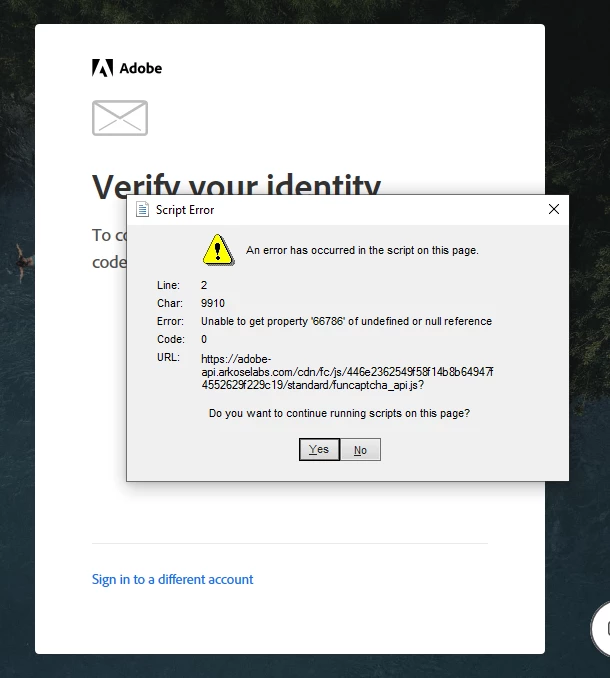


It appears a script for some type of automated captcha from Arkose Labs is the culprit. I have attempted signing in from outside our network to verify it’s not something in our firewall rules.

This topic has been closed for replies.
Correct answer Meenakshi Negi

Hi All,


Thank you for reaching out, and sorry about the trouble caused.


The issue has been fixed. Please check again and let us know if you are still having trouble with the issue.


Thanks,

Meenakshi 

8 replies

New Participant
November 22, 2023

i have problem scripts


Meenakshi Negi
Community Manager
Meenakshi NegiCommunity ManagerCorrect answer
Community Manager
October 14, 2022

Hi All,


Thank you for reaching out, and sorry about the trouble caused.


The issue has been fixed. Please check again and let us know if you are still having trouble with the issue.


Thanks,

Meenakshi 

Participating Frequently
October 14, 2022

The issue does appear to be fixed now. Thank you!

New Participant
October 12, 2022

I am having the same issue. I cannot complete my email address at login before this error message pops up. Onlt Task Manager will allow you to close it. Please help. This is so annoying.


Participating Frequently
October 12, 2022

Just call in.  they will remote connect and fix your issue.  It took less than 5 minutes to connect with them and then they remotely connected and fixed it in 20 minutes

New Participant
October 12, 2022

Spoke with an Adobe rep and resetting the password before you sign in resolved the issue for now 

Meenakshi Negi
Community Manager
Community Manager
October 12, 2022

Hi All,


Thank you for reaching out.


Would you mind sharing more details about this issue?

- Did you start receiving this error recently?

- Share the steps that pop-ups the error message.

- Share the current Acrobat and OS versions on the machine.


Thanks,

Meenakshi

Participating Frequently
October 12, 2022

The pop up occurred for my two users when they double clicked on a PDF to view it.  Acrobat opened, but immediately popped up the Sign in window where you enter your email address.  After entering the user's email address and clicking the continue button, that is when the script error occurs.  I showed that Acrobat updated yesterday to 22.003.20258, and this is in a Windows 10 machine running 21H2 19044.2006

Participating Frequently
October 12, 2022

I have two users who experienced this issue.  They both had the  22.003.20258 update applied to their system within the last 24 hours.  I was able to kill off everything Acrobat related from Task Manager, then relaunched Acrobat, and before trying to log them in again, went to the Help menu and did Repair Installation.  After the repair, I was able to log the users in.  

Participating Frequently
October 10, 2022

Is there a fix for this?  So frustrating as I pay for this service and the error won't let me even close the error!


Participating Frequently
October 10, 2022

I contacted Adobe support about it but I haven't heard anything back yet. They need to fix it though. I'm surprised more people haven't complained about it. Do you know how to block a URL? 

Participating Frequently
October 10, 2022

No I don't know how to do this.   Do you have a link or email to complain about this issue.  

Participating Frequently
October 7, 2022

I forgot to add that blocking the the url adobe-api.arkoselabs.com fixes the issue, but that's only a bandaid till Adobe fixes this. 

rogers groupi75603915
New Participant
October 10, 2022

thanks that worked for my user (workaround). Adobe support is horrid