


New Participant
May 13, 2021
Answered

Signature is invalid - Invalid Policy Constraint - Certificate from EUTL

  • May 13, 2021
  • 2 replies
  • 15974 views

Hello,


I have a digitally signed document with qualified certificate from EUTL - CA named "First certification authority, a.s." or https://www.ica.cz/.

As of today, signature with this certificate is showing as an Invalid, with error "Invalid Policy Constraint".

Version of my Acrobat Reader DC:  2021.001.20155


First, I tried is to turn off "load certificates from AATL server" and only left EUTL turned on in preferences, this did nothing, Acrobat is still showing source of trust obtained from AATL.


Second, I found this thread and it seems like in the end nobody solved it. https://community.adobe.com/t5/acrobat/previously-valid-signing-certificate-shows-invalid-policy-constraint-in-dc-2019/td-p/10573803


Since this is policy constraint error, here I share the policies from root cert. in chain.

I also attached signed file.

Multiple certificates from different persons are returning this error.
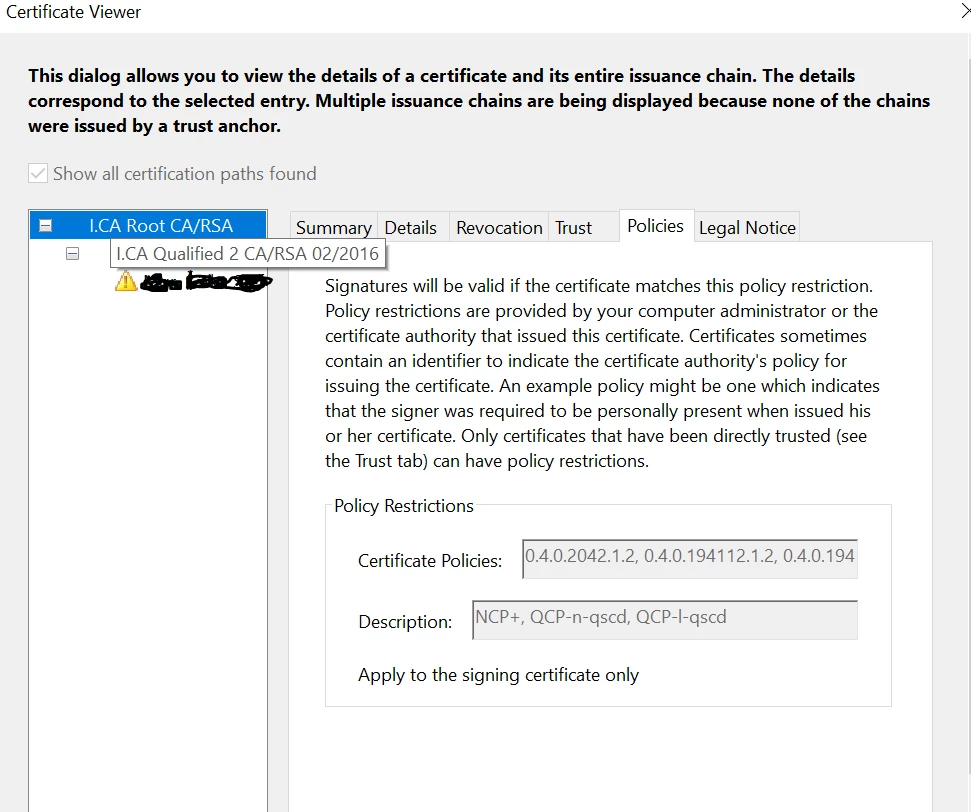
  

Could you give me some advice how to solve this?


Kind regards,

John

This topic has been closed for replies.
Correct answer MikelKlink

That would explain why it works for me. Indeed, I have /Source[(EUTL)(AATL)] for that certificate.

But looking at the OP's screen shot the root certificate is selected and displays the inappropriate policy constraints, it looks like in his case the CA certificate was not trusted at all, neither AATL nor EUTL. Or is the CA not taken as a trust anchor in his case because of the unfulfilled AATL policy constraints?

2 replies

Known Participant
October 6, 2021

The real problem here is, that certificate issuer "I.CA Qualified 2 CA/RSA 02/2016" is registered both in AATL and in EUTL, but the registrations are not identical.


When you first load EUTL, addressbook.acrodata contains:

/Country(CZ)/Editable true/Enabled true/ID ..../Source[(EUTL)(AATL)]/

and the signature is verified according to EUTL.


However, the default is to load AATL first, which results in addressbook.acrodata containing:

/Editable true/ID ..../Source[(AATL)(EUTL)]/

and the signature fails verification with Invalid policy constraint


MikelKlink
MikelKlinkCorrect answer
Participating Frequently
October 6, 2021

That would explain why it works for me. Indeed, I have /Source[(EUTL)(AATL)] for that certificate.

But looking at the OP's screen shot the root certificate is selected and displays the inappropriate policy constraints, it looks like in his case the CA certificate was not trusted at all, neither AATL nor EUTL. Or is the CA not taken as a trust anchor in his case because of the unfulfilled AATL policy constraints?

Known Participant
October 6, 2021

Certificate for "I.CA Qualified 2 CA/RSA 02/2016" is directly trusted in EUTL, so "I.CA Root CA/RSA" is not even considered/displayed and its policy constraints are ignored when EUTL is checked first.


However, when AATL is checked first, Acrobat shows, that only "I.CA Root CA/RSA" is directly trusted in AATL, but for "I.CA Qualified 2 CA/RSA 02/2016" it shows "Source of trust obtained from AATL". Thus policy constraints from root CA now apply down the certification path and are not fulfilled by the signing certificate.


MikelKlink
Participating Frequently
May 15, 2021

I have opened your PDF in Acrobat Reader here and got a "Signed and all signatures are valid." I even updated Adobe Reader to the same version 2021.001.20155 and explicitly updated the trust list information.

An interesting difference to your screen shot, though: Here the certificate path is only displayed up to the intermediary qualified CA certificate, not the root CA certificate. This suffices as that intermediary CA certificate already is trusted by the AATL and/or EUTL.

Thus, it looks like this is not a general issue but one specific to your configuration. Have you or has your system administrator changed relevant trust settings in a way that the intermediary CA certificate is not trusted directly anymore but trust requires the root CA certificate?

Indeed, that root CA certificate in the Adobe Reader trust settings is associated with the policy requirements you see in your screen shot, i.e. 0.4.0.2042.1.2 (NCP+), 0.4.0.194112.1.2 (QCP-n-qscd), or 0.4.0.194112.1.3 (QCP-l-qscd). But the end entity certificate in your certificate chain only has the related policy 0.4.0.194112.1.0 (QCP-n). Thus, if trust is based on the root CA, that end entity certificate does not fulfill the associated policy requirements.

New Participant
June 10, 2021

I've solved it.

Problem was in addressbook.acrodata


I've deleted whole directory of "%appdata%\Adobe\Acrobat"

Then manually updated AATL and EUTL list in Acrobat in Edit > Preferences > Trust Manager


And it's validating signatures correctly now. Even it shows EUTL server in validated signature detail, before it showed only AATL.

Probably some update of Acrobat Reader DC from last 2 months did this, because I have multiple computers with same problem.