Participant
April 27, 2020
Answered

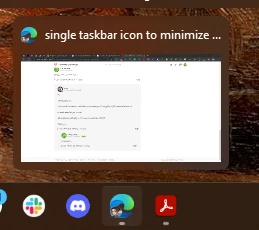
single taskbar icon to minimize the window with a few open tabs with one click

  • April 27, 2020
  • 3 replies
  • 13633 views

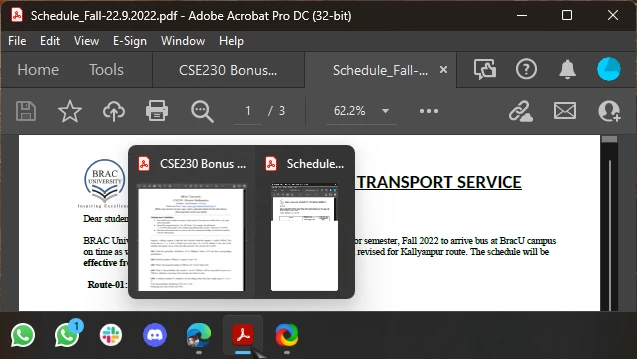
Hello, with the recent update it is possible now to have a few open pdf files in tabs in one adobe window, and this is awesome. But, when I want to minimize the window by clicking to the taskbar icon, it shows me preview of all open pdf files, and the only way to minimize is to use he button in the right top corner, but it is much easier to minimize different windows only moving in the taskbar area.

I have tried to turn off Aero Peek to be sure, but it wouldn't help.

Is it possible to make the taskbar icon look like if there was just one window open, like chrome, for example? So that one can easily minimize and maximize the window (which contains a few tabs)

Thank you


This topic has been closed for replies.
Correct answer ls_rbls


In web browsers like chrome and edge we get a single window preview if multiple tabs are in the same window. Which allows us to minimize and restore the app from the taskbar quickly. But in acrobat all the tabs get different preview windows in the taskbar. So, by clicking the taskbar icon, minimizing doesn't work and opening a tab gets very frustrating because if we have lots of tabs.


 Well,


To my own dismay, and after researching and fiddleling enough with Windows, I have to answer this question like this: Adobe Acrobat is not a web browser.


The feature that we all have been longing for is called Tabbed Browsing


We've been confusing design behaviors that are entirely different.


If we dig a little more about how computer programs are designed to interact with a specific operating system, it all becomes obvious.


That said, Not because we can group several  PDFs documents opened in individual tabs inside of one Adobe Acrobat working space it means that this is  "Tabbed Browsing".


While convenient, the experience of opening PDFs inside of an Acrobat window on its own tab,  the same is not true for Microsoft Office programs (or any other software intended to run locally in a computer).


Let's try, for instance, opening Notepad.exe three times; and hover the mouse pointer over its icon on the task bar... what do you see?


Can you tab-browse that program like you would with  Microsft Edge, Mozzilla Firefox or Google Chrome web browsers?  


You'll soon realize that Each document (or instance of the program), they all will be opened (and handled by the operating system) as individual tasks.


Therefore the opened programs will be displayed in its own container window when you hover the mouse pointer over the corresponding icon in the task bar.


3 replies

spinalGR
Inspiring
December 12, 2022

Its really annoying

spinalGR
Inspiring
December 12, 2022

ls_rbls
Community Expert
Community Expert
December 12, 2022

Please see this discussion:


The only work around that I was able to work with is with a small  registry edit.

Participating Frequently
November 8, 2022

Did you find any solution yet? 

ls_rbls
Community Expert
Community Expert
November 8, 2022

Hi,


This thread is old.


I don't think there was no resolution to this annoyance. I still get in my Micrososft Windows 10.


In which operating are you on?


Would you mind sharing a screenshot to update this thread?


Thank you.

Participating Frequently
December 4, 2022

Windows 11

ls_rbls
Community Expert
Community Expert
April 27, 2020

There seems to be an answer here: https://community.adobe.com/t5/acrobat-reader/acrobat-reader-setting-for-windows-taskbar-view/td-p/10117228?page=1


However, from taking a look at the screenshot that you posted it seems that you're running MS Windows 7?


I am wondering if this is an editable registry preference in MS Windows. Have you asked the same question in a Microsoft support forum and see what they recommend?


I've tried a few things for about an hour and doesn't seem to get rid of this. So it maybe possible to check if there is a registry preference that can take care of this .


See if you can find an answer here:

 https://www.adobe.com/devnet-docs/acrobatetk/tools/PrefRef/Windows/index.html

Participant
November 7, 2021

This doesn't resolve the issue. Firefox and Chrome have no problem with this feature (one window with many tabs, one taskbar item).
Adobe needs to add this feature, plain and simple. Many have complained and every time they get annoying work arounds instead of a proper solution.

try67
Community Expert
Community Expert
November 7, 2021

> one window with many tabs, one taskbar item

It already exists. Go to Edit - Preferences - General and tick "Open documents as new tabs in the same window".

