Exit
  • Global community
    • Language:
      • Deutsch
      • English
      • Español
      • Français
      • Português
  • 日本語コミュニティ
  • 한국 커뮤니티
0

Some font weights not showing up in text field properties form appearance.

Community Beginner ,
Dec 10, 2018 Dec 10, 2018

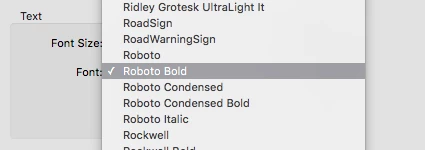
Does anyone know why some weights of a font aren't showing up under the form editor text field properties?

It's only showing "Roboto" which is actually showing up as Roboto Light. As well as bold, condensed and condensed bold. But I want to use Roboto Black, and Roboto Regular. I have the font downloaded. Clearly the issue isn't related to licence restrictions, since it is showing some of the weights.

Let me know if there's anything I can do to make this work! Thanks

Screen Shot 2018-12-10 at 4.29.39 PM.png

TOPICS
PDF forms
3.1K
Translate
Report
Community guidelines
Be kind and respectful, give credit to the original source of content, and search for duplicates before posting. Learn more
community guidelines
LEGEND ,
Dec 10, 2018 Dec 10, 2018

It most likely does have to do with embedding permissions. A font must have at least editable embedding permissions or Acrobat won't allow it to be used with form fields. All of the Roboto fonts I have are limited to Print & Preview embedding. I don't know why some would work for you, but my guess is they're different than the ones I have. They could be earlier/later versions, or customized.

Translate
Report
Community guidelines
Be kind and respectful, give credit to the original source of content, and search for duplicates before posting. Learn more
community guidelines
Community Beginner ,
Dec 11, 2018 Dec 11, 2018

I can't see why it would be tied to embedding permissions, since the whole font family was installed as one unit, at one point time.

I am not an expert on licenses, but I found this statement in the license: "You may reproduce and distribute copies of the Work or Derivative Works thereof in any medium, with or without modifications, and in Source or Object form"

There is no mention of the font being limited to certain types of embedding.

And I can't imagine that someone would decide some weights are permitted, but others aren't.

Translate
Report
Community guidelines
Be kind and respectful, give credit to the original source of content, and search for duplicates before posting. Learn more
community guidelines
LEGEND ,
Dec 11, 2018 Dec 11, 2018

It's a setting within the font file. Here's a link to more information: Font embedding permissions | Adobe Type

I agree that it's odd that some work for you and others don't, which is why I checked it out myself, and as I said, Acrobat allows none of the ones I have to be used with a form field due to the restrictive embedding permissions (Preview & Print) of each individual font.

It would be interesting to take a look at the permission settings of the Roboto fonts that do work for you, and compare to the ones that don't. You should be able to do this yourself. What OS are you using?

Translate
Report
Community guidelines
Be kind and respectful, give credit to the original source of content, and search for duplicates before posting. Learn more
community guidelines
Community Beginner ,
Dec 11, 2018 Dec 11, 2018

I'm using osx 10.11.6

How do I check the embedding permissions? This is all I could find:

Screen Shot 2018-12-11 at 11.40.40 AM.png

Screen Shot 2018-12-11 at 11.39.22 AM.png

Translate
Report
Community guidelines
Be kind and respectful, give credit to the original source of content, and search for duplicates before posting. Learn more
community guidelines
LEGEND ,
Dec 11, 2018 Dec 11, 2018
LATEST

Unfortunately, it seems that OS X doesn't show details about font embeddability (just a Yes/No, vs the 4 possibilities, 3 of which could be considered a some degree a Yes). It's easier on a recent Windows machine if you have access to one.

Translate
Report
Community guidelines
Be kind and respectful, give credit to the original source of content, and search for duplicates before posting. Learn more
community guidelines