


New Participant
August 22, 2022
Question

'Specify where to sign' button not working on Request Signatures

  • August 22, 2022
  • 8 replies
  • 38626 views

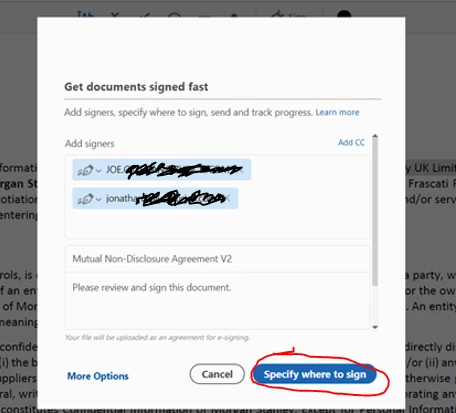
Hi everyone, I'm facing an issue with the Request Signature feature in Adobe Acrobat. The button 'Specify where to sign' seems to be inoperand, I fill the people who I want to request but when I click on the button nothing happens literally. It used to work fine a couple of week ago but now seems to be inoperant. I already tried reinstalling Acrobat but the issue persists, has anyone seen something like that ?  


8 replies

New Participant
June 9, 2025

Remember, pirating adobe products WILL ALWAYS BE MORALLY CORRECT for this reason. Uncompetent people working all around, it will help us all if it is eventually run to the ground and we all get an easier solution. Going to docusign. 

jacobreed123457
New Participant
September 11, 2024

Dang.... googling this only to find that Adobe has been aware of the issue for more than a year and has yet to solve it is very disappointing. The CC subscriber base is estimated at 33 million worldwide, at $19.99 for the cheapest subscription; conservatively, we can estimate you're making $659,670,000 per MONTH from all of us.


Respectfully, I'd love to know what the F you're doing with that money if you can't use it to make the most basic reason most of us use PDFs work the way it's supposed to?


After troubleshooting this for ten minutes and eventually finding this help thread, I signed up for a free Docusign trial and took care of it in a minute.

New Participant
September 19, 2024

I too will be looking into another software. After updating my software last month, it regularly freezes and needs to be force shut down - and now I have completely lost the ability to request e-signatures. So disappointing, especially with this problem lingering for over a year now like you said.

New Participant
August 24, 2024

Adobe has messed up the "request e-sigantures" feature so badly that many of us are contemplating jumping to PDF Expert: It has been a nightmare ever since the update in May 2024. I work on a Mac, but move around a lot between office in NYC, apartment in NYC, and house in NJ, so I am always having to log out of one machine, because Adobe won't let you have more than two computers logged onto the same account at a time. As a lawyer & sole practitioner I have relied on Acrobat AdobeSign and the "request e-signatures" feature for years - It used to take me a total of 5 to 8 minutes to select an engagement letter template in Word, customize & personalize it to the prospective client, convert it to a PDF, e-sign it myself, identify the recipient sign & date fields, and email it out to them for countersignature. Since the May update, it regularly takes more than half an hour, and there's a fair amount of swearing involved. Among the problems that recur too frequently to forgive: 1) Adobe has decided that the correct default field type for the recipient's signature line is "Text" not "E-signature"; 2) after I have created the PDF and e-signed it myself, but before I designate a recipient, it erroneously decides that I'm not a paid subscriber and don't have access to Request E-signatures, so then I have to log out, log back in, and start over; 3) almost always, when uploading the PDF to Creative Cloud & before designating recipients, Acrobat hangs and freezes at 72% - spinning beach ball of doom [please do NOT tell me to do a clean reinstall: I've done it countless times; it does not help]: Force Quit is now a daily occurrence with Adobe; sometimes even that function freezes, and then I have to reboot the computer. 4) when I'm trying to re-designate the signature line as "E-Signature" instead of "Text," it gets cranky and the cursor gets jerky, so it will occasionally deposit a superfluous text box elsewhere in the letter, & then I have to trash the PDF & start over. Acrobat has transformed itself from business essential to a giant time suck. 


New Participant
December 13, 2023

Also having this issue. 


Amal.
Community Manager
Community Manager
December 14, 2023

Hi there


Please update the application to the new version 23.08.2042X from the help menu > check for updates and reboot the computer once and see if that works.


Let us know how it goes.


~Amal

New Participant
December 14, 2023

Thank you.  My apologies.  After much troubleshooting, I found that the function was disabled by my organization.  I would like to propose that if this is the case instead of the buttons just not working, that the user be notified that that is the case and to contact their admin with any concerns. 

Participating Frequently
August 16, 2023

I too, am having this issue. The web solution works, but this is disappointing and I don't have time to collect my CC logs and send them to you. The whole point of software like this is to make us more efficient. Good luck!

Amal.
Community Manager
Community Manager
August 18, 2023

Hi there


We are sorry to hear that. In order to get this issue addressed, we would need the logs as requested earlier.


Looking forward to your help to get this issue isolated for the fix.


Regards

Amal

New Participant
September 13, 2023

Same issue. How do I send you the log files to review?

New Participant
June 22, 2023

I am also experiencing this same issue. Any fixes?

New Participant
July 7, 2023

Yup, about to cancel my subscription over this.

Legasalud
New Participant
September 8, 2022

 Hola, me acaba de suceder lo mismo, ¿que está sucediendo?  Acabo de comprar 3 licencias de acrobat pro y recien inició el problema.. con cloud funcionaba bien.. que se supone que debo hacer ahora..?? 

Amal.
Community Manager
Community Manager
September 9, 2022

Hi @Legasalud 


Please help us with the logs as requested above so that we can get this issue isolated for the fix.


Waiting for your reply.


Regards

Amal

New Participant
April 25, 2023

@Amal. 

do we have a conclusive fix for this yet? i've been in a couple forums about this issue and ones similar and i have not seen anything listed as a definite fix. I work for an IT company and have a client with this issue exactly, they click the "specify where to sign" button and the right side of the ui for e-signature just goes blank. nothing more. 

Amal.
Community Manager
Community Manager
August 22, 2022

Hi there


Hope you are doing well and sorry for the trouble.


Is this an issue with a particular PDF file or with all the PDFs? Please try with a different PDF file and check.


What is the version of the Acrobat DC and the OS you are using? To check the version go to Help > About Acrobat and make sure you have the recent version 22.2.20191 installed. Go to Help > Check for updates and reboot the computer once.


Also, please try to request signatures via document cloud using the link https://acrobat.adobe.com/ and see if that works.


Regards

Amal

New Participant
August 23, 2022

Hi Amal,


Thanks for your help on this. The version we have is the 22.001.20085 which is the one we've packaged in our company. The issue is hapenning in all documents. I'll try updating the version and see how it goes. Any other thoughts?