


Inspiring
April 1, 2025
Answered

Split PDF by Top level bookmarks does not work

  • April 1, 2025
  • 4 replies
  • 2079 views

Hi,

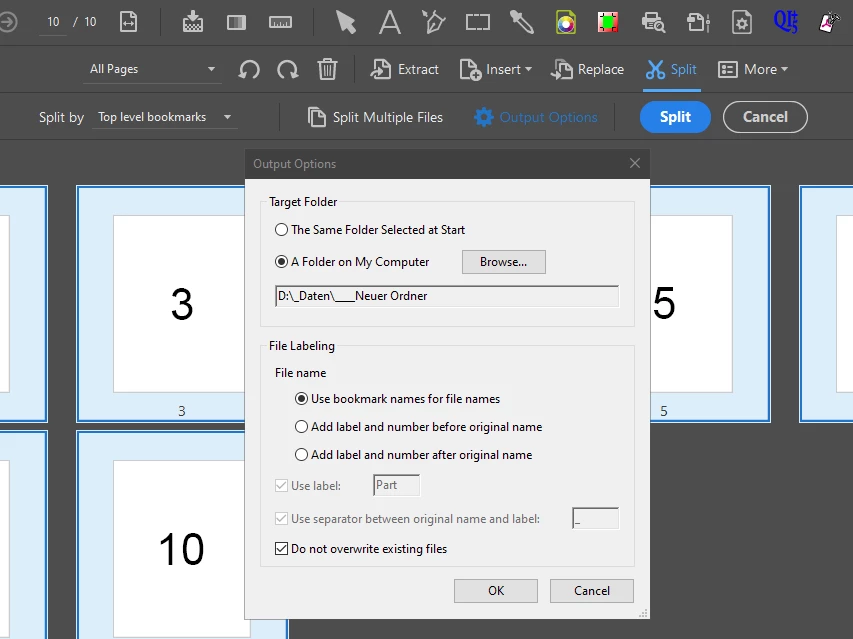
I use Adobe Acrobat's own split function to split a PDF into single-page PDFs whose file names are made up of the bookmarks of the source PDF. Each page can be accessed with its own bookmark. The bookmark 'Page_1' leads to page 1 and should be written out as a separate PDF with the file name 'Page_1.pdf'.
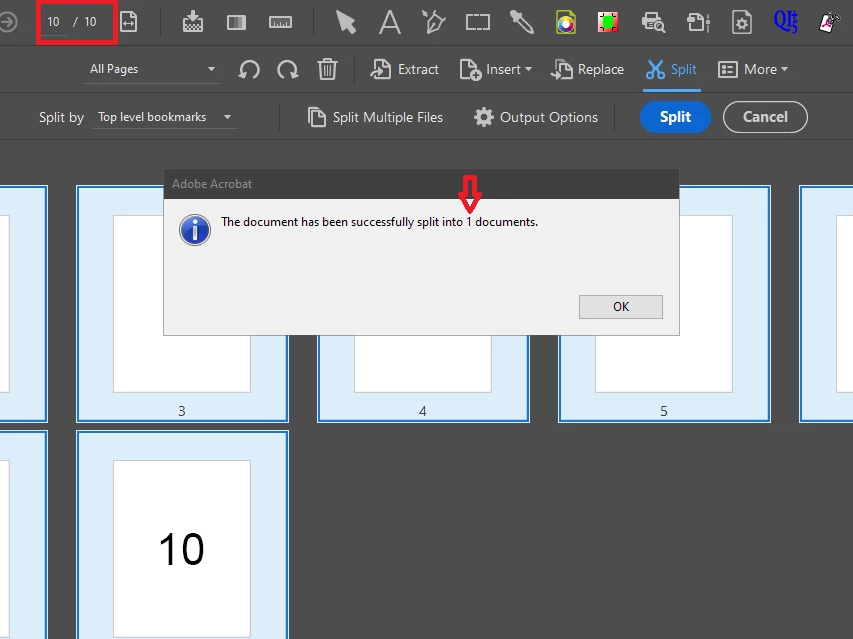
I create the bookmarks in the PDF with the following JavaScript. After splitting, however, only a single PDF is written out. Why isn't a separate PDF written out for each page, as I specify in the settings for splitting?


var root = this.bookmarkRoot;
for (var i = 0; i < this.numPages; i++)
       {
       root.createChild("Page_" + (i+1), "this.pageNum=" + i, i);
	   }


yosimo

Correct answer yosimo

Hi,

I have experimented further and have now created this solution. The bookmarks are now suitable for Acrobat's own function ‘Split by Top level Bookmarks’.
The basis is the JavaScript from Thom Parker:

https://acrobatusers.com/tutorials/auto_bookmark_creation/ 

function FindBookmarkByName(oBkMkParent, cFindName, nInc) {
    if (nInc == null)
        nInc = [1];
    else if (typeof(nInc) == "number")
        nInc = [nInc];

    var aBkMks = oBkMkParent.children;
    var oRtn = null;
    if (aBkMks != null) {
        for (var i = 0; i < aBkMks.length; i++) {
            if (aBkMks[i].name == cFindName) {
                if (--nInc[0] <= 0)
                    oRtn = aBkMks[i];
            }
            if ((oRtn == null) && (aBkMks[i].children != null))
                oRtn = FindBookmarkByName(aBkMks[i], cFindName, nInc);
            if (oRtn != null)
                break;
        }
    }
    return oRtn;
}

(function () {
    var numPages = this.numPages;

    // Delete existing bookmarks
    while (this.bookmarkRoot.children && this.bookmarkRoot.children.length > 0) {
        this.bookmarkRoot.children[0].remove();
    }

    // Create bookmarks
    for (var i = 0; i < numPages; i++) {
        this.pageNum = i;
        app.execMenuItem("NewBookmark");

        var bkm = FindBookmarkByName(this.bookmarkRoot, "Untitled");
        if (bkm != null) {
            bkm.name = "Seite_" + (i + 1);
        }
    }

    // Take focus from last bookmark → Create and delete dummy bookmark
    this.pageNum = 0;
    app.execMenuItem("NewBookmark");

    var dummy = FindBookmarkByName(this.bookmarkRoot, "Untitled");
    if (dummy) dummy.remove();

  //  app.alert("All bookmarks have been successfully created.");
})();


4 replies

yosimoAuthorCorrect answer
Inspiring
May 18, 2025

Hi,

I have experimented further and have now created this solution. The bookmarks are now suitable for Acrobat's own function ‘Split by Top level Bookmarks’.
The basis is the JavaScript from Thom Parker:

https://acrobatusers.com/tutorials/auto_bookmark_creation/ 

function FindBookmarkByName(oBkMkParent, cFindName, nInc) {
    if (nInc == null)
        nInc = [1];
    else if (typeof(nInc) == "number")
        nInc = [nInc];

    var aBkMks = oBkMkParent.children;
    var oRtn = null;
    if (aBkMks != null) {
        for (var i = 0; i < aBkMks.length; i++) {
            if (aBkMks[i].name == cFindName) {
                if (--nInc[0] <= 0)
                    oRtn = aBkMks[i];
            }
            if ((oRtn == null) && (aBkMks[i].children != null))
                oRtn = FindBookmarkByName(aBkMks[i], cFindName, nInc);
            if (oRtn != null)
                break;
        }
    }
    return oRtn;
}

(function () {
    var numPages = this.numPages;

    // Delete existing bookmarks
    while (this.bookmarkRoot.children && this.bookmarkRoot.children.length > 0) {
        this.bookmarkRoot.children[0].remove();
    }

    // Create bookmarks
    for (var i = 0; i < numPages; i++) {
        this.pageNum = i;
        app.execMenuItem("NewBookmark");

        var bkm = FindBookmarkByName(this.bookmarkRoot, "Untitled");
        if (bkm != null) {
            bkm.name = "Seite_" + (i + 1);
        }
    }

    // Take focus from last bookmark → Create and delete dummy bookmark
    this.pageNum = 0;
    app.execMenuItem("NewBookmark");

    var dummy = FindBookmarkByName(this.bookmarkRoot, "Untitled");
    if (dummy) dummy.remove();

  //  app.alert("All bookmarks have been successfully created.");
})();


JR Boulay
Community Expert
Community Expert
April 2, 2025

[MOVED TO THE ACROBAT DISCUSSIONS]

Acrobate du PDF, InDesigner et Photoshopographe
bebarth
Community Expert
Community Expert
April 2, 2025

Hi,

Your script was almost correct, but it must be like below to work fine:

this.bookmarkRoot.remove();
for (var i=0; i<this.numPages; i++) this.bookmarkRoot.createChild("Page_"+(i+1),"this.pageNum="+i,i);

The 805-page api reference took about 5 seconds to generate the 805 bookmarks on my Macbook.


Do you really need the bookmarks??? With the script below and always with the 805-page api reference that took about 18 second for extracting the 805 pages in the same folder as the original one...

for (var i=0; i<this.numPages; i++) {
	this.extractPages({
		nStart: i,
		cPath: "Page_"+(i+1)+".pdf"
	});
}


@+

yosimoAuthor
Inspiring
April 3, 2025

Hi bebarth,
Thanks for your correction to my JS.
I really don't need the bookmarks. As I wrote above, I just wanted to find out whether the split function in Acrobat works faster than executing it with JavaScript.
To do this, I quickly set the bookmarks via JS, not realizing that Acrobat can't do anything with them in a JS.
But of course I can also live with splitting via JS. It's not worth the effort for a few seconds of advantage.


How did you record and output the log of the process time?

bebarth
Community Expert
Community Expert
April 3, 2025

Hi,

For generating bookmarks:

d0=new Date();
debut=util.printd("dd/mm/yyyy, HH:MM",d0);
this.bookmarkRoot.remove();
for (var i=0; i<this.numPages; i++) {
	console.clear();
	console.println("Process Starting: "+debut);
	console.println("Page ")+(i+1);
	this.bookmarkRoot.createChild("Page_"+(i+1),"this.pageNum="+i,i);
}
df=new Date();
fin=util.printd("dd/mm/yyyy, HH:MM",df);
temps=(df.valueOf()-d0.valueOf())/1000/60;
var lesMinutes=parseInt(temps);
var lesSecondes=(temps-lesMinutes)*60;
var lesSecondes=parseInt(lesSecondes*10)/10;
var leTemps="";
if (lesMinutes>0) {
	if (lesMinutes==1) {
		var leTemps="1 minute";
	} else {
		var leTemps=lesMinutes+"minutes";
	}
}
if (lesSecondes>0) {
	if (lesSecondes<2) {
		var leTemps=leTemps+" "+lesSecondes+" second";
	} else {
		var leTemps=leTemps+" "+lesSecondes+" seconds";
	}
} else  var leTemps="Less than 1 second";
var leTemps=leTemps.replace(/^\s+|\s+$/gm,"");
console.clear();
console.println("Process Starting: "+debut);
console.println("Process Ending: "+fin);
console.println("––––––––––––––");
console.println("Process Duration: "+leTemps+" for generating "+this.numPages+" bookmarks");


...and for extracting pages:

d0=new Date();
debut=util.printd("dd/mm/yyyy, HH:MM",d0);
for (var i=0; i<this.numPages; i++) {
	console.clear();
	console.println("Process Starting: "+debut);
	console.println("Page ")+(i+1);
	this.extractPages({
		nStart: i,
		cPath: "Page_"+(i+1)+".pdf"
	});
}
df=new Date();
fin=util.printd("dd/mm/yyyy, HH:MM",df);
temps=(df.valueOf()-d0.valueOf())/1000/60;
var lesMinutes=parseInt(temps);
var lesSecondes=(temps-lesMinutes)*60;
var lesSecondes=parseInt(lesSecondes*10)/10;
var leTemps="";
if (lesMinutes>0) {
	if (lesMinutes==1) {
		var leTemps="1 minute";
	} else {
		var leTemps=lesMinutes+"minutes";
	}
}
if (lesSecondes>0) {
	if (lesSecondes<2) {
		var leTemps=leTemps+" "+lesSecondes+" second";
	} else {
		var leTemps=leTemps+" "+lesSecondes+" seconds";
	}
} else  var leTemps="Less than 1 second";
var leTemps=leTemps.replace(/^\s+|\s+$/gm,"");
console.clear();
console.println("Process Starting: "+debut);
console.println("Process Ending: "+fin);
console.println("––––––––––––––");
console.println("Process Duration: "+leTemps+" for extracting "+this.numPages+" pages");

@+

try67
Community Expert
Community Expert
April 1, 2025

Because that command doesn't actually execute the bookmarks. It looks at the action associated with them, and it can't handle a JS-based one properly. To do that you would need to split the file using a script, like this (paid-for) one I've developed: https://www.try67.com/tool/acrobat-extract-chapters-by-bookmarks


yosimoAuthor
Inspiring
April 2, 2025

Hi Gilad,

I have actually been using a script for splitting. But when the source document is very large, the processing becomes quite slow. That's why I wanted to find out if Acrobat's own split function works faster.
If I export a PDF with bookmarks from Indesign, then splitting works in Acrobat.
What do I have to change in my JavaScript so that splitting works correctly in Acrobat?

try67
Community Expert
Community Expert
April 2, 2025

There's nothing you can do in JS to fix this, as JS can only create JS-based actions.

What you can do, though, is convert those actions to "Go to a Page"-type actions, but that requires using an external tool, like this other (paid-for) tool I've developed:

https://www.try67.com/tool/convert-javascript-links-to-real-links

Once you do that you would be able to use the built-in split commands, and that tool can process a file in seconds.