Participant
October 5, 2018
Answered

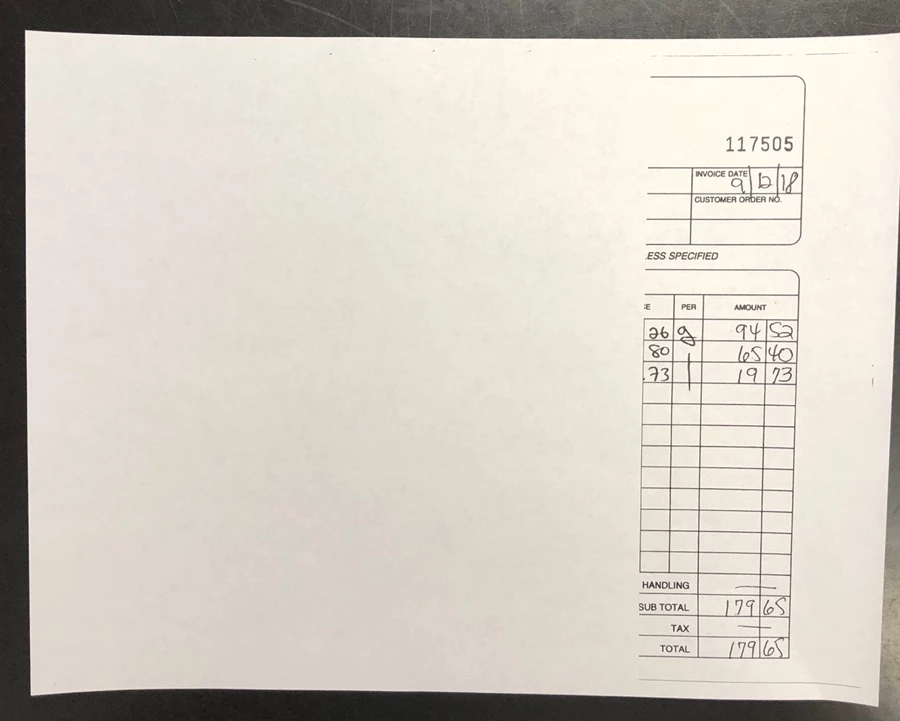
suddenly adobe won't print the whole page

  • October 5, 2018
  • 1 reply
  • 1207 views

All of a sudden, my pdf's, when opened (in Acrobat Pro DC) show as correct in the print preview pane, only print about the last two inches on the right side of the page. I've changed nothing. This happens on both printers here. Anything else we print (not pdf's) print out correctly, so something must have changed in Adobe.

Would appreciate any ideas. Thanks.

page.

This topic has been closed for replies.
Correct answer Vishal@PDF

lorries99573713

Adobe Acrobat and Reader official update (19.008.20074) containing the fix for this issue is now available. This update will be automatically pushed to all existing installations of Acrobat and Reader. If you want, you may also manually trigger the update early by opening the application and going to Help > Check for Updates.

More information about this release is here: 19.008.20074 Optional update, October 08, 2018 — Release Notes for Acrobat DC Products

Please try it out and let us know your feedback.

Thanks for your patience and support!

-Vishal

1 reply

Vishal@PDFCorrect answer
Adobe Employee
October 8, 2018

lorries99573713

Adobe Acrobat and Reader official update (19.008.20074) containing the fix for this issue is now available. This update will be automatically pushed to all existing installations of Acrobat and Reader. If you want, you may also manually trigger the update early by opening the application and going to Help > Check for Updates.

More information about this release is here: 19.008.20074 Optional update, October 08, 2018 — Release Notes for Acrobat DC Products

Please try it out and let us know your feedback.

Thanks for your patience and support!

-Vishal

Participant
December 15, 2022

Doesnt work Error 404