Known Participant
April 30, 2019
Question

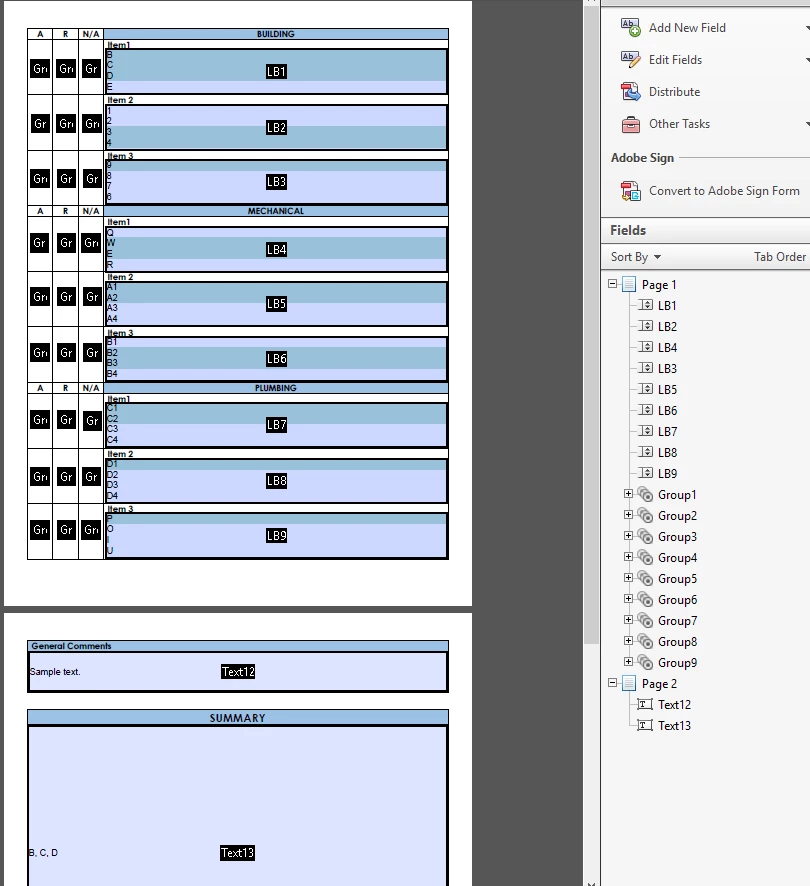
Summary section that shows all selected answers in multiple list boxes and text field

  • April 30, 2019
  • 1 reply
  • 3945 views

I have a form that contains different categories, subcategories and a summary section.

Per item, users must choose 1 from 3 radio buttons (A,R & N/A), and select an option in a list box. Users can select multiple items in the list box if they need to.

The form looks like this.
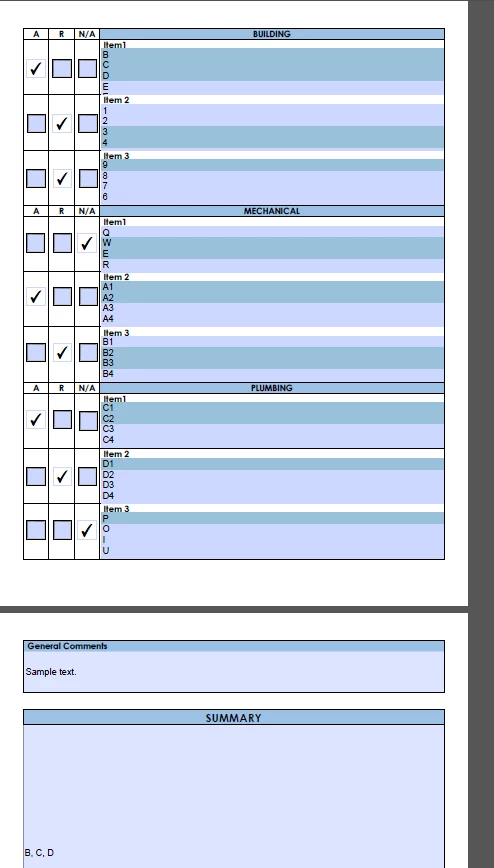
I want the Summary box to contain the category name, sub category name, selected radio button option, selected items and the general comments section.

I know the script on how to populate a textbox with the selected items in a list box, but that's just for one item only and not multiple list boxes.

Here's how I want the summery box to look like based on the selected items in the image..

     Building

     Item 1 - A

     Detailed Item List: B, C, D

     Item 2 - R

     Detailed Item List: 3, 4

     Item 3 - R

     Detailed Item List: 9

     Mechanical

     Item 1 - N/A

     Detailed Item List: W, E

     Item 2 - A

     Detailed Item List: A1, A2

     Item 3 - R

     Detailed Item List: B2, B3

     Plumbing

     Item 1 - A

     Detailed Item List: C1, C2

     Item 2 - R

     Detailed Item List: D1

     Item 3 - N/A

     Detailed Item List: P

     General Comments

     Sample text.

I'm not sure if this is the easiest way to do this, to use list boxes. Or check boxes is the way to go. I can add all the items and just put check boxes beside every option.

Any suggestions on how to make this happen?

Thank you in advance.

This topic has been closed for replies.

1 reply

Thom Parker
Community Expert
Community Expert
April 30, 2019

So what is the script you have now for only one item?

It looks pretty straight forward. I imagine the complete script is an extension of the one you already have.

Just add up all the text values exported from each group of fields (using the desired formatting) into one string, and place this in the summary text box.

Since each block has an identical set of fields, I'd suggest using a function to create the formatted text for each block, with inputs for each of fields.

Thom Parker - Software Developer at PDFScriptingUse the Acrobat JavaScript Reference early and often
Known Participant
April 30, 2019

Here it is.

var v = this.getField("LB1").value;

if (typeof v=="object") event.value = v.join(", ");

else event.value = v.toString();

The thing is this script does not show the category name, subcategory name and the selected radio button. I also do not have an idea on how to add the other subcategories and the remaining categories.

Thom Parker
Community Expert
Community Expert
April 30, 2019

Do you just add something to the existing summary field script? Can you help me with the script? It would be a big help.


You've already seen how the list value is tested.  What you need to do is use the console window to learn the values of the fields when they are in different states, mainly the unselected state, which is what you want to detect. Write code to test for these values in the function. If all the fields are unselected, then return an empty string instead of the values. 

Here's a tutorial on the console window.

Free Video Content & Full Listing of Available Videos

Thom Parker - Software Developer at PDFScriptingUse the Acrobat JavaScript Reference early and often