Participant
January 12, 2024
Question

Tagging tables in document leaves unnecessary spaces afterwards.

  • January 12, 2024
  • 1 reply
  • 260 views

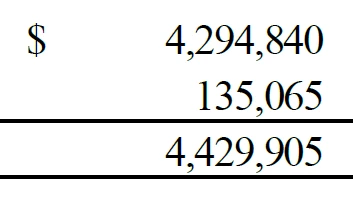
The current document I am working on has a table set that I am converting to be 508 compliant. Before tagging the numbers, the numbers look normal. However, after tagging as anything using the reading order tool, it adds a space after the 4 each time. It does this in every cell that includes numbers in multiple tables. Is this a document issue, a program bug, or something entirely different? Has anyone come across this issue?

This topic has been closed for replies.

1 reply

Participant
January 18, 2024

If need be, I can give more details about the issues occurring. This is a PDF that was exported from a Word fie.

Bevi Chagnon - PubCom.com
Legend
January 18, 2024

Hard to see from your screen captures what's happening.


My inclination is that this has something to do with how the original source file was created and formatted in Word, and how it was exported from Word to PDF.

If the PDF was exported correctly, you shoudn't have to do much in Acrobat to correct its accessibility.


Try re-exporting the PDF from Word using one of these 3 methods described in this blog, and see if the table is correctly tagged afterwards.

https://www.pubcom.com/blog/tutorials/ms-office/export-pdf/index.shtml


|    Bevi Chagnon   |  Designer, Trainer, & Technologist for Accessible Documents ||    PubCom |    Classes & Books for Accessible InDesign, PDFs & MS Office |