


Participating Frequently
December 19, 2023
Question

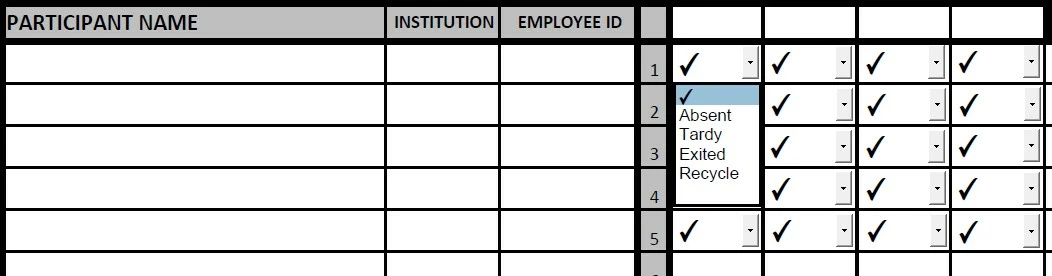
Text field color fill from multiple dropdowns
  • December 19, 2023
  • 1 reply
  • 1787 views

I have an adobe form with 4 dropdown list. All 4 dropdowns have the same information. I am trying to get a text box to change the fill color based on the selection from the dropdown list regaurdless us whic one I use. I have managed to get this to work for the one of them but can't figure out the code for all 4.

This topic has been closed for replies.

1 reply

Bernd Alheit
Community Expert
December 19, 2023

What script does you use?

Participating Frequently
December 19, 2023

I used the below in in Custom calculation script.


var indicator = this.getField("STP-1").value; {

if (indicator=="Absent")

event.target.fillColor = color.green;

else if (indicator=="Tardy")

event.target.fillColor = color.green;

else if (indicator=="Exited")

event.target.fillColor = color.red;

else if (indicator=="Recycle")

event.target.fillColor = color.yellow;

else

event.target.fillColor = color.transparent;

event.target.fontColor = color.transparent;}


try67
Community Expert
December 20, 2023

It is an attendance sheet, if the partictpant is present for the fist half of the day and not there for the aftrenoon and I select "absent" for the afternoon then I want partcipant field green to match the absent from thr dropdown list. The same if they recycle or exited. 


I'm sorry, but you didn't really answer my question. In your examples all the options are the same. The question is what should happen if they are not the same.


