


Participating Frequently
October 21, 2021
Question

text field Column calculation not working

  • October 21, 2021
  • 7 replies
  • 2218 views

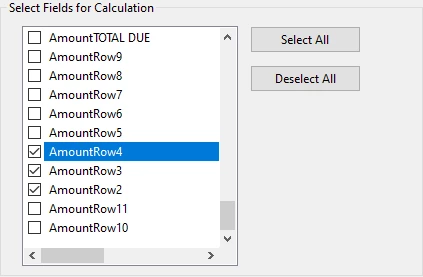
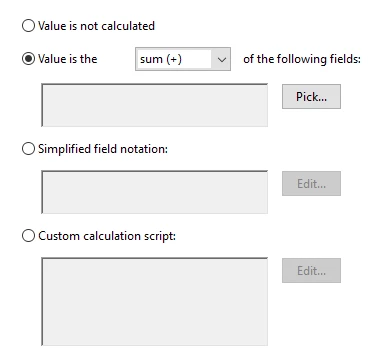
I'm trying to calculate 10 text fields in a column to show the total due at the bottom.  I've done it many times from the properties>calculation tab with success.  Now all of a sudden, when I "pick" the fields, and hit OK, nothing shows in the pick box at all.  I also tried to "set field calculation order", but again, the only choice showing in the pick box is the "Amount Total Due"


    This topic has been closed for replies.

    7 replies

    JR Boulay
    Community Expert
    November 14, 2021

    Go to Page Thumbnails : select all thumbnails : right-click (or local menu) : Rotate Pages.


    Acrobate du PDF, InDesigner et Photoshopographe
    JR Boulay
    Community Expert
    October 24, 2021

    Copy paste this URL into Google Translate to learn how to force open a PDF form with Acrobat :

    https://www.abracadabrapdf.net/ressources-et-tutos/js-et-formulaires-ressources/forcer-utilisation-pdf-avec-acrobat-reader/

    Acrobate du PDF, InDesigner et Photoshopographe
    Joan5FCAAuthor
    Participating Frequently
    November 12, 2021

    Hello,

    Could you tell me how to rotate my document (88 pages) and save it so it remains rotated?

    Thanks

    JR Boulay
    Community Expert
    October 24, 2021

    I guess this PDF was flatenned (form fields are merged in the layout) using a virtual printer.

    I have never heard of "PDFium", I don't know what it is.


    Acrobate du PDF, InDesigner et Photoshopographe
    JR Boulay
    Community Expert
    October 22, 2021

    I'd rather teach you how to fish than give you a fish.

    But don't worry, it won't take you more than a minute:

    😉


    Acrobate du PDF, InDesigner et Photoshopographe
    Joan5FCAAuthor
    Participating Frequently
    October 22, 2021

    FANTASTIC!!!

    Thanks very much!  I've been working on, and learning to create this form for our school community for weeks! I now have a great form for them!

    Joan5FCAAuthor
    Participating Frequently
    October 22, 2021

    Another problem.  I've distributed this form to faculty/staff to use.  They are to fill it out, "save as", email it back to me.  When I get it back, I am unable to add in anything they may have forgotten.  Is there a setting I can adjust to give me permissions to make changes or additions?

    Thanks

    JR Boulay
    Community Expert
    October 21, 2021

    May be a bug in Acrobat, you should restart the computer.

    Here is your "OK" file: https://documentcloud.adobe.com/link/track?uri=urn:aaid:scds:US:ad3135d8-baa5-49fa-8d3f-452a79e33174


    Acrobate du PDF, InDesigner et Photoshopographe
    Joan5FCAAuthor
    Participating Frequently
    October 21, 2021

    I did restart, but I can see the difference from your fix and my original.  You have a subset "Amount Row" with the text fields under it and then choose "AmountTotalDue" for the calculation.  I'll work off your "ok" doc. 

    Thanks so much!

    Joan5FCAAuthor
    Participating Frequently
    October 21, 2021

    Actually, would you mind doing the calculations on the amount column on this more recently updated document.  I spent tons of time getting all the other fields exactly how I want them, EXCEPT for the amount column and don't want to have to start over.

    That being said, I'd love to learn what you did to make it work, vs. what I did.

    Peru Bob
    Community Expert
    October 21, 2021

    I've moved this from the Using the Community forum (which is the forum for issues using the forums) to the Acrobat forum so that proper help can be offered.

    Joan5FCAAuthor
    Participating Frequently
    October 21, 2021

    Ok.  Thank you.

    Joan5FCAAuthor
    Participating Frequently
    October 21, 2021
    PAYMENT_REQUEST_FORM_amt_calc.pdf