


New Participant
January 2, 2025
Question

Text Field Font Issue In PDF File

  • January 2, 2025
  • 2 replies
  • 742 views


I have a PDF file that has editable text fields within that calls for a specific text font (OCRAStd).  However, when we open this PDF file, the text field not display the OCRAStd font but some other font (not sure what font it is).  Does anyone know why this is happening and how we can "fix" the issue so it will display the proper font?


Some background information that may be of use:

- the PDF file was created using a Mac

- the PDF file was opened/viewed using a PC (Adobe Acrobat Pro Version 2024.003.20112 64-bit)

- I changed to this version of Adobe Acrobat Pro was recent (last 3 months).  I didn't have this issue in the prior version (Adobe Acrobat Standard 2017).

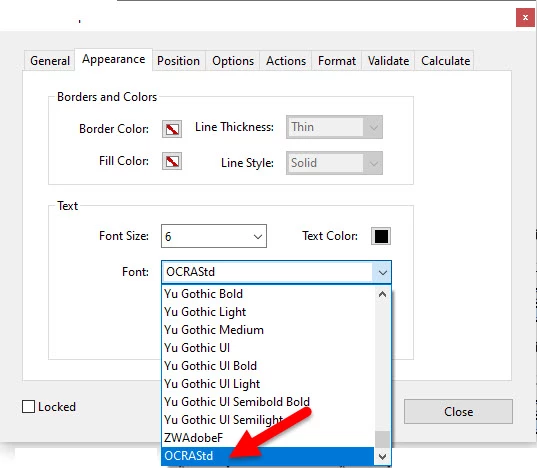
- I tried to change to a different font for the text field and then change it back to OCRAStd font, but this OCRAStd font is not longer available to select [note: it initially showed near the BOTTOM of the font list (see attached picture), but when I changed the font and tried to select it again, it's no longer at the bottom or anywhere on the list].  This seems to imply a font availability issue (and Acrobat could be replacing this unavailable font with solme other font), but I don't know if this is true or not.


Any help or input that can be provided for this would be greatly appreciated.


Thanks in advance.


2 replies

try67
Community Expert
January 2, 2025

Do you know how the file was created? What application was used for it?

When using a font in a field it must be fully embedded in the PDF. If that is not the case, the viewer application won't be able to correctly display it, unless it's installed on the machine by chance. It seems that when the file was created those fonts were not (properly) embedded in it, which is why you have this issue now.

New Participant
January 3, 2025

I will have to ask the person who made the PDF on how the file was created and what application was used.  Your thoughts about fully embedding fonts within the PDF is very interesting and I will also raise it to the person who made the PDF.  Thanks for your input, it's appreciated.

PDF Automation Station
Community Expert
January 3, 2025

If you press Ctrl + d to open the document properties, it might tell you in the description tab under "PDF Producer".

PDF Automation Station
Community Expert
January 2, 2025

Is that font (OCRAStd) installed on your system?

New Participant
January 2, 2025

I just checked and this font (OCRAStd) is not installed on my PC.

PDF Automation Station
Community Expert
January 2, 2025

It needs to be installed on your PC if you want it show up in the font dropdown of the field properties.