


The referenced component 'Acrobat' could not be found.
I download the Acrobat DC SDK from https://console.adobe.io/servicesandapis.
After download when I open C#Samples from Adobe\Acrobat DC SDK\Version 1\InterAppCommunicationSupport\C#Samples .
I got the error The referenced component 'Acrobat' could not be found.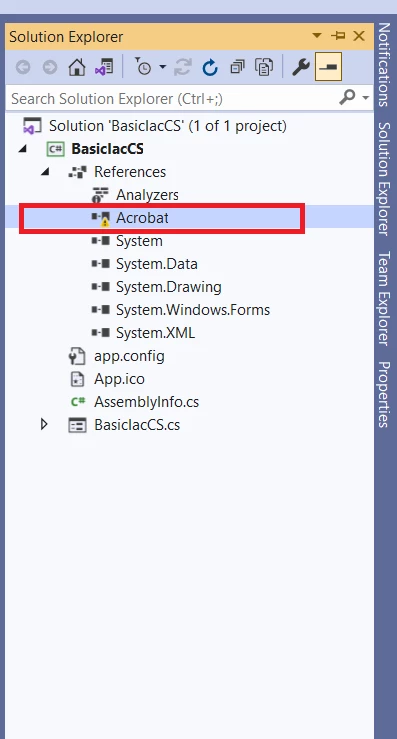
In my computer, I have already installed the Adobe Acrobat Reader DC.
Next step I go inside the unzip folder\InterAppCommunicationSupport\Headers and saw acrobat.tlb is present.
I followed https://docs.microsoft.com/en-us/previous-versions/dotnet/netframework-2.0/tzat5yw6(v=vs.80)?redirectedfrom=MSDN this step to solve this problem.
C:\Windows\Microsoft.NET\Framework\v4.0.30319\RegAsm.exe "C:\Acribat DC Developer\Adobe\Acrobat DC SDK\Version 1\InterAppCommunicationSupport\Headers\acrobat.tlb"
I tried this command but not working.
RegAsm : error RA0000 : Failed to load 'C:\Acribat DC Developer\Adobe\Acrobat DC SDK\Version 1\InterAppCommunicationSupport\Headers\acrobat.tlb' because it is not a valid .NET assembly
 AdChoices