
Participating Frequently
February 19, 2021
Question

The Signature block is not working

  • February 19, 2021
  • 2 replies
  • 12842 views

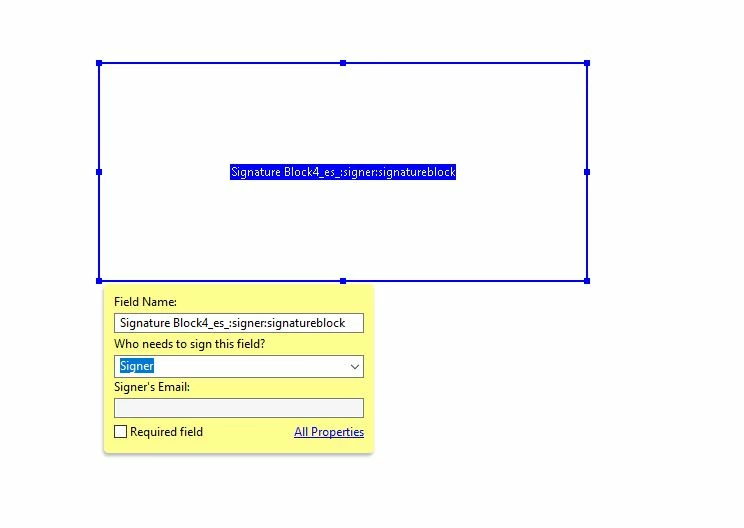
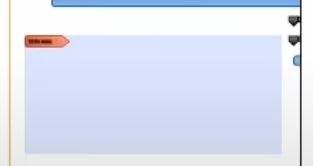
I need to add a signature block for someone else to digital sign it and for some reason is not working. When I am adding the box on "Edit"" mode I can see the box. When I preview it, it does not show. I know I can go ahead and add a border to it but still the person can't sign. I need the gray box to appear where it has a red symbol indicating to sign here and they can sign digital. I uploaded three screenshots to explain what's going on. The first one is how it appear when I am adding the signature box, the second one is how it looks when I preview it ( blank- nothing shows), and the third one is what I am looking for. Any help? Thanks

2 replies

Participant
September 15, 2023

Where did this option for a signature block go?  My computer updated Adobe again and now this field is gone.  How are we supposed to create a document with a signature field?  The signature block does not work because when you type into it it does not take you to adding your certified signature.  It just lets you type into it.  

Participant
July 30, 2024

 I have the same baffling issue - I did find when I DID NOT CLICK The "This Document require Signature" check box. The signature field buttons were available and the red signature flag appears.    Another issue is when you link the PDF in Constant Contact email - the signature function disappears for some users, even if download.  This unpredictablity is really bad for business on multiple levels.

S_S
Community Manager
Community Manager
August 2, 2024

Hi @Renee26453004ul1e,


Hope you are doing well. Sorry for your experience with Acrobat.


Do you see the issue with every instance within the application? 

To test, would you mind trying the online portal https://acrobat.adobe.com/link/home and going to the E-Sign tab to see if the signature block appears there? 


If yes, and it does not appear on the desktop version, would you mind sharing a screen recording video of the event for a better understanding and further investigation?


Also, I suggest updating the application to the latest version (go to Help-> Check for Updates).


-Souvik

AkanchhaS8194121
Legend
February 20, 2021

Hi,


Thank you for the screenshot.

Looking at the first 2 pictures, I guess you are applying a simple text filed for signature and that is the reason it looks blank.

Have you selected Prepare form>Add Digital signature (from menu bar at the top)? If not, then try that. 


This will bring the "Sign here" dialog box as showed in last image.

If it still doesn't work then share a short video of step-by-step action taken at your end. 


Thanks,

Akanchha 

Isis5C26Author
Participating Frequently
February 22, 2021

Hi,


I appreciate you responding back to me. I notice what was going on. When I select "Prepare a Form", I was checking the box "This form requires a signature" (which is exactly what I need) and the opton that I needed didn't appear.  What I need is to create a box for another user to be able to sign it. Checking the check box "This form requires a signature, I think is for the creator to create a signature. It was a bit misleading on how to request a signature. By unchecking the box, I was able to add the box that has the red flag for someone to make a digital signature. Thank you

AkanchhaS8194121
Legend
February 22, 2021

Your observation is absolutely correct. That option is needs to be checked if you (sender) would like to sign the document too.


Good to hear that its working for you now. Let us know if there's any further assistance is required. 


Thanks,

Akanchha