


New Participant
February 11, 2016
Question

There is insufficient memory to process this page

  • February 11, 2016
  • 6 replies
  • 33486 views

Hello

I have a PDF document and when ever I try to edit it I get the error message shown in the below image:
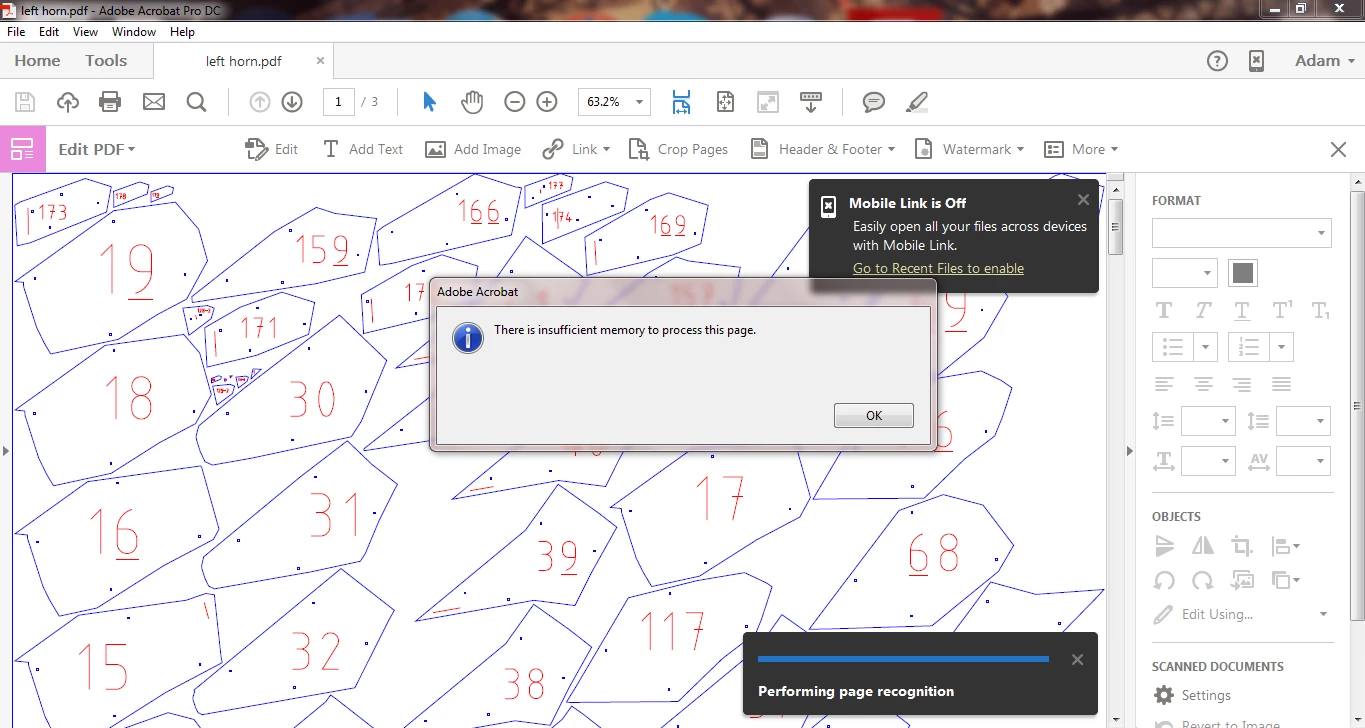
The PDF is 401KB, when trying to edit I have about 4GB of free RAM (temporary memory) and 55GB of free space on my hard drive.

Document can be downloaded here left horn.pdf - Google Drive

I have tried restarting, reinstalling and remaking the PDF.

This does not occur with some other PDFs but I cannot see how for this one there is not enough memory.

Any suggestions?

Thank you in advance.

Adobe Acrobat Pro DC version 2015.010.20056

This topic has been closed for replies.

6 replies

drinkwa2
New Participant
October 26, 2020

It is now October 2020 and I have been getting this error message when trying to edit a PDF of a recipe.  I checked for updates and it says that are no updates?  Is there another fix yet for this issue?  I have over 100 GB of free storage on my laptop.

New Participant
December 16, 2020

Same. Adobe this is absolutely pathetic. I can't add a comment larger than size 24. I can't edit text. What am I paying for? 

New Participant
April 23, 2021

Today is 4/23/2021.  I reinstalled Adobe Acrobat DC today and am still having the same issues named above!!~!  After converting the PDF to .docx, the page is still not editable.  I'm uploading it here and hope to get this issue resolved!  Thanks. Pam 

New Participant
August 29, 2017

This issue is still not resolved?? I continually check for updates and continue to have the same error of insufficient memory happen in large documents. What is the fix?

Adobe Employee
April 13, 2017

With the latest release of Acrobat on 11th April 2017, this issue has been addressed.

To get the latest product update, within the product, click on the menu Help-> Check for updat

May 3, 2017

Uhm, no its not corrected. I'm getting the error and its 2nd May 2017. Additionally, I am up to date. Im with

padadof2 why is this such a problem? more then a year has gone by and this is still This question is Not Answered.

Lovekesh Garg
Adobe Employee
Adobe Employee
May 3, 2017

This issue is file specific. So please share the file you are facing this issue.

Also, the Acrobat DC.version as there are different Acrobat DC product available.

Thanks.

padadof2
New Participant
February 14, 2017

I am having the same trouble.  I have Adobe Acrobat Pro version 2015.006.30280 and get this message way too often.  Why is a $650 software program giving so many error messages.  Bluebeam Revu doesn't have any issues, and it was 1/2 the cost.  Help me understand why I want to keep giving Adobe money when it doesn't work like it should?

Lovekesh Garg
Adobe Employee
Adobe Employee
February 15, 2017

We are extremely sorry for the issue. This error usually happens when file takes lot of memory of computer. It might hampers your other work, that's why we try to control it. I suggest you, please share the file and your machine configuration. It would help us understand the issue.

Thanks.

New Participant
October 7, 2016

Hi- this is a little late, but I was receiving the same error. Mine was caused by the OCR, which runs when you choose Edit PDF. Unfortunately it looks like there is no way to turn off the OCR process, but if you right click the image and select Add Text, it will send you into editing mode without running OCR, and, subsequently, without giving you this error.

Lovekesh Garg
Adobe Employee
Adobe Employee
January 17, 2017

Hi,

Please install latest update of Acrobat DC. This issue is fixed now. You won't get this error on this PDF.

Go to Help> Check for updates, for installing latest update. If no update available, means you are already on latest version. And now you won't face this issue.

Thanks.

New Participant
January 23, 2017

We have the same issue running on the latest version of Acrobat DC Professional ( 2015.006.30280 ).

Have a document from our drawing scanner ( HP DesignJet T2350PS ) which we use the Enhance Page option to recognize the text.  After this, going to Edit Page will cause the error in question to be raised.  We have tried down scaling the image, removing portions of the image that we thought were too complex or had text running in a different direction to no avail.

After performing the enhance PDF option and saving there is no issues.  You can select the text it recognized.  Its only when you go into the Edit PDF that the error is presented.

gary_sc
Community Expert
September 19, 2016

First off, not a clue.

I tried to download the file and it wasn't available.

Sorry. If you place it somewhere else for download, let us know