

Known Participant
January 31, 2023
Question

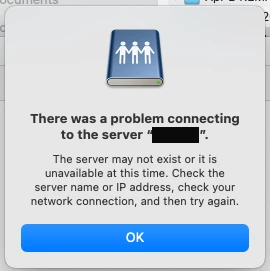
There was a problem connecting to the server and Shared Review

  • January 31, 2023
  • 1 reply
  • 1599 views

I am getting this error when the PDF in the destination folder gets opened and I can't figure out the problem. 

Any advice?
 

This topic has been closed for replies.

1 reply

Karl Heinz  Kremer
Community Expert
January 31, 2023

Does the server exist and is it reachable from where you opened the file? This can happen if you configure the shared review with an internal server, but then the PDF is opened outside of your company's network, and the server is either not accessible, or requres a fully qualified domain name. 

Known Participant
February 8, 2023

The server exists and is reachable. We use VPN to access it. 

Karl Heinz  Kremer
Community Expert
February 8, 2023

I rely on my IT dept and have suggested WebDAV as an option but no one has responded to that question. Yes I was referring to us accessing the server from the Mac side. The PC side currently has no issue.

No sure what you are asking RE: how did we specify the path in the PDF file. In Acrobat preferences, do you mean? I'll do my best to answer but my IT guys helped set that up. ANy suggestions on resources I can refer to to become an expert in troubleshooting and setting things up with Adobe products in general? I'd love to get into that. Please advise.


When you started your shared review, you specified a path to a server (which is now stored in the PDF file). As far as becoming an expert goes, you just work with the application day in and day out until your colleages become aware of you knowing a bit more about the application as they do, and they come to you with all sorts of problems, and you then do the research to resolve those problems. 🙂 Give it a few years, and you'll get very good at it 🙂 But seriously, I've been working with Adobe Acrobat since Acrobat 3, so I don't have any good suggestions regarding resources because I've never used any besides the information on Adobe's website and in the official product documentation - and a lot of Googling for solutions to more obscure problems.
