

Known Participant
January 31, 2023
Question

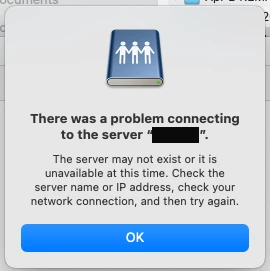
There was a problem connecting to the server and Shared Review

  • January 31, 2023
  • 1 reply
  • 1599 views

I am getting this error when the PDF in the destination folder gets opened and I can't figure out the problem. 

Any advice?
 

This topic has been closed for replies.

1 reply

Karl Heinz  Kremer
Community Expert
Community Expert
January 31, 2023

Does the server exist and is it reachable from where you opened the file? This can happen if you configure the shared review with an internal server, but then the PDF is opened outside of your company's network, and the server is either not accessible, or requres a fully qualified domain name. 

Known Participant
January 31, 2023

Some more details:

My creative team is all mac based and we have colleagues in other departments we do the Shared Review with that are on PCs and we al work remotely. In order to make it work, I have had to set up Shared Review remoting in to a PC at our office and run the review through it (it just plays nicer with the PC based servers and indiviual employee PCs). 

My test group did not get the prompt and comments came across OK. It's just that I and one of my teammates I used to test it got this prompt and I'm worried about it being an issue.

So the PC is where the original PDF lives and the destination folder for the review file lives on an internal server. When I or my teammate (again, Mac based) opens the review file in the destination folder, we get that prompt and the file does not have teh Publish Comments and Check for new comments buttons (see attached).

Karl Heinz  Kremer
Community Expert
Community Expert
January 31, 2023

I am writing this on a Mac, so I feel your pain when it comes to using Macs in a PC centric environment. I suspect that the path to the review folder is specified using the Windows syntax, and the Mac cannot make any sense out of that. I would create a WebDAV server that can be accessed from both Windows and Mac systems. Using WebDAV requires that you have access to a web server. This page (even though the site is about some other software) shows how to set up WebDAV on Apache, running on a Windows system: https://community.microstrategy.com/s/article/KB423699-How-to-enable-WebDAV-in-Apache-Server-2-4-x-in-Windows-for-multimedia-widget?language=en_US
