


Participant
May 6, 2021
Answered

this pdf form requires a newer version of adobe acrobat...

  • May 6, 2021
  • 3 replies
  • 8834 views

When I open certain forms in Acrobat I get the following error.

"This pdf form requires a newer version of Adobe Acrobat..."

When I close the error, the form opens.

I have verified that my Acrobat is up to date.  How do I resolve this error issue?  
This topic has been closed for replies.
Correct answer JR Boulay

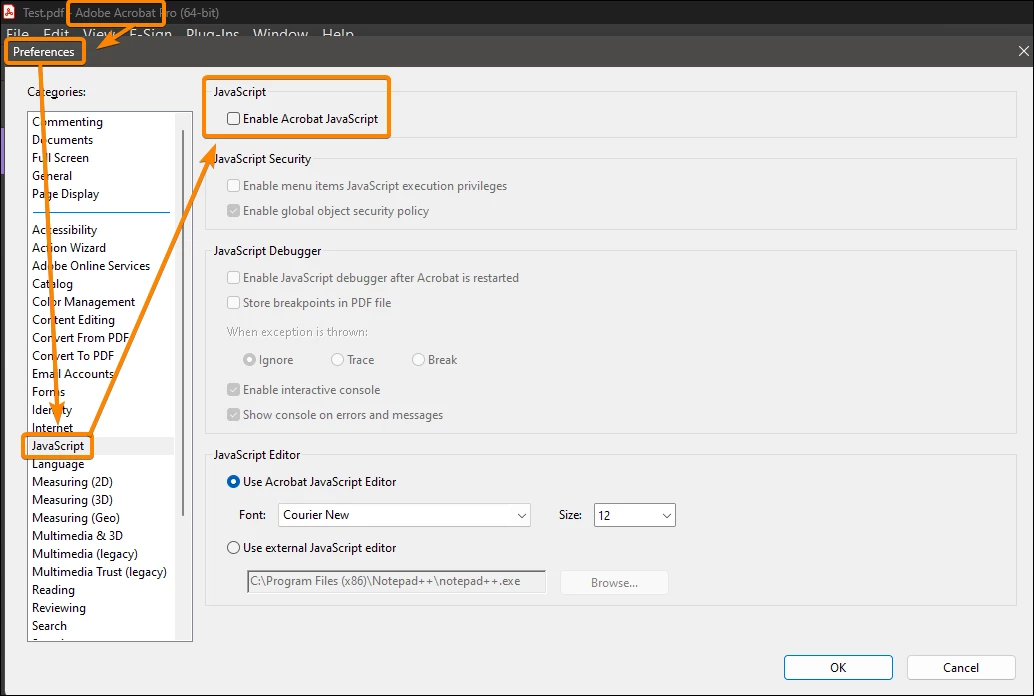
It's a lousy JavaScript running at opening that closes the document.
Disable JavaScript in Preferences and you should be able to open it.


3 replies

JR Boulay
Community Expert
JR BoulayCommunity ExpertCorrect answer
Community Expert
May 3, 2023

It's a lousy JavaScript running at opening that closes the document.
Disable JavaScript in Preferences and you should be able to open it.


Acrobate du PDF, InDesigner et Photoshopographe
Participant
May 4, 2023

Thanks for that! However I want to to not give that message for everyone, so I want to get rid of the source of the Javascript, which I believe is caused from the person that made the PDF using an older version of Adobe Acrobat DC. Going to have someone with the current version of Adobe Acrobat Pro to re-make the PDF and hope that takes care of it. 

Participant
July 29, 2023

I am having this same issue using the VA website to download forms. The form comes back blank in sections after it is signed. I still can't figure out how to fix it. 

Legend
May 6, 2021

Also, what is the specific version of your Adobe Acrobat - not "up to date" but a string of numbers like 2016.123.21332 or 11.4.32?

Participant
May 2, 2023

I'm running Adobe Acrobat Reader version 2023.001.20143 | 64-bit. Here's a screenshot of the error I get with a few PDFs. Is there a way to not get this error?


Legend
May 2, 2023

It's certainly strange, since you are indeed already running the latest version available today. Where are these files from? Are you able to share one?

try67
Community Expert
Community Expert
May 6, 2021

Please post a full-window screenshot of this message.