


TestriteVisual
Inspiring
April 19, 2023
Answered

To email a PDF as an an attachment and NOT a cloud link

  • April 19, 2023
  • 8 replies
  • 98765 views

I came across this setting in case anyone has the same problem.


Problem:

Not sure how this setting even changed, but all of a sudden if I clicked the email icon in Acrobat, it opens my Outlook and just shows a cloud link with the following text


You can view "test template.pdf" at:

https://acrobat.adobe.com/...

________________

Sent with Adobe's cloud storage. Click on the link above to access the file online. No sign up or installation of Acrobat is required to access.


Solution

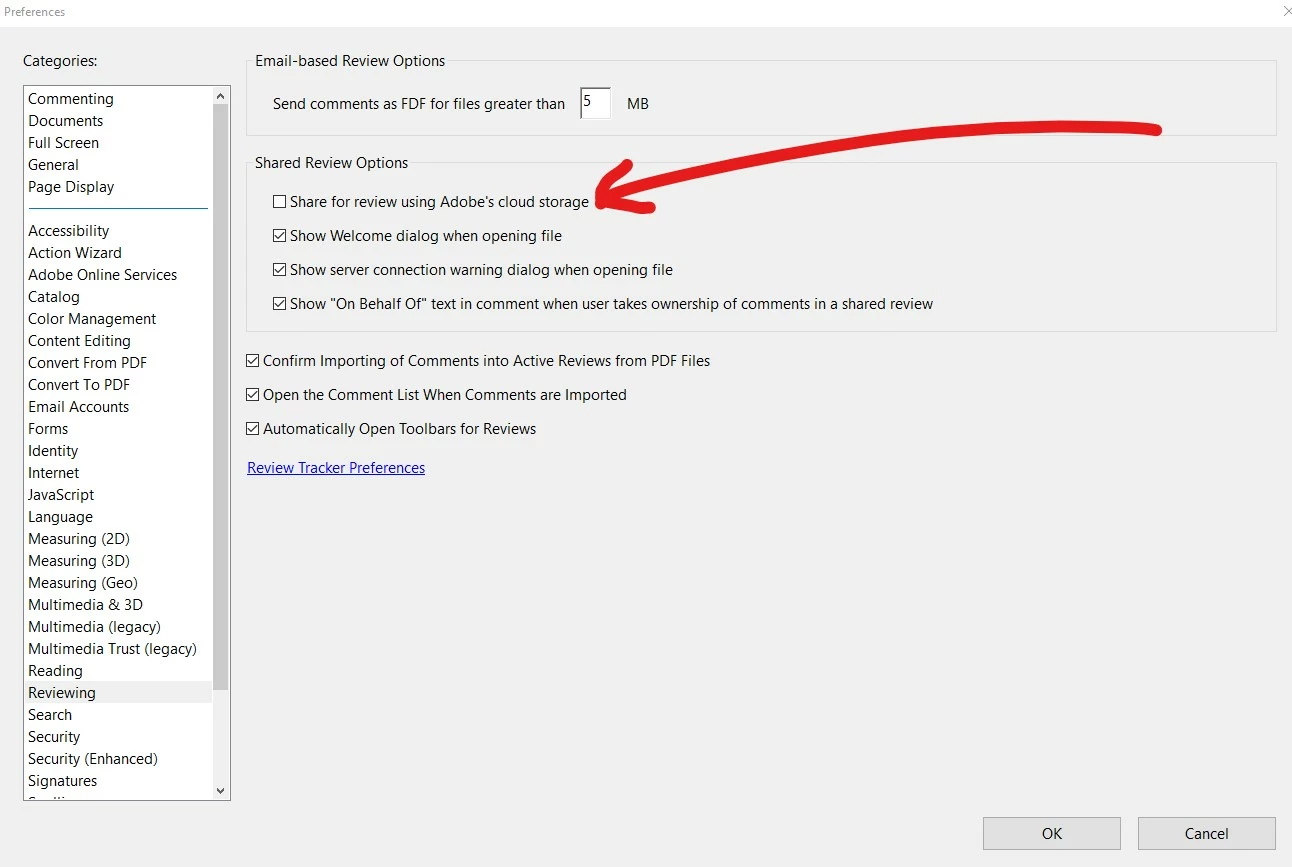
I was able to revert back to sending an attachment and NOT a link by going to 

Edit>Preferences>Reviewing and then UNCHECK "Share for review using Adobe's cloud storage"
 

Correct answer TestriteVisual

Thanks for the reply @Meenakshi Negi . I just realized that I actually had tried UNCHECKING "Send link in attach to email ", but it did not work at first. What you said DOES WORK, but I needed to actually QUIT acrobat first and then reopen it for the setting to take effect.

8 replies

Participant
November 6, 2024

Where do you find this? Theer is no "edit"

Edit>Preferences>Reviewing and then UNCHECK "Share for review using Adobe's cloud storage"

TestriteVisual
Inspiring
November 6, 2024

On Acrobat 2024.003 or similar you need to click on Menu to see the Preferences button shown in the screenshot. 

Participant
July 11, 2024

None of these worked for me. On a Mac using default Mac mail client. Tried everything. Absolutely deplorable performance. 

Participating Frequently
July 1, 2024

Changing settings in Acrobat Reader (2024 version) did not work for me.  I was able to change this behavior in Microsoft Outlook. 

  1. Click on the "Attach File via Link" button in the "Message" ribbon of a new email message.  (Other replies mentioned an option in the menu bar, to the right of "Help", but I do not have that menu item in Outlook.)
  2. Click Settings
  3. If you want to have a popup choice every time you attach a PDF file, select "Always prompt while attaching."  I did NOT want to ever attach as a link, so I chose "Never prompt while attaching."


This worked for me.

Participant
May 29, 2024

Hi Really dumb question where do I find my preernce in Adobe? I go into it and it just gives me the documents I have tried to attach to me emails?

Participating Frequently
December 15, 2023

tried this and it did not work.


Participant
February 2, 2024

It did not work for me either. Ijust want to be able to forward an email wirh a pdf attachment  and let me just foeward an email without the natzi police turning it into a cloud storage thing that no one wants to deal with,

Participant
March 4, 2024

I'm not sure if this is still an issue, but I found this on Microsoft's website:


https://answers.microsoft.com/en-us/outlook_com/forum/all/i-keep-getting-messages-about-sending-pdf-files/9491cc08-456b-42ad-bf24-123f9e8c99cb


Hopefully this resolves your issue.

October 2, 2023

NONE of these solutions work. I am running Acrobat Pro version 2023.006.20320 on MacOS Sonoma. I have unchecked the "Always send files as a link" option in Preferences (see attached screenshot), yet Acrobat insists on send the file as a link. This is so aggrivating!


Suggestions?


Participant
November 14, 2023

None of these worked for me.

I had to uncheck the Adobe Cloud Add-in in Outlook for it to finally stop attaching as a link

File/Options/Add-ins/Com Add-ins Go button and uncheck

Abambo
Community Expert
Community Expert
November 14, 2023

Works for me, but I'm not using Microsoft Outlook.

ABAMBO | Hard- and Software Engineer | Photographer
Participant
September 29, 2023

HELP.. Ive tried all steps below and nothing is shutting this feature off. It takes one extra step every time I send an email and I sent hundred of attachments a day. 

Meenakshi Negi
Community Manager
Community Manager
April 19, 2023

Hi TestriteVisual,


Thank you for your patience so far.


To send the PDF as an email attachment by default, disable the "Send link in attach to email (Sign-in required)" option in Acrobat Preferences.

Go to Edit > Preferences >  Email accounts in Acrobat or Acrobat Reader on a Windows machine. For Mac, Application Preferences > Email accounts.

Refer to the screenshot attached below:


Thanks,

Meenakshi


Marking a reply or response “Correct” will help future users with the same issue quickly identify the correct answer.

TestriteVisual
TestriteVisualAuthorCorrect answer
Inspiring
April 19, 2023

Thanks for the reply @Meenakshi Negi . I just realized that I actually had tried UNCHECKING "Send link in attach to email ", but it did not work at first. What you said DOES WORK, but I needed to actually QUIT acrobat first and then reopen it for the setting to take effect.