


Inspiring
May 5, 2021
Question

Tools Panel keep resetting to default!

  • May 5, 2021
  • 33 replies
  • 29790 views

Good day community,
Please can someone assist.

We have two work station with seperate licenses and we get this problem on both computers.

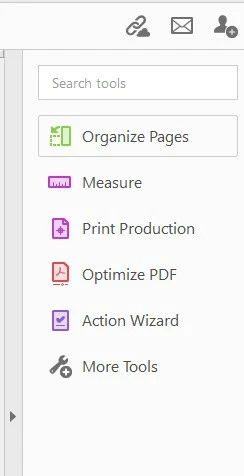
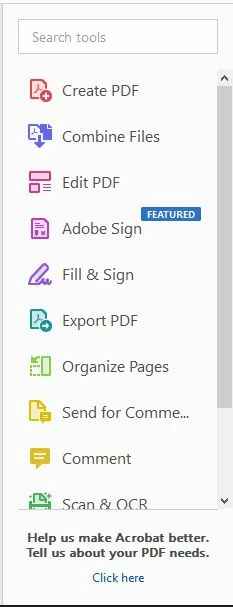
When you customize Adobe Acrobat Pro DC 32bit tool panel, the tool panel stays customised only for short while then goes back to default. I cannot wrap my head around this and it is driving me crazy having to set it up every day; some times more than once.

Cusomized:
Default:
33 replies

Participant
November 10, 2024

Hi,

I'm having the same problem, the customisation only  last until the programme is open or the computer shuts down.


As I see there are many others here have replied the same, and it hasn't been fixed for the past three years since it was raised, I'm guessing there's not going to be a fix for this soon. It only happened after I switched to the new Acrobat Pro, so I guess that's the problem. 

S_S
Community Manager
Community Manager
November 12, 2024

Hi @Brendan250296773nf1,


Hope you are doing well. Sorry for the trouble.


Would you mind sharing a screen recording video of the entire event, covering the preferences, closing and re-opening Acrobat, and showing the issue? 

This will help us understand the situation better, and assist accordingly.


Thanks,

Souvik

Participant
November 12, 2024
Hi Souvik,

Thanks for replying. It's quite simple really, it doesn't need screen
recordings.

In Acrobat Pro (new version), on the toolbox, by default there are four
features, (select text/, add a comment, highlight text and draw freehand).
To add more features, I can customise the toolbar by pressing on the three
dots at the bottom of the toolbox and clicking on "customise toolbox", This
brings up a dialog box with options to add to the toolbar. It works fine,
but the problem is that when I shut down the computer and reopen it, the
customisations have gone, and the toolbox has returned to the default
settings. This didn't happen in the old version.

thanks again,
Brendan
Participant
September 5, 2024

This is so annoying. It seems like every other time I open Acrobat I have to add back the tools I need.

S_S
Community Manager
Community Manager
September 11, 2024

Hi @G&S Signs,


Hope you are doing well. Sorry for your experience with Acrobat.


You might want to check in the Preferences-> Adobe Online Services, if the option "Sync Preferences across devices and document services" are checked.


The other would be to check Preferences-> Documents-> "Restrore last view settings when reopening documents."


If neither of these work, try resetting the preferences of the application and try changing the settings as described above.

The steps to reset preferences can be found here: How to reset Acrobat Preference settings to defaul... - Adobe Community - 4792082


Hope this helps.


-Souvik

Participating Frequently
August 16, 2023

Hey all - my original post on here was in Oct 2022, and I can't explain how or why, but I literally have not had my Tools reset since that day. (Knocking on all the woods!) It's the longest stretch of this glorious functionality I've ever had. I do have my Online preferences setup to Sync across devices per Adobe support's latest suggestion, but I'm pretty that's always been checked for us. Plus that solution was offered months after my original complaint... so I'm not sure if one of their updates patched something to make that checkbox finally solve something, or if I've just hit a lucky streak after posting that's eventually going to break again now that I'm comfortable. But for what it's worth, maybe there's hope for your sanity too. Good luck to us all! 🙂

AkanchhaS8194121
Legend
August 29, 2023

We appreciate @DawnyK taking the time to update your old discussion and share your findings with us.

Per our engineering team, this issue has been fixed with our May release. So, it shouldn't be causing any trouble with the classic viewer.

Also, 's whole new Acrobat has been rolled out which is called Acrobat New View. 

Please do keep us informed if you happen to see a similar issue with the new Acrobat.


Thanks,

Akanchha 


Participant
August 31, 2023

I have 2 PCs, I run classic view, and this problem has not been fixed. Just happened AGAIN, which is why I went looking for a fix. I remove 5 tools, add 2, and it goes back to default at least weekly. I have "sync preferences across devices and document services" checked on both devices and have had for months. Sn annoying that I have to pay a premium price for this software (I have to have it for work) for this to happen all the time. 

G&S Signs
Participating Frequently
August 16, 2023

This is DEFINITELY tied to updates.  Both our design station and production station had Creative Cloud updates and Acrobat was one of them.  BOTH computers had their panels reset.  GRRRRRRRR!  (Threw my production guy off.  First time he's seen it happen.  NEWB, lol!)

G&S Signs
Participating Frequently
September 6, 2023

Since that update, no resets.  So the last time was SPECIFICALLY caused by the update.  I had a suspicion that was A cause but not the ONLY cause.  The other "causes" (whatever they were) appear to have been resolved.  It took quite a long time but THANKS Adobe support for making it happen.

G&S Signs
Participating Frequently
January 12, 2024

It's BAAAAAAACK!  Just a quick FYI Adobe, the tools sidebar reset sometime between yesterday and today.

andrewc74267665
Participating Frequently
August 1, 2023

This has literally been going on for years. Every now and then I check back to see if Adobe has actually done anything about it, and every time I'm shocked (I don't know why).  

Might as well remove the ability to change the toolbar at this point and just call it fixed. All it does is give the false impression that I will be able to customize it. 

Participant
July 14, 2023

I have the same problem...such a pain in the a$$

MADink_Designs27
Inspiring
June 26, 2023

I've had this issue for about the last 5-7 years on every PC I've used Acrobat on. I count about 6 PCs. It's very frustrating to not be able to rely on your tools panel having the proper tools easily accessible for your workflow. Why is it all other Adobe software can have custom workspaces that are easy to set up and keep, but Acrobat cannot?


Acrobat seems to have gone downhill over the past few years. I used to script a lot of PDF forms, and in 2021 Acrobat stopped opening script editors such as Sublime and Visual Studio even though it was set to do so. A lot of people had that issue as well. I'm not sure that issue has been fixed either.

gillianAWWA
Participating Frequently
March 21, 2023

Same problem here, running Acrobat vers. 2022.003.20322 on Windows 10 vers 21H2 (OS Build 19044.2604) but certainly not unique to this version combo. Incredibly frustrating to lose my customized tool menu all the time!

Participant
March 28, 2023

It's a bit of a joke that nearly 2 years since the original post, nothing has been done.

Like many of you, I have exactly the same problem with no concrete answer in sight.

The Adobe response may as well be "Have you tried turning it off and on again?"


Inspiring
March 14, 2023

I have had the same problem ever since the tool sidebar was introduced. I added my Pitstop Edit tools and Measurement tools this morning just to see how long it takes to reset. I figured that it resets when Acrobat crashes but I can't be sure. I use this software all day every week so crashes happen. My toolbar up top is fine though...

AkanchhaS8194121
Legend
March 15, 2023

@KayraTheNomad @NW3-PPC @stanislavb98449803 @Stab2k 


Sorry to hear that the issue persists.

I have sent you an email from our official Document Cloud account. Where requesting the fiddler logs for further investigation of this issue.

Could you please share the requested details with us over email? 


~Akanchha 

Known Participant
March 14, 2023

Hi, I may have come up with temporary solutions.
The "com.adobe.Acrobat.Pro.plist" file appears to contain information about preferences and panel settings. It is stored in "/Users/yourname/Library/Preferences/com.adobe.Acrobat.Pro.plist". I took this file from my other computer where I still had the panel as I needed and replaced it in the other computer. After rebooting I had my panel back. So I have saved this file and when the panel is reset again, I will replace it again - that's the idea.


Important notice!

I saved the original file to another location before overwriting it with the new one.
Both my computers had the same version of macOS and CC.
I don't know if it is also applicable for Windows users.


This has worked for me so far, any changes you make are your own responsibility.