


Inspiring
May 5, 2021
Question

Tools Panel keep resetting to default!

  • May 5, 2021
  • 33 replies
  • 29790 views

Good day community,
Please can someone assist.

We have two work station with seperate licenses and we get this problem on both computers.

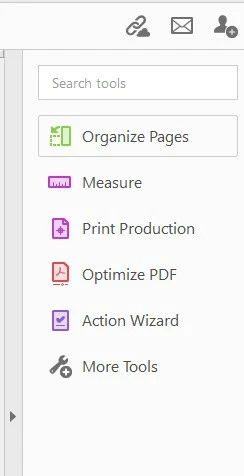
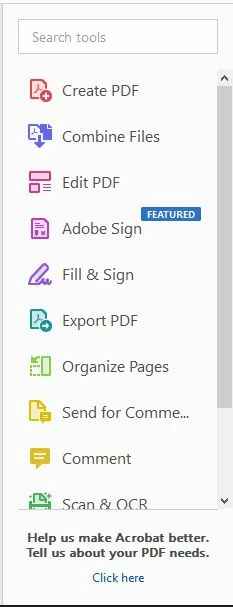
When you customize Adobe Acrobat Pro DC 32bit tool panel, the tool panel stays customised only for short while then goes back to default. I cannot wrap my head around this and it is driving me crazy having to set it up every day; some times more than once.

Cusomized:
Default:
33 replies

New Participant
September 1, 2022

Same issue here. Between the crashing and constant resetting of the tools, I'm wondering why I'm even wasting my money anymore. Especially with these generic answers I see from Adobe Support. Bad enough everytime I try to send the error report after it crashes, I receive no response or a response that tells me they have no solution, but to see it typed in by a person on the forum is extremely disappointing with what we pay to have it. Get your act together Adobe. Fix the problems please.

EveningStarlight
New Participant
August 18, 2022

Mine also keeps resetting, sometimes almost daily. All we need is a button that lets us "lock" our customization. Would that really be so hard to do?

I have five tools that I use the most, one of which is Prepare Form, and is constantly dropped when I lose my customization. Please fix the issue!

AkanchhaS8194121
Brainiac
August 18, 2022

Hi Eve,


So sorry to hear that the issue persists.

To investigate this further, please share the following details with us. 

1- Screenshot of the current version of Acrobat DC. Open Acrobat>help>About Acrobat DC

2- Also, please collect the Adobe CC logs https://helpx.adobe.com/creative-cloud/kb/cc-log-collector.html  and share them via document cloud as explained here https://helpx.adobe.com/document-cloud/help/sharing-pdfs.html

ProcmonLogs :

https://www.adobe.com/devnet-docs/acrobatetk/tools/Labs/acromonitor.html


Thanks,

Akanchha 


EveningStarlight
New Participant
August 19, 2022

Logs file: 

File: AdobeLogs_20220819_123116_645-win-GS.zxp

Default Tools List (changed from yesterday when I customized it twice)

Customized Tool List (what I change it to every time it goes back to the default)


New Participant
August 2, 2022

Same here. My Adobe has been like that for a couple of weeks now and it is driving me crazy! Nobody else in my department seems to have the issue and IT didn't find a solution.

I tried resetting the application preferences now as recomended by MeenakshiNegi. Hoping this will help! (*fingerscrossed*)

New Participant
August 2, 2022

It didn't work for me. Lasted a few days and out of the blue right back to the STUPID defaults which are worthless to me. Why even give us to opportunity to make a change? Clearly "mother" knows best!

New Participant
June 13, 2022

Same issue, been happening for over a year now. Seems to reset every few weeks or so. I would think its due to when updates are pushed out possibly 

New Participant
April 29, 2022

Hello Adobe, I have the same issue. I customize my quick tool bar and my customization randomly disappears... My computer is managed by my employer, so at first I thought it was because of that. The IT told me that the problem is on your side. It is frustrating to have to put it back again every day and sometimes multiple times a day. It seems to happen after the computer went to sleep or after a restart. I hope you can fix this !!


This is the version I am using but it’s been doing that for a year...


Participating Frequently
May 1, 2022

Thanks for chiming in and letting us know that it has nothing to do with the IT department.


Also: look at all of us replicating the issue. And they said it couldn't be done! 😂

Participating Frequently
April 19, 2022

Same issue here. 

Participating Frequently
April 14, 2022

I'm wondering, could it have something to do with the fact that the IT department of my company is running all updates?

New Participant
April 8, 2022

Also having this problem, it's driving me batty. So many I don't use. I've been able to add the forms app, and it's stays there. I remove the ones I don't use, but they keep coming back. Very frustrating. All of the solutions I find say to go to Edit > Preferences > Documents and there should be a check box to lock the tool pane to last settings. However, that check box doesn't exist for me.

G&S Signs
Participating Frequently
March 29, 2022

Same issue that EVERYONE else here has listed.  I only use a handful of tools in Acrobat but two of those VERY frequently and of course the one i use ALL the time is the one not included in the default list.  The only difference, mine used to be fine for months or weeks but the frequency has been increasing.


Is it tied to updating the app (via Creative Cloud)?  That sometimes triggers the issue but is not always the case.  Sometimes the tools just randomly reset in the middle of my work day.  (I don't leave the app running so i open and close it multiple times a day.)


Super frustrating.  (running Windows 10)

G&S Signs
Participating Frequently
April 27, 2022

It's happening AGAIN!  It's happened twice since i posted my first reply on 3/29/22.  I was working in Acrobat earlier this morning and it was my usual toolbars.  I closed it and worked on some other things, then opened it again to optimize a proof and... GONE!  The toolbar reset to default again and my MOST USED tool isn't on the list (and a couple others i use semi-frequently).  The settings i had in the individual tools are still there but the tool button is gone from the side panel.

G&S Signs
Participating Frequently
June 2, 2022

AND AGAIN!  SOOOOO FRUSTRATING!  I've been using it off and on all day without issue and then BAM! it resets to default.

New Participant
March 18, 2022

FYI! I am also having this issue and have been having this issue for a long while now (like years)! I have tried searching for help multiple times, and this is the first time someone else finally posted something about it... Which means I AM NOT ALONE. Adobe your excuse of "trying to replicate the behavior" is completely ridiculous...
You can replicate it, by having a specific set of tools that you use other than default on a daily basis and then experience losing that comfort and having to reset all your favorite things back multiple times at random! Why give us the power to customize it, if you are just going to default it back at random??? Understand this is an issue, quit making excuses and fix it please!
Thanks