


Participant
June 2, 2022
Question

Trying to create specific PDF format from clip board by copying and pasting from another pdf

  • June 2, 2022
  • 3 replies
  • 565 views

Hello, I am trying to create a specific PDF format by copying then creating PDF from clipboard:

Open a PDF file.

Press cntr+A to select all of document.

Press cntr+C to copy all of the document to the clip board

In Adobe got to File-menu and select “Create” then select “PDF from Clipboard”

After sometime I get the following error
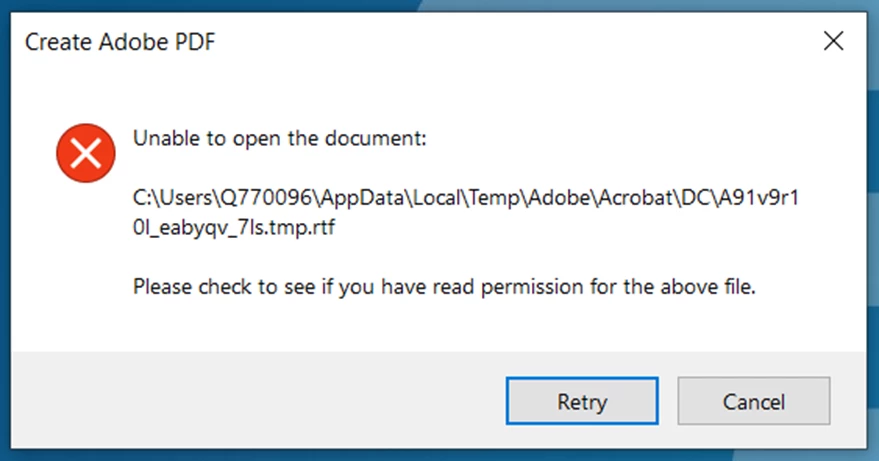
The file is ~ 1.79 kilobytes. 

If I split the file into two files each approximately 1.1kilobytes I DO NOT get the error.

Does this mean the issue is file size related?

This topic has been closed for replies.

3 replies

JR Boulay
Community Expert
Community Expert
June 2, 2022

I meant: what tool is activated in Acrobat when you select all using the keyboard?

The Hand tool, the Select tool, the Edit tool, … ?

Acrobate du PDF, InDesigner et Photoshopographe
JR Boulay
Community Expert
Community Expert
June 2, 2022

"Press cntr+A to select all of document.

Press cntr+C to copy all of the document to the clip board"

Which tool are you using for this?

Acrobate du PDF, InDesigner et Photoshopographe
BMitzel2Author
Participant
June 2, 2022

Hi JR.

Adobe DC.....standard keys for select all and copy....the problem comes after I copy to the clip board then go up to file->create->create PDF from clipboard.  

Karl Heinz  Kremer
Community Expert
Community Expert
June 2, 2022

This is something I've never tried, the only things I used to "Create from clipboard" are images or screenshots. About 1.8kB does not sound like a lot. I just tried this with a three page document (just text), with a PDF file size of about 59kB, and it worked correctly. You will just get the content, no formatting will make it into the new file. What is a bit suprising in your case is that the error message is referring to an RTF file. Is there an RTF involved? 

BMitzel2Author
Participant
June 2, 2022

Hi Karl, 


Thanks for your reply


The RTF file is the endgame after the formatting manipulation from creating a pdf through clipboard.  So from your reply doesn't look to be a size issue.  

Karl Heinz  Kremer
Community Expert
Community Expert
June 2, 2022

That makes it even more puzzling: When you create from clipboard, Acrobat does not know that you want to go to an RTF file eventually. And, why do you go via PDF if you want the end result to be RTF? You should be able to copy right into MS Word and then save as RTF.