


Participant
August 17, 2024
Answered

Turn off converting to editable text and images

  • August 17, 2024
  • 2 replies
  • 6188 views

Hello,


Using Adobe Acrobate Pro version 2024.002.20991.


I'm trying to turn off the converting scanned document to editable text and images that runs on every page as you scroll through a document. I'm able to turn this off for individual documents after it has already started. Is there a way to default this to not run?
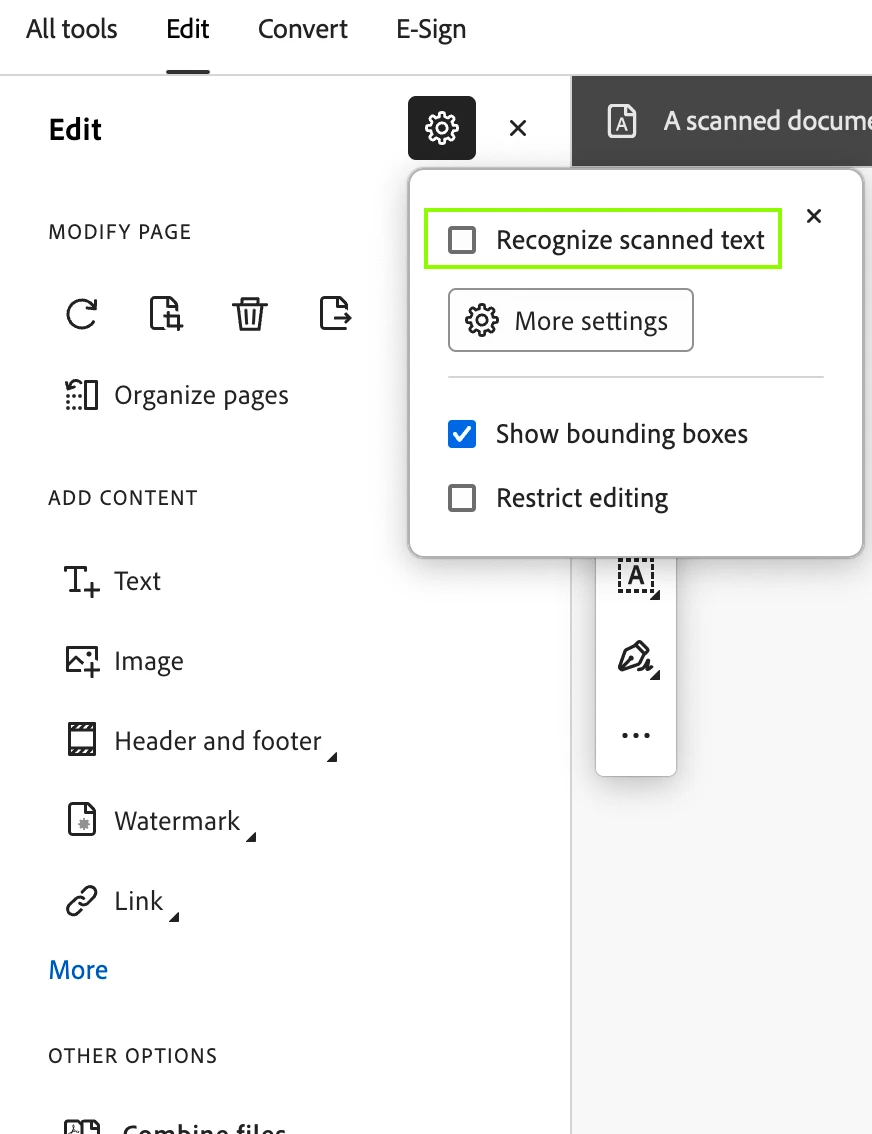


Correct answer SubratoNamata

And with new UI, pls find the attached screenshot.


2 replies

SubratoNamataCorrect answer
Adobe Employee
August 18, 2024

And with new UI, pls find the attached screenshot.


RonaldCz
Inspiring
September 1, 2024

mine is greyed out, I created the page myself and did not scan. I wanted to get rid of the break up paragraphs and make it one long text. Seems it auto scans and breaks up my document. How can I turn this off?

Windows 10 64-bitGigabyte Z490 AORUS Ultra IntelLGA 1200 ATX MotherboardIntel I9-10900K CPU@3.70GHzRAM 16GBNVIDIA GeForce RTX 2070 Super& NVIDIA GeForce GTX 1650
Participant
September 3, 2024

I haver the exact same problem. I have the box greyed out and bounding boxes selected.

If I import or copy CV's from other PDF's with certificates in image format ADOBE just automatically starts converting when I am scrolling throug pages. I have docs some 20MB and the whole program just locks and pressing escape does not work either.

Also if I go into edit mode it just starts recognition.

What is reqiored is somehow to disable OCR etc all together and only use it where and when required.


Currently it is just a loose cannon!

JR Boulay
Community Expert
Community Expert
August 18, 2024

Yes, see the capture.


Acrobate du PDF, InDesigner et Photoshopographe
RonaldCz
Inspiring
September 1, 2024

my scanned documents is grayed out and cannot be changed. Is it because I did not scan in a document?

Windows 10 64-bitGigabyte Z490 AORUS Ultra IntelLGA 1200 ATX MotherboardIntel I9-10900K CPU@3.70GHzRAM 16GBNVIDIA GeForce RTX 2070 Super& NVIDIA GeForce GTX 1650
Bernd Alheit
Community Expert
Community Expert
September 2, 2024

No, it's not. I started a new page, when I save it and reopen the project it divides up the page into sections and i can no longer do word processing. Have to go back to Microsoft word to write a letter.  How do you keep the page from breaking up with headings and paragraphs?


You can disable the option "Show bounding boxes".