


Participant
August 17, 2024
Answered

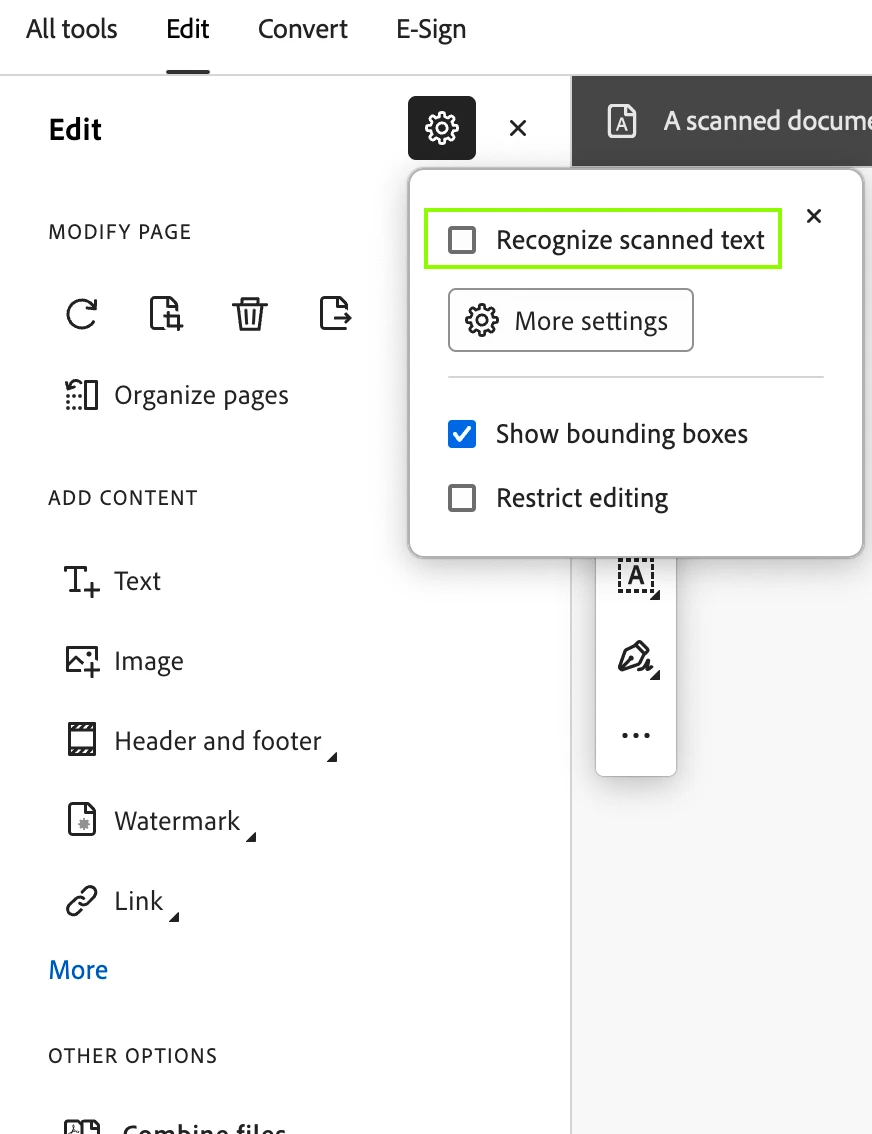
Turn off converting to editable text and images

  • August 17, 2024
  • 2 replies
  • 6188 views

Hello,


Using Adobe Acrobate Pro version 2024.002.20991.


I'm trying to turn off the converting scanned document to editable text and images that runs on every page as you scroll through a document. I'm able to turn this off for individual documents after it has already started. Is there a way to default this to not run?


Correct answer SubratoNamata

And with new UI, pls find the attached screenshot.


2 replies

SubratoNamataCorrect answer
Adobe Employee
August 18, 2024

And with new UI, pls find the attached screenshot.


Participant
April 8, 2025

this is not a solution because every time I restart my computer, AA acts like I never set that option and will proceed to convert to text. please show us how to disable this feature so that I don't have to reset it every single day of my life. thanks!

JR Boulay
Community Expert
Community Expert
April 9, 2025

After deactivating this option, you need to quit Acrobat properly (File menu or keyboard shortcut) to save the setting.
Don't wait for the computer to shut down, which forces the software to quit without saving the settings.

Acrobate du PDF, InDesigner et Photoshopographe
JR Boulay
Community Expert
Community Expert
August 18, 2024

Yes, see the capture.


Acrobate du PDF, InDesigner et Photoshopographe
RonaldCz
Inspiring
September 1, 2024

my scanned documents is grayed out and cannot be changed. Is it because I did not scan in a document?

Windows 10 64-bitGigabyte Z490 AORUS Ultra IntelLGA 1200 ATX MotherboardIntel I9-10900K CPU@3.70GHzRAM 16GBNVIDIA GeForce RTX 2070 Super& NVIDIA GeForce GTX 1650
Bernd Alheit
Community Expert
Community Expert
September 1, 2024

Your document doesn't look like a scanned document.