johnnyZ
Inspiring
January 8, 2023
Answered

Two character State field validation

  • January 8, 2023
  • 1 reply
  • 8333 views

I have Adobe Acrobat 9 Standard. I created a fill-in form with a field called "State". It is a 2 character field allowing for the US State abbreviation. I would like a way make sure the user enters a valid US State abbreviation.  Under Field PROPERTIES - FORMAT - CUSTOM KEYSTROKE SCRIPT, I already have this code to force Upper case letters.    event.change = event.change.toUpperCase();


Here is a list of all of the US State abbreviations including the District of Columbia.

 AL, AK, AZ, AR, CA, CO, CT, DE, DC, FL, GA, HI, ID, IL, IN, IA, KS, KY, LA, ME, MD, MA, MI, MN, MS, MO, MT, NE, NV, NH, NJ, NM, NY, NC, ND, OH, OK, OR, PA, RI, SC, SD, TN, TX, UT, VT, VA, WA, WV, WI, WY


I am a total novice with this, so please also explain where I put the final script.

Thank you in advance for your help.

John.

This topic has been closed for replies.
Correct answer johnnyZ

You can use this as 'validate' script of same field:

var state = ["AL", "AK", "AZ", "AR", "CA", "CO", "CT", "DE", "DC", "FL", "GA", "HI", "ID", "IL", "IN", "IA", "KS", "KY", "LA", "ME", "MD", "MA", "MI", "MN", "MS", "MO", "MT", "NE", "NV", "NH", "NJ", "NM", "NY", "NC", "ND", "OH", "OK", "OR", "PA", "RI", "SC", "SD", "TN", "TX", "UT", "VT", "VA", "WA", "WV", "WI", "WY"];
if(event.value){
var check = state.indexOf(event.value) > -1;
if(!check){
app.alert("Please enter correct US State abbreviation.");
event.rc = false;}}

Dear Nesa Nurani

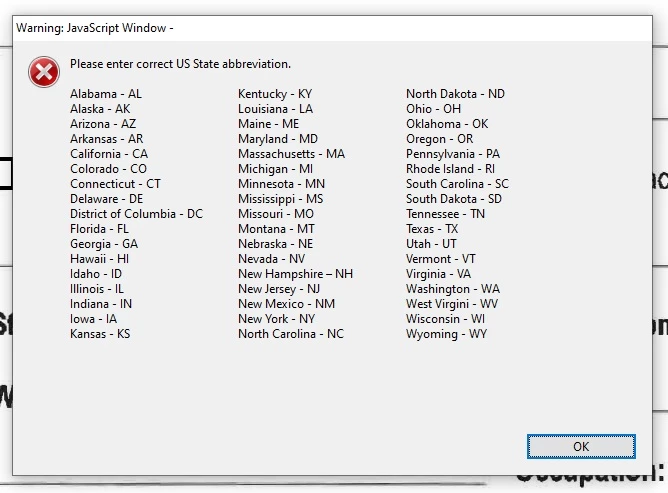
Thank you soooo much for your help.  With your suggestion, and a little modifying on my part, I came up with this, which I LOVE !!!  Please try it out and feel free to share it with others.

I copied and pasted it into MS Word and added TAB marks to separate the columns.  The TAB marks aren't showing in this copy, so I replaced all of the TAB marks with "@".

Thanks again,  John.


var state = ["AL", "AK", "AZ", "AR", "CA", "CO", "CT", "DE", "DC", "FL", "GA", "HI", "ID", "IL", "IN", "IA", "KS", "KY", "LA", "ME", "MD", "MA", "MI", "MN", "MS", "MO", "MT", "NE", "NV", "NH", "NJ", "NM", "NY", "NC", "ND", "OH", "OK", "OR", "PA", "RI", "SC", "SD", "TN", "TX", "UT", "VT", "VA", "WA", "WV", "WI", "WY"];
if(event.value){
var check = state.indexOf(event.value) > -1;
if(!check){
app.alert("Please enter correct US State abbreviation. \n \n

Alabama - AL@@Kentucky - KY@@North Dakota - ND\nAlaska - AK@@Louisiana - LA@@Ohio - OH\nArizona - AZ@@Maine - ME@@Oklahoma - OK\nArkansas - AR@@Maryland - MD@@Oregon - OR\nCalifornia - CA@@Massachusetts - MA@@Pennsylvania - PA\nColorado - CO@@Michigan - MI@@Rhode Island - RI\nConnecticut - CT@@Minnesota - MN@@South Carolina - SC\nDelaware - DE@@Mississippi - MS@@South Dakota - SD\nDistrict of Columbia - DC@Missouri - MO@@Tennessee - TN\nFlorida - FL@@Montana - MT@@Texas - TX\nGeorgia - GA@@Nebraska - NE@@Utah - UT\nHawaii - HI@@Nevada - NV@@Vermont - VT\nIdaho - ID@@@New Hampshire – NH@Virginia - VA\nIllinois - IL@@@New Jersey - NJ@@Washington - WA\nIndiana - IN@@New Mexico - NM@@West Virgini - WV\nIowa - IA@@@New York - NY@@Wisconsin - WI\nKansas - KS@@North Carolina - NC@@Wyoming - WY\n

");
event.rc = false;}}
1 reply

Brainiac
January 8, 2023

Just a tip: This is harder than it at first appears. You need to allow a one character entry too, if you check when it is typed. Otherwise, nobody can enter a two character code, because they can't type the first character. This also means that later it may still be one character. 

johnnyZ
johnnyZAuthor
Inspiring
January 8, 2023

Hi Test Screen Name,  Thank you for your response.

OK,  Here is a unique list of all of the first letters in the abbreviations:

A, C, D, F, G, H, I, K, L, M, N, O, P, R, S, T, U, V, W,

And in case you need it,

Here is a unique list of all of the second letters in the abbreviations:

A, C, D, E, H, I, J, K, L, M, N, O, R, S, T, V, X, Y, Z,

But, it's the combination of BOTH letters for which I'd like it to check.

Basically, I'm trying to prevent someone from entering "ZZ", (for example) as a US State abbreviation.

Nesa Nurani
Community Expert
January 8, 2023

You can use this as 'validate' script of same field:

var state = ["AL", "AK", "AZ", "AR", "CA", "CO", "CT", "DE", "DC", "FL", "GA", "HI", "ID", "IL", "IN", "IA", "KS", "KY", "LA", "ME", "MD", "MA", "MI", "MN", "MS", "MO", "MT", "NE", "NV", "NH", "NJ", "NM", "NY", "NC", "ND", "OH", "OK", "OR", "PA", "RI", "SC", "SD", "TN", "TX", "UT", "VT", "VA", "WA", "WV", "WI", "WY"];
if(event.value){
var check = state.indexOf(event.value) > -1;
if(!check){
app.alert("Please enter correct US State abbreviation.");
event.rc = false;}}