

New Participant
October 13, 2023
Question

Unable to change font while filling the form

  • October 13, 2023
  • 1 reply
  • 858 views

Hi Community ,

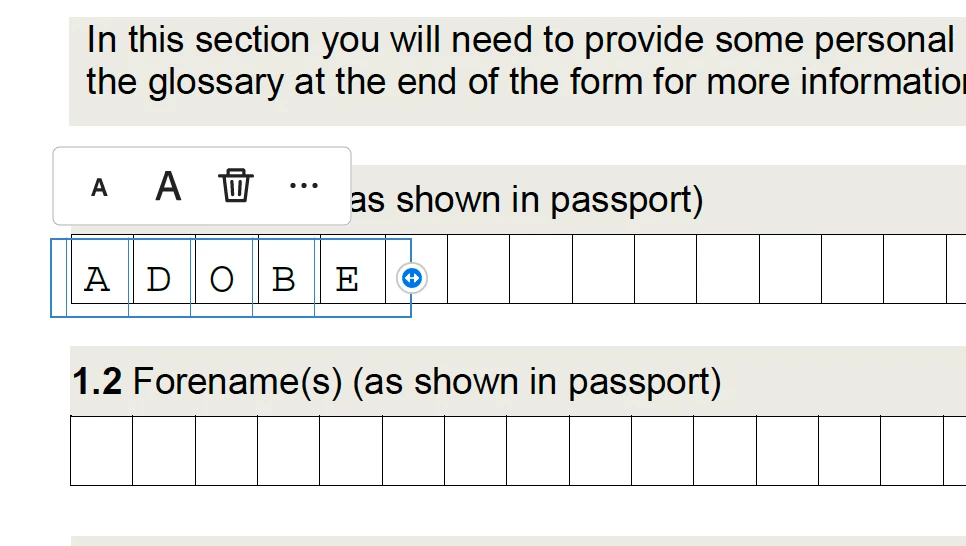
How do I change a font while filling this form using Adobe Acrobat Pro.

Sample name filled ADOBE but I want to fill this using ARIAL font.
This topic has been closed for replies.

1 reply

Thom Parker
Community Expert
October 13, 2023

Why do you want the font to change? And explain the exact sequence of actions that causes the change. 


Thom Parker - Software Developer at PDFScriptingUse the Acrobat JavaScript Reference early and often
Abdh27Author
New Participant
October 14, 2023

Hi Thom,


This is simple PDF Form given by School I was filling. 

1. Free Adobe reader allows to edit it by clicking on the boxes as shown in image. Looks like default font it's taking Times New Roman or Typewrite not fully sure.

2. I Purchased Acrobat Pro so that I can change default font an use same font as used in Form text which is Arial.


Not sure why its not allowing to change when filled as a Single letter in each box (requirement of form) 

I am able to edit it using new MAC OS SONOMA  with ARIAL font as attached in below snapshot but default editor by MAC OS is not user friendly.

Thanks.

Thom Parker
Community Expert
October 14, 2023

The way you worded the question made it sound like you wanted to change the font dynamically while the user was filling it in. What you really meant to say is that you want to change the font used to fill the field.  That's easy.

Read this:

https://www.pdfscripting.com/public/Editing-Fields-Properties.cfm


If you recently purchased an Acrobat Pro license, then it is likely you are using the new 64bit interface.  You can convert it to the old interface, which is much better. 


Thom Parker - Software Developer at PDFScriptingUse the Acrobat JavaScript Reference early and often
