


Participant
October 8, 2018
Answered

Unable to Get New Comments on Shared Review with SharePoint Online

  • October 8, 2018
  • 9 replies
  • 38403 views

When checking for new comments on a PDF that I was successfully able to upload to SharePoint Online, I receive the error message, "Could not get new comments. Adobe Acrobat did not get a response from the server. Try again later or contact your system administrator." I am able to successfully ping the server (13.107.136.9). I am also unable to see new comments for all other previously uploaded PDFs that were uploaded to SharePoint Online. Other users in my company are able to access and comment on the PDFs.
This topic has been closed for replies.
Correct answer David_DRT

Hi,

A registry protected fix has been released as part of the Adobe Acrobat and Reader official update (19.010.20091).

Please follow the steps to resolve this issue-

-Update Adobe Acrobat to the latest version(19.010.20091) if not done already(Help > Check for Updates)

-Quit Acrobat/Reader

-Open task manage and kill the processes “AdobeCollabSync.exe”

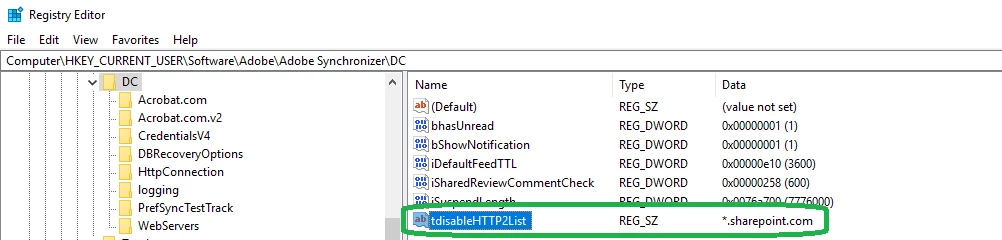
-Create the REG_SZ type key "tdisableHTTP2List" and set its value to "*.sharepoint.com" at the below path

  [HKEY_CURRENT_USER\Software\Adobe\Adobe Synchronizer\DC]

"tdisableHTTP2List"="*.sharepoint.com"

(See the snapshot in of the created registry)

Now try your workflow and see if it resolves the issue. Please let us know in case of any concerns.

Thanks for your patience and support!

Regards,

Arvind


Thank you Arvind. This fix is confirmed working with Acrobat DC. However I tried the same with Acrobat 11 and it doesn't work (HKCU:\Software\Adobe\Adobe Synchronizer\11.0).I  Is their another path to a reg fix for that? Please advise.

9 replies

Participating Frequently
May 4, 2022

I faced a similar issue. The workaround: Help > Repair Installation, fixed my issue.

I found this solution from one of the comments in this thread.

Participant
May 4, 2022

I've tried a repair, uninstall/reinstall, uninstall--restart my computer three times--reinstall, uninstall the entire Creative Suite and reinstall. Finally, I had a call with Adobe tech support in September where they captured a bunch of stuff. They recorded a bug (ADC-4344860) for this issue in January.

Participant
May 2, 2022

My team and I have been suffering through this issue for 1-2 weeks after changing SSO logins for the last two years.  It seems to have gotten worse with the latest update--I'm approaching three weeks, and I can't participate in any reviews--whether I created them or not. I've had a case logged with Adobe for about one year now. This is getting ridiculous.

Participant
January 26, 2022

I had this error in Adobe Acrobat Pro DC, version 2021.011.20039.

I can open the documents from a network drive, but it doesn't retrieve or publish comments, the Server Status icon just spins & spins.

The Tracker shows the Server Status is OK, but then shows this error on the individual review details.


Using Help > Repair Installation fixed it. Now Acrobat crashes every time I open another document, but at least I can actually collaborate in the review when one does open.

Participating Frequently
May 4, 2022

I faced a similar issue. The workaround: Help > Repair Installation, fixed my issue.

Thank you, for the help.

JamesProvost
Participating Frequently
August 19, 2021

Is there a fix for Mac users experiencing the same problem?

paulcnova
Participant
August 13, 2019

For anybody still having this problem after applying the fix or updating to the latest version: check folder permissions.

This was the problem for me. IT had to set the proper permissions for one of the folders in the path where the file was located - only then did this error go away.

Participant
July 22, 2020

@paulcnova, could you tell me specifically what you set the permissions to, and are there any other folder settings that I should check? I've tried with versioning on and off, checked permissions, and we are still having comments disappear from one day to the next when hosting on SharePoint. I can host the same file on a local server and everything works fine - no disappearing comments. I've been trying to resolve for months and cannot find any resolution so far. Thanks!

Participating Frequently
November 27, 2018

Hi,

Here is my last days experience:

I have the same issue with my SharePoint server and collaborative reviews. I've tried creating a local server, and it worked. The SharePoint issue remained.

Then, I've tried to uninstall and reinstall the Acrobat, thinking of a possible glitch in the last update. Being a subscription-based CC owner, I installed the version available, which I later discovered it is version 2019:

And here comes the twist in the story: when I pressed the Send for Review option in Tools, this is what is showing as sharing menu:

The process is run through Document Cloud, but I don't seem to have so much control over the file I send for review. In my opinion, this is just a SHARE, not the actual collaborative review. No option to change the deadline later in the process (or not one that is intuitive), not too much online help to rely on.

When opening the Tracker from under View menu to see if my previous files are still there, the list shown, with no success on reaching comments. So I guess it remembers something, but not to re-set the process as it was.

So my actual question is: will Acrobat continue to support collaborative reviews via local servers/SharePoint or web? In my opinion, these solutions offered more control, more options, and better view over the process. And how much time such a fix would take?

Regards,

Alexandra

AkanchhaS8194121
Legend
October 11, 2018

Hi All,

Sorry to hear about the inconvenience caused. From how long you are you experiencing this problem? Is it with the latest update of Acrobat?

Please share the exact version of Acrobat you are working on. Open Acrobat>Help>About Acrobat DC  Release Notes | Adobe Acrobat, Reader

Acrobat Desktop refreshes the comments automatically after few seconds (~15-30 or less) if review document is opened.

And the manual refresh- Acrobat Desktop will sync the comments on switching to Home View or document in another tab or context board (where all the reviewers are listed) and then back to review document.

You may also download Acrobat DC updates from here:  Adobe software and product updates

Let us know If none these are solving this issue. We will look into this further and escalate it to the concern team.

Regards,

Akanchha

Participant
October 17, 2018

A reviewer I work with is also experiencing this issue for about a week (give or take a few days). He is using version 2019.008.20074.

Participant
October 9, 2018

I'm having the exact same thing, I'm guessing it should be a host-name in there and not the IP address that we are seeing.

Strangely, they're able to post comments successfully, but not see any other comments.

jaggedpeak
Inspiring
October 9, 2018

I have the same issue (can't access 13.107.136.9).

Dropped that address into a browser and got ...

<h2>Our services aren't available right now</h2><p>We're working to restore all services as soon as possible. Please check back soon.</p>Ref A: EF97D03194D445D79977C4C957C0B943 Ref B: BL2EDGE0122 Ref C: 2018-10-09T17:03:41Z

So... hopefully it'll get better 'as soon as possible'