


New Participant
December 4, 2018
Answered

Unable to print fillable PDF form fields

  • December 4, 2018
  • 8 replies
  • 224971 views

I have created a pdf form with fillable fields. I have emailed it out as an attachment to other users. They fill it out and email it back to me. I can see their answers on my computer screen. When I print the form out, the fields are all blank. How do I make them print?

I did a test and sent the form to myself using Adobe Sign and that did print. I really don't want to have to send these forms out that way as sending it as an attachment is much easier. Is there a way to make the forms print showing the answers in the fillable fields?
Correct answer AkanchhaS8194121

Hi Dorothya,

We are sorry for the delay in response to your query.

As mentioned above, that the forms send back to you by the users can be viewed in Acrobat but forms field are blank while printing. So, there are couple of possibilities, and any one of them might be causing this trouble-

  • Try printing the form "As Image" using Adobe Acrobat.
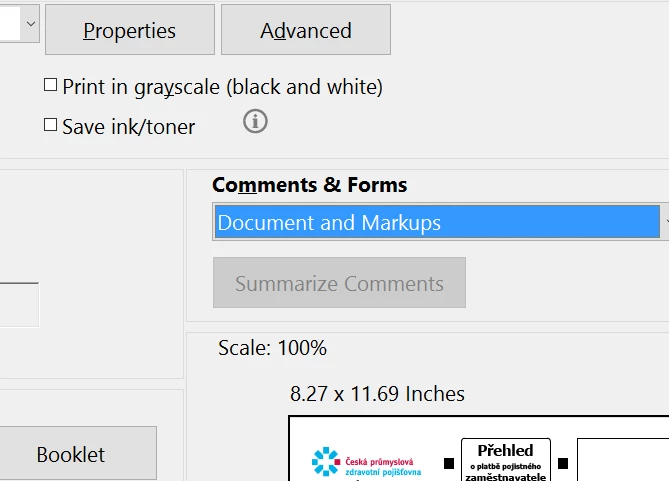
  • While printing the form, in print preview check what you have selected under "Comments & Forms" (As shown in pic)

  • As the form created by you, so you might need to check the form's properties whether its whether its properties allows to print or just view, but not print?
  • Please check with the end users whether they are filling the form in Mac Preview or Adobe Reader DC? ask them to use Adobe Reader DC for form filling.

Let us know the result.

Regards,

Akanchha

8 replies

New Participant
March 7, 2024

Unfortunately, Adobe is populated by imbeciles.  You can capture the entire image with the SnagIt product, then save it or print it. It is a lifesaver.
Google search on Snagit - it's very cheap and worth evey penny.

New Participant
July 18, 2023

I had the same problem solved it by printing to microsoft pdf instead of adobe pdf.  select print form and from the drop down of printers chose Microsoft.  Not sure why Adobe prevented it from printing the filled out portions but this was a government issued pdf so I could not change the security settings and was prevented from printing with comments as others suggested.


New Participant
March 28, 2023

Go to your print icon and there is a section that is under Comments & Forms  (bottom left of print menu and right above Page Set Up).

Choose Document and Markups

Click Print


New Participant
March 31, 2023

I went back to the same document that I had issues with and tried your fix as stated below, and it does NOT work.  The print result AND the Adobe document do not show the content which I know is there, based on what I had to do above.

"Go to your print icon and there is a section that is under Comments & Forms  (bottom left of print menu and right above Page Set Up).

Choose Document and Markups

Click Print"

New Participant
March 31, 2023

Also printing as an image as stated above as the "Correct answer" by AkanchhaS also does NOT work.  I'd gladly show anyone from Adobe that these fixes don't work.

New Participant
December 7, 2022

Click the three dots at the top right corner of the pdf (in the toolbar).  Select "PRESENT".  Your document will open.  Right click in your document, then select "PRINT". 

New Participant
March 9, 2021

We have this commonly happen when we email out a PDF forms which  is opened/edited from an Ipad then sent back.  The print as image option is grey'ed out, no matter what we try we can only see their form fields and cannot print them with those fields. In my case, our HR dept can't print them.  Shame on you Adobe for having such a bug/limiation, defeats the point of having form fields. 

Thom Parker
Community Expert
March 9, 2021

The problem isn't Adobe, the problem is Apple. You need to say Shame On Apple for not following the PDF specification. The fact is that the Safari PDF viewer, and many other PDF viewers for mobile, corrupt PDF documents. 


The only decent form filling tools on the iPad are Acrobat Mobile Reader and PDF Expert.  The solution is to set up your PDF form so that it shows the user a message that blocks the form fields if it is not opened in one of these apps, and informs the user they need to use a compliant PDF viewer.   

Thom Parker - Software Developer at PDFScriptingUse the Acrobat JavaScript Reference early and often
New Participant
August 23, 2021

Can you advise about how to set it up to show the user the message? I need to do this with my forms! Safari's Preview butchers the formatting of the Adobe documents I create, which makes for angry customers who don't read instructions. The message would be a great solution for me! Thanks!

New Participant
July 3, 2020

When you select "Print", down near the bottom is a section called "Comments & Forms".  Directly below that is a selectable field - set it "Document and Markups".  Now you should get both the form & the filled in data.


IF it is set to document, you will only get the blank form.  Had this problem myself up to a few minutes ago.


regards,


Robert2020

try67
Community Expert
July 4, 2020

This setting does not affect form fields, only comments.

Thom Parker
Community Expert
January 15, 2020

Did you check the visibility settings on the form fields? You may have accidentally set them to not print. 

Thom Parker - Software Developer at PDFScriptingUse the Acrobat JavaScript Reference early and often
New Participant
August 20, 2020

Has anyone run into the Form Field visibility resetting to "Visible, but doesn't print"? I've got two sets of interactive PDFs that I've been setting up for people to use out in the field. They're going to be mainly digital, but since they'll be out of my hands, I'm sure someone will try to print them. At least three times, I've gone through and made all of the text fields "Visible" under Properties. However, when I save and reopen the PDF, they're all reset to "Visible, but doesn't print."  Any help would be greatly appreciated! I'm on Adobe Acrobat Pro DC vers. 2020.012 (continuous release), running on a MacBook Pro (OS Catalina vers 10.15.6). 

New Participant
December 17, 2021

I'm having the same issue currently! Any guidance would be very appreciated. 

AkanchhaS8194121
AkanchhaS8194121Correct answer
Brainiac
December 11, 2018

Hi Dorothya,

We are sorry for the delay in response to your query.

As mentioned above, that the forms send back to you by the users can be viewed in Acrobat but forms field are blank while printing. So, there are couple of possibilities, and any one of them might be causing this trouble-

  • Try printing the form "As Image" using Adobe Acrobat.
  • While printing the form, in print preview check what you have selected under "Comments & Forms" (As shown in pic)

  • As the form created by you, so you might need to check the form's properties whether its whether its properties allows to print or just view, but not print?
  • Please check with the end users whether they are filling the form in Mac Preview or Adobe Reader DC? ask them to use Adobe Reader DC for form filling.

Let us know the result.

Regards,

Akanchha

New Participant
December 11, 2018

Hi,

Thank you so much for your reply!

I tried printing as an image and that worked!

I looked under File on the form and went to Properties and couldn't find

anything there that allowed or disallowed printing of the form. The form

always prints, it's just the fillable fields that don't print without

changing to Print as Image.

I can live with that fix.

Thank you again for your help! I have seen many people post about this

issue and have never seen the solutions you offered. I have tried all the

other solutions I have seen and none worked.

AkanchhaS8194121
Brainiac
January 4, 2019

Hi Dorothya,

Thanks for trying the troubleshooting steps suggested. Good to hear it has worked for you while selecting "Print As Image". Print As Image is suggested, because a PDF file can contain damaged content such as images or fonts that Acrobat cannot process during printing. This might be a case with a specific form and its fields.

Here is a detailed description why we suggest to use it- Print PDF as image | Adobe Acrobat, Reader

We also recommend you to install the latest patch of Adobe Acrobat and update it to the latest version- DC Release Notes — Release Notes for Acrobat DC Products

You can share a sample pdf form with us, we would like to test the same at our end. "You can share the file with us via email. And you can send it to the email that is shared via private message. Please do mention your forum thread in the subject"

Regards,

Akanchha