


New Participant
June 3, 2024
Answered

Unable to save Adobe Printer preference settings

  • June 3, 2024
  • 1 reply
  • 1189 views

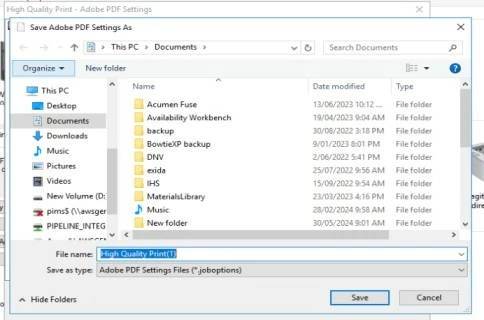
When I saved Adobe Printer preference settings, the settings were not reflected in the above printer drop-down list. It is showing the default settings.


I'd like to have that new  setting as my default, but keep the old one.


As checked, the settings are getting saved in the 'Documents' folder instead of the 'C:\Users\name\AppData\Roaming\Adobe\Adobe PDF\Settings' folder. 


Please help.

Thanks!
 

This topic has been closed for replies.
Correct answer Amal.

Hi there


Acrobat XI is an EOL application and not supported on the latest version of Mac and Windows OS. For more info. please check the help page https://helpx.adobe.com/acrobat/kb/end-of-support-acrobat-xi-reader-xi.html


~Amal

1 reply

Amal.
Community Manager
Community Manager
June 17, 2024

Hi there 
 
Hope you are doing well and sorry to hear that
 
What is the version of the OS and the Acrobat DC you are using? To check the version go to Help > About Acrobat and make sure you have the recent version 24.02.20857 installed. Go to Help > Check for updates and reboot the computer once and see if that works.


Let us know how it goes.


~Amal

New Participant
June 21, 2024

Hi Amal, 


Thanks for your response. Currently, we are using Adobe Acrobat XI Standard version 11.0.1. The application is installed on the windows server.


Regards,

Shekhar

Amal.
Community Manager
Amal.Community ManagerCorrect answer
Community Manager
June 21, 2024

Hi there


Acrobat XI is an EOL application and not supported on the latest version of Mac and Windows OS. For more info. please check the help page https://helpx.adobe.com/acrobat/kb/end-of-support-acrobat-xi-reader-xi.html


~Amal