


Participating Frequently
September 22, 2018
Question

Unable to start Acrobat – Error 0xc0000005

  • September 22, 2018
  • 7 replies
  • 51880 views

Whenever I would try to open the application this error message would popup.
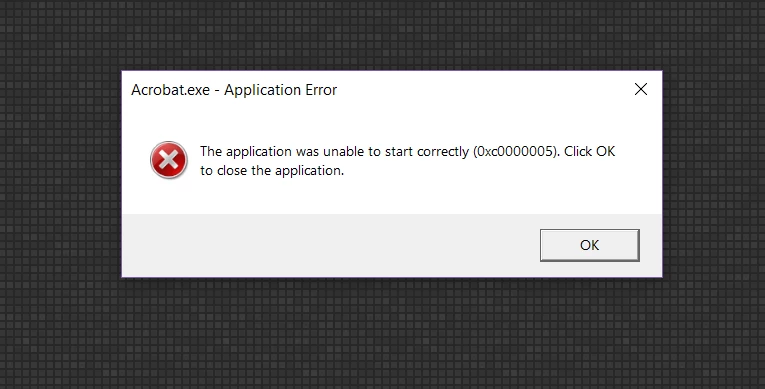
I tried uninstalling and re-installing the regular way. I've also tried uninstalling and reinstalling using Creative Cloud. I don't know what else to do. Please help!

This topic has been closed for replies.

7 replies

ls_rbls
Braniac
September 14, 2020

It would be helpful if you go to www.sysinternals.com and download and install Process Explorer.


This is a more complete graphical utility than MS Windows Task Manager; it will capture any event that happens in real-time and allow you to trace it by DLLs, process tree, etc.


Just right-click on the event or process of interest and select from the context menu " Create mini-dump".


Then you can share that mini-dump here.


The way we are jumping into solutions for Error 0xc0000005 without even analyzing all the bits and pieces that are interacting with your Acrobat is not the correct way of troubleshooting a MS Windows system.


Every system is different. As such this error pop for different things that are not necessarily and exclusively related to Acrobat (to include viruses, deffective disk drives, outdated or corrup system drivers, for example).


In my opinion we should take one small step back to square one and let's begin with the basics: share a mini-dump.


New Participant
September 13, 2020
New Participant
September 17, 2019

i have the same problem, what should i do??

New Participant
September 13, 2020
Braniac
October 7, 2018

That's double clicking a PDF. What about if you just open the application, without trying to open a PDF? Same? Or is it OK, until you use OPEN?

Braniac
October 6, 2018

No, that's the folder. It's hidden like most critical folders so people don't move stuff by accident.

Try this (Windows 10). Hit Windows key + R to get the Run box.

Type %APPDATA%\Adobe like this

You should now see the folder Acrobat.

Participating Frequently
October 7, 2018

Thanks for that. Unfortunately, it's still no bueno.

Here's what I did:

  1. I went to the Adobe folder using the run box and deleted the Acrobat folder.
  2. I emptied my recycle bin.
  3. I rebooted.
  4. I downloaded and ran the Acrobat cleaning tool.
  5. I rebooted again.
  6. I downloaded and ran the Acrobat DC subscription exe program.
  7. I double-clicked on a pdf file on my desktop.

The spinning wheel would appear then after 2 seconds it would disappear.

*Sigh*.

I'm getting really impatient. I don't know what's wrong.

Braniac
October 1, 2018

For what it's worth, this error code 0x00000005 means "permission denied".

Participating Frequently
October 2, 2018

Thanks. When you said this, I logged into admin, uninstalled, rebooted, and reinstalled Acrobat. No luck again. I'm getting frustrated.

Adorobat
Community Manager
Community Manager
September 24, 2018

Hi Auroraa,

As per the issue description mentioned above, you are receiving an error when trying to launch Acrobat, is that correct?

Please try following troubleshooting steps:

1- Check if an update is available for Acrobat using "Check for updates" option under "Help" menu, reboot the machine after installing update and try again.

2- Launch Acrobat as an administrator- Run an Adobe program as administrator | Windows 7, Vista

2- Try running Acrobat in compatibility mode by locating Acrobat icon on the desktop > right click > properties > compatibility tab > check the box run this program in compatibility mode for and select Windows 7 from the drop-down options. (if using windows 10) click Apply OK and check.

Also, let us know dot version of Acrobat and the operating system installed on the machine? You may refer to the steps given in this link on how to check the version in Acrobat: Identify the product and its version for Acrobat and Reader DC

Let us know if you need any help.

Shivam

Participating Frequently
September 30, 2018

How do I go to the help menu if I can't even open the application?