


erikw24796637
Participant
February 18, 2019
Question

Unable to turn off or disable automatic OCR for scanned documents

  • February 18, 2019
  • 1 reply
  • 5356 views

Hello,

We are having an issue with trying to turn on automatic OCR in Adobe Acrobat Standard DC. We are on version 2015.006.30475. According to this link: Edit scanned PDFs, turn off automatic OCR, Adobe Acrobat we should be able to turn on Automatic OCR. However, I am not seeing this option on the right pane. The only thing I can figure is because we are on an older version.

We want it be automatic because any time we open a PDF that is scanned or came from another program, we get the following message: 
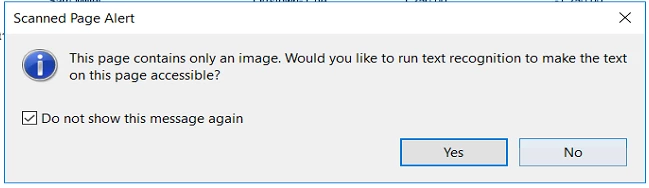
Any help is appreciated.

This topic has been closed for replies.

1 reply

AkanchhaS8194121
Legend
February 20, 2019

Hi Erikw, 

Thanks for sharing the detailed information.

As suggested in the help document Edit scanned PDFs, turn off automatic OCR, Adobe Acrobat "Recognize Text" option appears when pdf is opened in the Edit mode.

Are you getting the dialog box for scanned page alert for every scanned page or a specific one? And when exactly you are getting it, is it while using any tool?

You may try resetting Acrobat's preferences following the instructions given here: How to reset Acrobat Preference settings to default.

Let us know how it goes.

Regards,

Akanchha

erikw24796637
Participant
February 20, 2019

Hello,

Even when editing the PDF in edit mode, there is no options for editing scanned documents. We are getting that alert from multiple PDF's that have been scanned or came from another program. We get the message when we go to make an edit to the PDF, such as using the highlighter function.

Thanks!

AkanchhaS8194121
Legend
March 11, 2019

Sorry for the delay in response to your previous message.

Even when editing the PDF in edit mode, there is no options for editing scanned documents.

There wouldn't be any additional option to edit scanned documents. While editing the scanned document, do you see "Recognize Text" at the menu available right side?

Additional: install the latest patch released in Feb 2019 from here: DC Release Notes — Release Notes for Acrobat DC Products

Can you please share any one of your scanner PDF with us to test it at our end?

"You can share the file with us via email. And you can send it to the email address that is shared via private message. Please do mention your forum thread in the subject"

Thanks,

Akanchha