


mahmood4949
Participant
April 29, 2018
Answered

Unable to type numbers in English

  • April 29, 2018
  • 2 replies
  • 89004 views

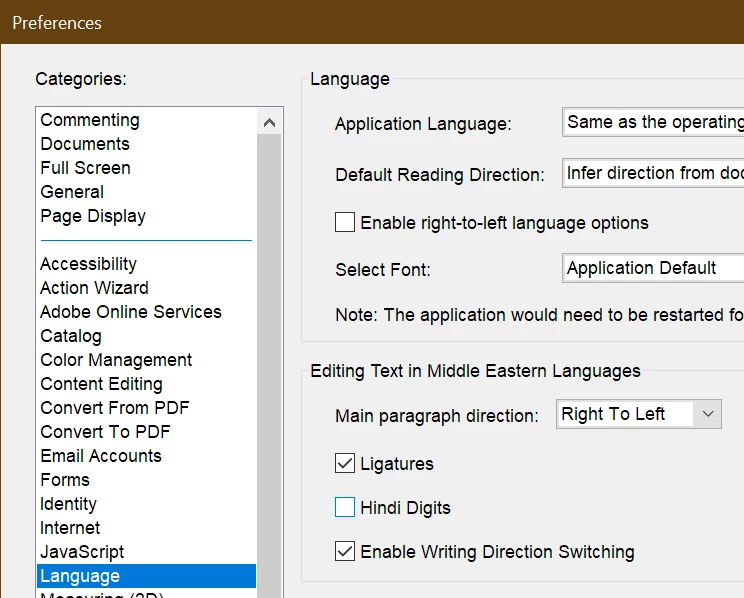
I have Adobe Acrobat DC professional version, i am facing a challenge with numbers while i am editing a PDF. Whenever I entered a number it types into Arabic font / version, strange part is on that computer all my setting is in English keyboard (US International). How can i fix this issue.

Please advise.

Ali
Correct answer ben.odell

Hi, just solved this myself. Go to Menu in top left > preferences > language, and untick hindi digits

Hope that helps.


Ben


2 replies

Participant
October 11, 2020

Thanks, It's perfect

Zaid Al Hilali
Community Expert
Community Expert
April 30, 2018

Salam Ali, Check the solution in this post which should solve your numerals issue.

Participant
July 10, 2024

Salam Ali,

I know this post is old I am having the same issue as the others described but unabel to view your post can you repost it or reply with the steps on how to fix the issue?  Thank you


Participant
March 16, 2025

Hi, just solved this myself. Go to Menu in top left > preferences > language, and untick hindi digits

Hope that helps.


Ben


Ben - thanks for your help, How counterintuitive was that?!