


Inspiring
July 24, 2019
Answered

Unable to write Numbers at the beginning of any Field

  • July 24, 2019
  • 2 replies
  • 9408 views

I have Adobe Acrobat DC Pro Version: 18.9.20044.

I'm trying to edit an existing PDF file, but I'm not able to write numbers at the beginning of any field.

Adobe Acrobat Reader flips it to the end of the sentence.

Ex:

If I'm writing an address like this:

9999 Test Street, CA. it put the numbers to the end of the text as below:

Test Street, CA 9999.

Any ideas on how to fix this?
Correct answer Deghidy

No problem with version 19.012.20035 of Adobe Acrobat DC.


It seems to be a bug.

I performed a workaround and it fixed the issue.

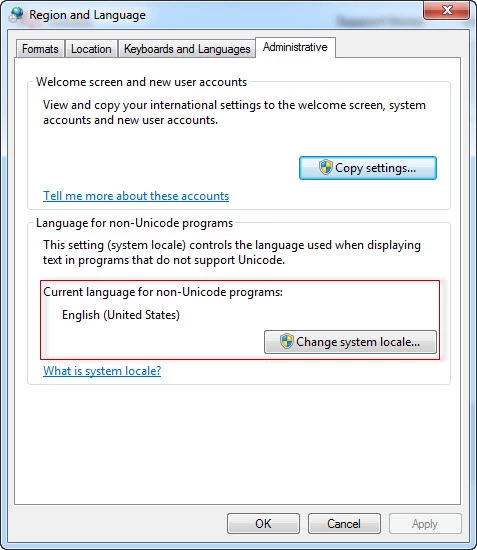
Simply, change the "Current language for non-Unicode programs" back to English, it would fix the writing direction issue that causes the problem.

Most probably if you have any right to left language defined, you would face the same issue.


2 replies

Bernd Alheit
Community Expert
Community Expert
July 24, 2019

Adobe Acrobat or Acrobat Reader?

DeghidyAuthor
Inspiring
July 24, 2019

Adobe Acrobat Pro DC  2018.

DeghidyAuthor
Inspiring
July 25, 2019

I realized a strange behavior that might help.

The text Writing/Editing direction is always from right to left regardless of the settings under Preferences >> Language.

Please refer to the below language settings:

try67
Community Expert
Community Expert
July 24, 2019

That's strange... Maybe the field is defined as Right-to-Left field? Or maybe there's a script that does that?

Could you share this file with us (via Dropbox, Google Drive, Adobe DC, etc.)?

DeghidyAuthor
Inspiring
July 24, 2019

Please find a sample test file at this link:

https://www.dropbox.com/s/1g8l3idt9tb3nrj/Test%20File.pdf?dl=0

try67
Community Expert
Community Expert
July 24, 2019

There are no fields in in this file. Are you maybe trying to edit the static text directly?