


Participating Frequently
October 24, 2020
Answered

underlining in fillable form text field

  • October 24, 2020
  • 1 reply
  • 13026 views

Good Afternoon, 


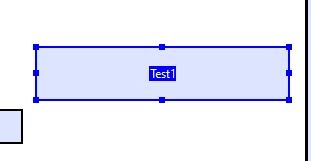
I am new to Adobe, and have acrobat pro dc right now. I have text field that is in my filliable form, and i want the text to be underlined when someone types in it. Right now, i have been placing lines physcially under the text field box, but i would love to know a way to have the text just automatically be underlined. The only solution i have found was from 2010 in this forum and its suggestions are no longer a part of DC that i can see. Can someone help me out. I attached a picture below of what i mean.Here is my test text field box and when someone clickes in there to type i want it to be underlined. I hope i have explained this well enough so you understand what i mean. Thank you in advance. 
Correct answer try67

Set the field as having Rich Text Formatting (under Properties - Options) and then apply the following code as its custom Keystroke script (under Format - Custom):


if (event.richValue) {
var spans = event.richValue;
for (var i in spans) spans[i].underline = true;
event.richValue = spans;
}


It's possible that in some cases the underline will only be added once you exit the field, though.

1 reply

try67
try67Correct answer
Community Expert
October 24, 2020

Set the field as having Rich Text Formatting (under Properties - Options) and then apply the following code as its custom Keystroke script (under Format - Custom):


if (event.richValue) {
var spans = event.richValue;
for (var i in spans) spans[i].underline = true;
event.richValue = spans;
}


It's possible that in some cases the underline will only be added once you exit the field, though.

Inspiring
November 3, 2021

Please how do i get it to underline my text in multi-line text

Thanks.

try67
Community Expert
June 9, 2025

It shouldn't matter if the field as set as Multi-line. As long as it has RTF enabled, my code should work.