


Inspiring
October 13, 2022
Answered

Update Failed - Error 2251

  • October 13, 2022
  • 8 replies
  • 9235 views

Anyone else having trouble installing the latest updates for Adobe Acrobat?

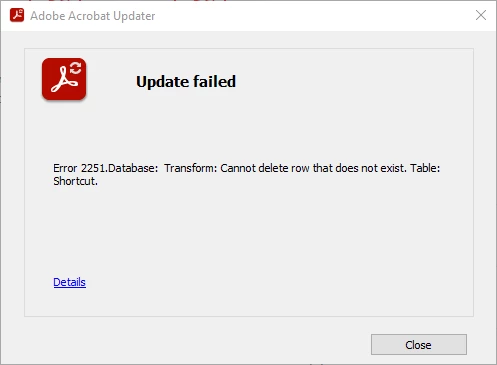
We're seeing this error in our office:

Error 2251.Database:  Transform:  Cannot delete row that does not exist.  Table: Shortcut.

I clicked on Details, and it takes you to a support site, but no info on this particular error code.   
 

This topic has been closed for replies.
Correct answer S_S

Hi @Christine_W @Craig Pedigo @Fred Ceballos @ChristineW19


As @KChZellemann mentioned, an optional patch with the fix is released. You may download the patch directly from the link: 22.003.20263 Optional update, Oct 22, 2022 (Windows Only) — Acrobat-Acrobat Reader Release Notes (adobe.com)


Let me know if this works for everyone.


-Souvik.

8 replies

Meenakshi Negi
Community Manager
Community Manager
November 17, 2022

Hi All,


Thank you for being patient.


We have released an optional update that addresses this issue.

Please update the application and check if you still experience the same behavior. In the application, go to Help > Check for updates.


You may refer to the following page for more information on the latest updates: https://helpx.adobe.com/acrobat/release-note/release-notes-acrobat-reader.html


Let us know how it goes.


Thanks,

Meenakshi

Fred Ceballos
Participant
November 17, 2022

It works now. Thank you.

Participant
October 22, 2022
S_S
Community Manager
S_SCommunity ManagerCorrect answer
Community Manager
October 24, 2022

Hi @Christine_W @Craig Pedigo @Fred Ceballos @ChristineW19


As @KChZellemann mentioned, an optional patch with the fix is released. You may download the patch directly from the link: 22.003.20263 Optional update, Oct 22, 2022 (Windows Only) — Acrobat-Acrobat Reader Release Notes (adobe.com)


Let me know if this works for everyone.


-Souvik.

Participant
October 27, 2022

We still have the issue on its installation: error 2251.database transform cannot delete row that does not exist. Table: Registry.

Participant
October 17, 2022

Same issue here on all my computers in the company.  We also delete the shortcut on the desktop. 

Participant
October 18, 2022

I opened a ticket with Adobe yesterday and we tested an update that seems to work. I was told an update will be released soon that corrects this issue.

Participant
October 20, 2022

Can you provide us the fix that were given to you?

Participating Frequently
October 17, 2022

We have the same issue. We customized the package and removed the desktop shortcut, which seems to cause the error. On a new install with the defaults and the desktop shortcut the patch installs without any issues. 

Participant
October 17, 2022

As of 10/17/2022 having same issue with both Acrobat DC (Continuous) and Adobe Acrobat Reader DC. I downloaded the patches again today just to be sure I have the latest update.

Participant
October 16, 2022

Have the same issue in our environment, the older transforms which were created seems to be working fine (however, when you install using those, the PDF preview stops working all together). When i created a new transform file, found this issue when applying the oct 2022 update.

Participant
October 14, 2022

Hello @S. S,

i have the same problem and it still persists.


S_S
Community Manager
Community Manager
October 14, 2022

Hi @ChristineW19 @KChZellemann,


Thank you for sharing the information. Will pass it on to the team for further investigation.


-Souvik.

Jagadeesh B
Participant
October 18, 2022

@S. S Same issue in our organization, All our users are facing update failed issue "Error 2251.Database: Tansform: Cannot delete row that does not exist. Table: Shortcut."
We have customized package and removed desktop shortcuts during Adobe Acrobat installation
Do we have a fix to implement and resolve this issue?

S_S
Community Manager
Community Manager
October 13, 2022

Hi @Christine_W,


Hope you are doing well. Sorry for the trouble. 


We have identified the issue at our end and have logged a bug.


While we understand how frustrating this might be, our team is working on the fix and will be implemented at the earliest possible.


-Souvik.

Inspiring
October 13, 2022

Thank you!  Glad to know it's not an issue on our end.  🙂

S_S
Community Manager
Community Manager
October 14, 2022

Hi @Christine_W


We have implemented a fix from our backend. Can you check if the issue still persists for you or it works now?


-Souvik.