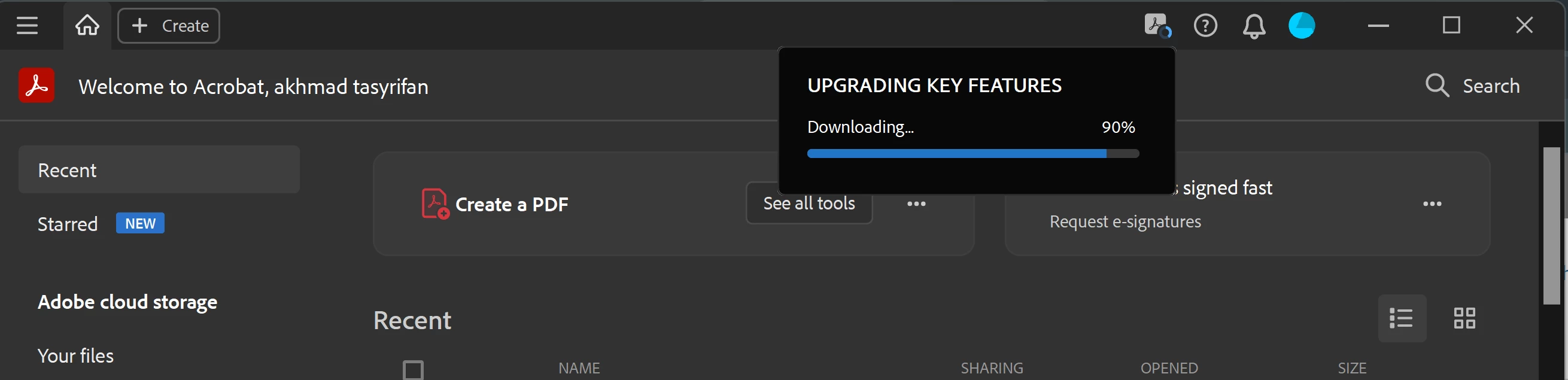
Correct answer lupesmiles

Mine seems to have been fixed when I went to Help > Repair installation. To date, this has been the ONLY thing that has worked outside of having to put my PC in airplane mode. 

12 replies

New Participant
September 19, 2024

For me the same issue, installer for key features stocked at 90%. 

What i see is this already an issue more than a year. why is this still not fixed by adobe?  

Participating Frequently
September 19, 2024

Just close a couple of Adobe PDFs. Don't have so many open, it goes away.

New Participant
September 20, 2024

Even if i open only adobe without pdf. it is still there 

New Participant
May 7, 2024

I seem to be having the same problem.   How did you sort it out?

New Participant
February 29, 2024

Having the same issue, it's really annoying. I am using a company managed version of Adobe Acrobat Pro. I am NOT going to share the logs of the fiddler cause they may contain info on other computer software I am using that are sensitive. Please address this issue. I cannot delete and re-install the software without company approval. I wonder if the upgrade gets stuck when I am not on the company wifi system and I am working from home without VPN.

New Participant
April 2, 2024

I think that it is absolutely ludicrous that Adobe software requires additional actions that require more than just clicking "upgrade". To be frank, I don't rate Adobe very highly as they can't organise their own software to update from one version to another without relying on the user to have to complete extra work on their behalf because they are unable to create an installer. I haven't had this sort of problem with any other paid-for software!


Adobe, YOU NEED TO GET THIS SORTED!

Amal.
Community Manager
Community Manager
April 3, 2024

Hi there


Have you tried the solutions mentioned above as correct? Please try them and see if that helps.


Also, make sure you have the recent version 24.01.206XX installed. Go to Help > Check for updates and reboot the computer once.


~Amal

Participating Frequently
October 17, 2023

When is this going to be fixed? 
Adobe has seriously let down it's paying customer base. The access to someone inside Adobe who can fix this is non-existent. 

Fix this issue or I remove my paid subscription for your dysfunctional product. It is unuseable. 

New Participant
October 17, 2023

I was not able to get any assistance on this matter after calling and chatting adobe support for weeks on end. 

I cancelled by subscription and used this community forum to justify getting a refund for the months where the primary product in my sub is unusable, and I switched to Xara for the time being. I know it's not a solution to adobe being crappy but I did help me in the meantime. 

New Participant
October 31, 2023

I too am sick of the feature rich TIME WASTING BS that Adobe believes should be of importance to me.  Upgrade ONLY when I say.  Not interested in reading through lots of how to live in Adobe BS.  FIX THE BUG so I can use the application I PAY FOR.  i.e. I am the customer OR become a yahoo or the like.  CUSTOMERS before Execs, Shareholders OR look forward to a law suit that has users going for companies....

New Participant
October 3, 2023

I am experiencing the same problem. Why isn't this getting fixed adobe? 

Amal.
Community Manager
Community Manager
October 3, 2023

Hi @microENVISION @Mario324453216uu8 


Would you mind collecting and sharing the fiddler logs so we can isolate the issue for the fix, Below are the steps to capture fiddler logs :
• Download fiddler from: https://www.telerik.com/download/fiddler
• Run fiddler and go to ‘Tools-> Options’
• In the HTTPS tab, ensure the checkboxes are checked: ‘Capture HTTPS connects’ and ‘Decrypt HTTPS traffic.
• Now let fiddler run and launch Acrobat and perform the same operation.
• Once complete do a save of data by ‘File->Save->All sessions’.
• Please share this data


Regards

Amal

New Participant
October 3, 2023

I am not comfortable downloading a random program to provide you the feedback you are requesting. Is there another way to help you to troubleshoot this issue?

New Participant
September 28, 2023

Hello Adobe Support,

Adobe just stopped answering for this unresolved issue? This is very troublesome! All the fixes and nothing works... What is being done on the Adobe side?

Participating Frequently
September 28, 2023

I noticed it only happens when I have several tabs open on Adobe. When I reduce it to 2 or 3 it goes away. Burdensome but it works. 

New Participant
September 28, 2023

OMG! You are right! I closed a couple and now it went away! That is helpful! THANK YOU


New Participant
September 19, 2023

Same issue since last January. Nothing works to fix it. Really disruptive to productivity. Crazy that after so long there is no resolution as so many users are experiencing the same issue. Has anyone had any luck getting rid of it with any other methods? If unresolved soon I will be cancelling my subscription to find a more efficient product.

New Participant
September 19, 2023

Having the same issue, read through all the comments and solutions provided either do not work or are not feasible (I cannot download their debugging client on a company managed device). I will be reaching out to Adobe to cancel. 


New Participant
November 27, 2023

This is all you need to do to get those pesky "upgrading key features" notifications to stop! https://www.wintips.org/how-to-disable-automatic-update-in-adobe-reader-dc/

Nothing else worked for me but this!

New Participant
August 23, 2023

This issue is driving me crazy

Amal.
Community Manager
Community Manager
August 23, 2023

Hi there


We are sorry to hear that. Try to switch the internet connection to a different and stable one and see if that helps. Also share the fiddler logs as asked in my previous reply so that we can isolate the issue for the fix.


~Amal

Participating Frequently
September 5, 2023

I am also suffering the same issue, which has frankly rendered this paid product useless. Please escalate to someone who can suggest a proper solution.

July 18, 2023

This issue needs to be resolved by Adobe ASAP. I can't use the Ctrl+F function and other functions because the "upgrading key features" notification keeps popping up. Super annoying! I didn't have this issue when I first downloaded Acrobat so it must be related to a recent update. 

Amal.
Community Manager
Community Manager
July 24, 2023

Hi there 


Please collect and share the fiddler logs, Below are the steps to capture fiddler logs :
• Download fiddler from: https://www.telerik.com/download/fiddler
• Run fiddler and go to ‘Tools-> Options’
• In the HTTPS tab, ensure the checkboxes are checked: ‘Capture HTTPS connects’ and ‘Decrypt HTTPS traffic.
• Now let fiddler run and launch Acrobat and perform the same operation.
• Once complete do a save of data by ‘File->Save->All sessions’.
• Please share this data


Regards

Amal

New Participant
July 11, 2023

Also expereincing similar problem, which ocnstantly interferes with the work with the Adobe Pro application.

The "generic" solutions or uninstall-reboot-reinstall doesn't work.

NOR DOES SWITCHING THE CORPORATE NETWORK CONNECTION !!!!

Kindly escalate this issue to proper personnel who can assist with a proper resolution.