


New Participant
August 2, 2021
Answered

Urgent: Where to find temporary files after computer/adobe crashed

  • August 2, 2021
  • 3 replies
  • 131275 views

Hi, 


hopefully here is someone who can help me as I am more than desperate, my Adobe Pro DC hangs up on a regular basis and the program no longer works, closes automatically or I cannot save the file. The result is that the comments, marks or other things in the document are then all gone. But I've actually set that there are backup copies. Adobe also asks whether the documents should be restored after the unexpected shutdown of the program - it would be nice if that worked, but it doesn't and only the information comes that no recovery is possible.


Actually, due to this it is no longer justifiable to use Acrobat (it's the main software I am working with!), as the damage it causes me is far too great - but after extensively working with it for years, I find it difficult to switch to an alternative. I've already tried to get technical help on this, but that was also in vain - they didn't found a reason why they also couldn't find temp. files. My only problem is that I just want to restore the last automatically saved (possibly not working, but why?!) processing status of the pdfs.

What I don't want is to save the document as a file every 30 minutes - I have tried that, but stupidly, overstoring doesn't always work and you come out with a lot of document versions.


It can't be that difficult to get the temporary files and I would be more than grateful, if someone had a solution as to where or how I could find the temporary file of the document or how to make sure, that I will find these files in the future. Alternatively I would be happy for a recommendation, where to find technical help in Germany/EU.


Many thanks in advance and desperate greetings,

Nikki 
Correct answer Bevi Chagnon - PubCom.com

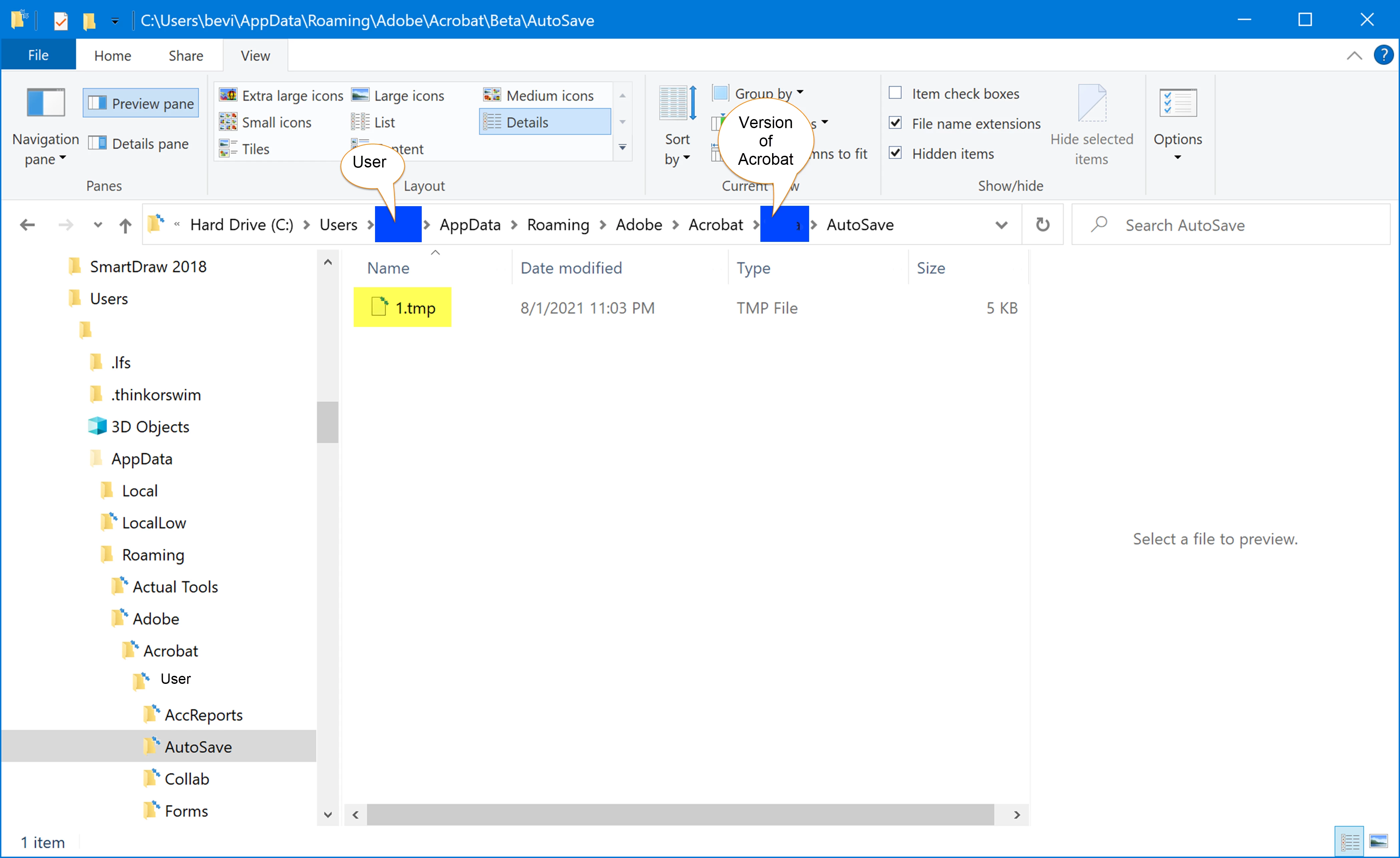
@defaulteg6y3kk0unep, To locate the temp file on Windows, look for the AutoSave folder at:

C > Users > (your user name) > AppData > Roaming > Adobe > Acrobat > (the version of Acrobat) > Autosave.

Any temporary files will be listed with the .tmp extension.


Note, however, that the AutoSave folder is erased when you close the file.


So when you do crash in the future, don't relaunch Acrobat just yet: wait, look for the .tmp file in the AutoSave folder, and copy it to a safe place on your computer. Then relanuch Acrobat and see if it recovers your work.


RE: the frequent crashes, have you recently updated your version of Acrobat DC Pro? If not, do so. Use the Update utility under Help / Check for Updates.


Also try running the Help / Repair Installation utility. It often corrects a buggy installation.


3 replies

New Participant
May 1, 2025

Hi i have similar. spent hours adding comments to a pdf, the it said not reposnsing, left for 30 minutes, then killed process. there is a 1.tmp file in the romading, dc filder but if i copy and rename to pdf, it doesnt open? so what do i do to open my 5 minute auto save backup?

New Participant
February 4, 2024

What worked for me (I've got the latest  version of Adobe DC Standard with all the just under pro bells and whistles).  If you do "Save As Other" and choose "Reduce Size PDF" it will prompt you to save an unsaved pdf before any file size reduction takes place.  So you can save and then cancel out of reducing the size.  When the reduce size dialog box comes up, the file has already been saved with the original size, so you can cancel and rest assured that your file has been saved.

Abambo
Community Expert
February 4, 2024

So what is stopping you from saving normally? Save or Svae as?

ABAMBO | Hard- and Software Engineer | Photographer
New Participant
February 4, 2024

Both.  I'll revise my original reply to include that.

Bevi Chagnon - PubCom.com
Brainiac
August 2, 2021

@defaulteg6y3kk0unep, To locate the temp file on Windows, look for the AutoSave folder at:

C > Users > (your user name) > AppData > Roaming > Adobe > Acrobat > (the version of Acrobat) > Autosave.

Any temporary files will be listed with the .tmp extension.


Note, however, that the AutoSave folder is erased when you close the file.


So when you do crash in the future, don't relaunch Acrobat just yet: wait, look for the .tmp file in the AutoSave folder, and copy it to a safe place on your computer. Then relanuch Acrobat and see if it recovers your work.


RE: the frequent crashes, have you recently updated your version of Acrobat DC Pro? If not, do so. Use the Update utility under Help / Check for Updates.


Also try running the Help / Repair Installation utility. It often corrects a buggy installation.


|    Bevi Chagnon   |  Designer, Trainer, & Technologist for Accessible Documents ||    PubCom |    Classes & Books for Accessible InDesign, PDFs & MS Office |
New Participant
July 17, 2022

Is there any way to find the Autosave folder once Adobe has automatically deleted it?

After Adobe crashed, I stupidly opened a saved older version of the document which seems to have prevented Adobe from restoring the version that I was busy with when it crashed. So now when I open the temp folder, there is no autosave folder. Please help!

Brainiac
July 17, 2022

No, there was only one chance.