


New Participant
December 5, 2024
Answered

Use Gmail with a Button in PDF to mail the pdf?

  • December 5, 2024
  • 2 replies
  • 754 views

My company used Microsoft Office prior to this year. I created a form in which my associates had to report sales activity to me via a PDF by clicking a button I made in the PDF, then it would automatically email via Outlook to me.


Now that Outlook is gone and we use Gmail, is there a way I can achieve the same thing via the PDF to open Chrome, then email the PDF to me via Gmail?
This topic has been closed for replies.
Correct answer PDF Automation Station

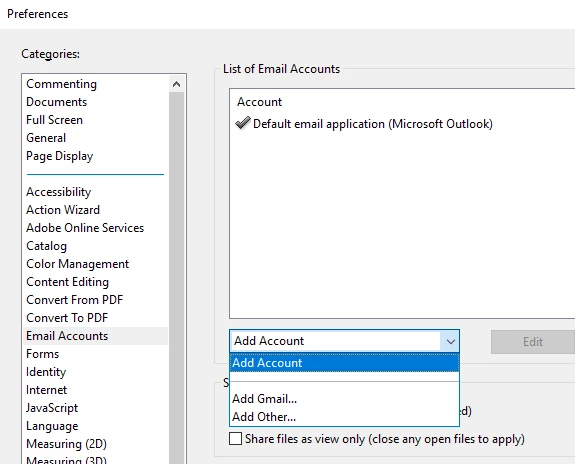
You can add the Gmail account under Edit > Preferences (Ctrl + k):


2 replies

PDF Automation Station
Community Expert
December 5, 2024

You can add the Gmail account under Edit > Preferences (Ctrl + k):


try67
Community Expert
December 5, 2024

Just be aware it won't actually send the email automatically, just generate a draft message with the file attached to it.

To send it automatically requires installing a script file on the computer, or running the code from a privileged context, such as an Action or the JS Console.

radzmar
Community Expert
December 5, 2024

The mail button in a PDF calls an API named MAPI, an interface from microsoft that opens a locally installed mail application currently assigned to the mailTo method. This works with Outlook for example, but can also be done with other apps like Thunderbird, but it won't work with web mail servers as Gmail. However, you can install Thunderbird for instance and connect it with your Gmail account.