

Participating Frequently
December 2, 2021
Answered

Using MS Paint app to edit PDF - no longer working
  • December 2, 2021
  • 2 replies
  • 3542 views

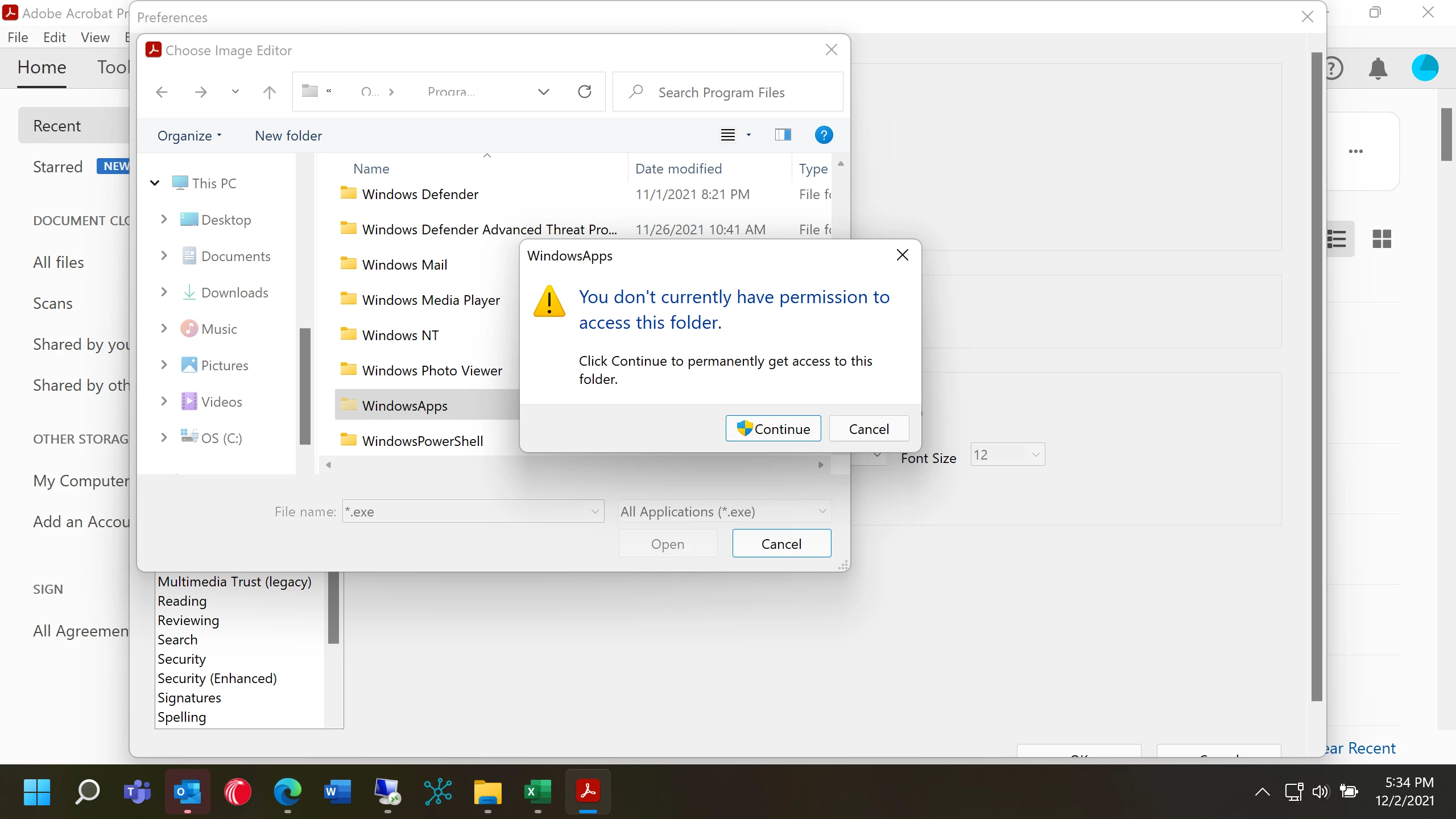
The link to MS Paint is no longer working. When I try to re-add it, I get the following error. I cannot find a way to edit objects in Adobe using MS Paint. Help.

 

Correct answer gauravs43202023

Hi All


This issue is fixed with the new release 22.2.20212, now available. Please update the application from the help menu > check for updates and reboot the computer once.

For more information about the new release please go through the help page https://www.adobe.com/devnet-docs/acrobatetk/tools/ReleaseNotesDC/index.html


Thanks,

Gaurav Sharma

2 replies

gauravs43202023
Adobe Employee
gauravs43202023Correct answer
Adobe Employee
September 11, 2022

Hi All


This issue is fixed with the new release 22.2.20212, now available. Please update the application from the help menu > check for updates and reboot the computer once.

For more information about the new release please go through the help page https://www.adobe.com/devnet-docs/acrobatetk/tools/ReleaseNotesDC/index.html


Thanks,

Gaurav Sharma

New Participant
May 18, 2025

This is not fixed. I have already fixed this several times before manually, by downloading the MS Paint version from Win 7, etc. I've even managed to get Acrobat Pro to find and use the current version of MS Paint. But today both programs give me the error "Adobe Acrobat cannot complete this operation."P

Community Manager
May 19, 2025

Hi @MamaSavage, 

Sorry for the troubled experience, and thanks for reaching out.
It seems you commented on a 3-year-old discussion. The issue listed here was related to a product bug, which isn't the case today. 

I tried reproducing the issue on my end, and it seems to be working fine.  Let's try the following troubleshooting steps:

- Please ensure your copy of Adobe Acrobat is updated. To check for any pending updates, launch Acrobat > Help > Check For Updates.

- Repair the Acrobat installation. Launch Acrobat > Help > Repair installation. Try the issue again. 
If the issue is still reproducible, try creating a new PDF with a few small images, like PNGs, then edit with MS Paint and check the issue again. 

Let us know how it works at your end.


~Tariq

Meenakshi Negi
Community Manager
Community Manager
December 3, 2021

Hi Ned,


Thank you for reaching out and sorry about the trouble. 


Please let us know if you are referring to the option to edit images under the Edit PDF tool.

If yes, please let us know what happens when you select the option. Do you receive any error messages?

Share the Acrobat and OS version installed on the machine.

Can you access the MS Paint application directly? Please check.


Let us know how it goes.


Thanks,

Meenakshi

Participating Frequently
December 3, 2021

Yes, the edit tool. When I select MS Paint, it tells me I have to select the .exe file. When I attempt, I get an error saying I do not have access to the folder to do so. This is a personal machine and I am the Administrator and only user. It is using Acrobat DC and Windows 11. 

Meenakshi Negi
Community Manager
Community Manager
February 10, 2022

Hi Ned,


Sorry for the delay in response.


Please let us know if the issue still occurs.

If yes, would you mind sharing a small video of the issue along with the Acrobat version information?


Thanks,

Meenakshi