


Participating Frequently
September 1, 2023
Answered

Using one field to calculate other fields

  • September 1, 2023
  • 1 reply
  • 3189 views

I have a form that if the user supplies the date, I want to add 5 days and populate other fields.
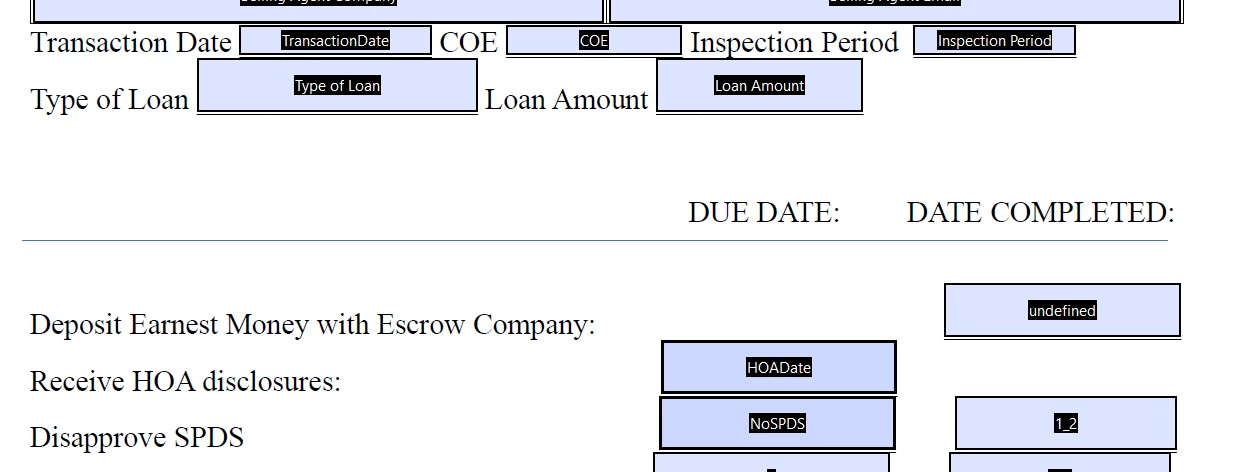
So, when the user puts an address in the Transaction date, it needs to add 5 day and autofill in the due date of HOADate and NoSPDS.  The code I have is giving me a syntax error 6 on Line 7.

This topic has been closed for replies.
Correct answer Thom Parker

So, if I just want to use the original 5 days, I can change the +5 on the NoSPDS to +0?


No, remove the second line of code altogether.  The "date" was changed once, it doesn't need to be changed again. 


Like this:


date.setDate(date.getDate() +5);
this.getField("HOADate").value = util.printd("mm/dd/yyyy",date);
this.getField("NoSPDS").value = util.printd("mm/dd/yyyy",date);


1 reply

Thom Parker
Community Expert
Community Expert
September 1, 2023

Please post the code you are using. 


Thom Parker - Software Developer at PDFScriptingUse the Acrobat JavaScript Reference early and often
Participating Frequently
September 1, 2023

var date = util.scand("mm/dd/yyyy",event.value);

if(event.value ==""){

this.getField("HOADate").value = "";

this.getField(”NoSPDS”).value = "";}


else {

date.setDate(date.getDate() +5);

this.getField("HOADate").value = util.printd("mm/dd/yyyy",date);

date.setDate(date.getDate() +5);

this.getField("NoSPDS").value = util.printd("mm/dd/yyyy",date);

}


This is the code I am using, it does not give me the error I was getting, but now does not return anything in the HOADate or the NoSPDS fields. 

Participating Frequently
September 1, 2023

So the problem is probably with the "NoSPDS" field.


Did you move the script to the Validate event? This is important for proper operation of the form. Calculation script do not belong on fields where data is manually entered.


Next, for the script that has  "NoSPDS" in the code. Is anything reported in the console window?

If not, then the next step is to remove each of the offending lines separately and see if there is a difference.

Add these lines back in

date.setDate(date.getDate() +5);

//this.getField("NoSPDS").value = util.printd("mm/dd/yyyy",date);


But notice that the second line is commented out. If the "HOADate" is filled correctly, then try changing the line that is commented:

//date.setDate(date.getDate() +5);

this.getField("NoSPDS").value = util.printd("mm/dd/yyyy",date);


This should fill both  "HOADate" and "NoSPDS" with the same date. If not, there's your error. 


I am thorougly confused. I have the calculation in the TransactionDate field. Should it be in the HOADate field and the NoSPDS fields? 

I put 

var date = util.scand("mm/dd/yyyy",event.value);

if(event.value ==""){

this.getField("HOADate").value = "";

this.getField(”NoSPDS”).value = "";}


else {

date.setDate(date.getDate() +5);

this.getField("HOADate").value = util.printd("mm/dd/yyyy",date);

date.setDate(date.getDate() +5);

this.getField("NoSPDS").value = util.printd("mm/dd/yyyy",date);

}

in the run custom validation under the Validate Tab and it still does not populate the fields. 

This is what I see when I run the console Javascript:

var date = util.scand("mm/dd/yyyy",event.value);
if(event.value ==""){
this.getField("HOADate").value = "";
this.getField(”NoSPDS”).value = "";}

else {
date.setDate(date.getDate() +5);
this.getField("HOADate").value = util.printd("mm/dd/yyyy",date);
date.setDate(date.getDate() +5);
this.getField("NoSPDS").value = util.printd("mm/dd/yyyy",date);
}

SyntaxError: illegal character
4:Field:Validate
SyntaxError: illegal character
4:Field:Calculate
SyntaxError: illegal character
4:Field:Validate
SyntaxError: illegal character
4:Field:Calculate
SyntaxError: illegal character
4:Field:Validate