


Participating Frequently
September 1, 2023
Answered

Using one field to calculate other fields

  • September 1, 2023
  • 1 reply
  • 3189 views

I have a form that if the user supplies the date, I want to add 5 days and populate other fields.
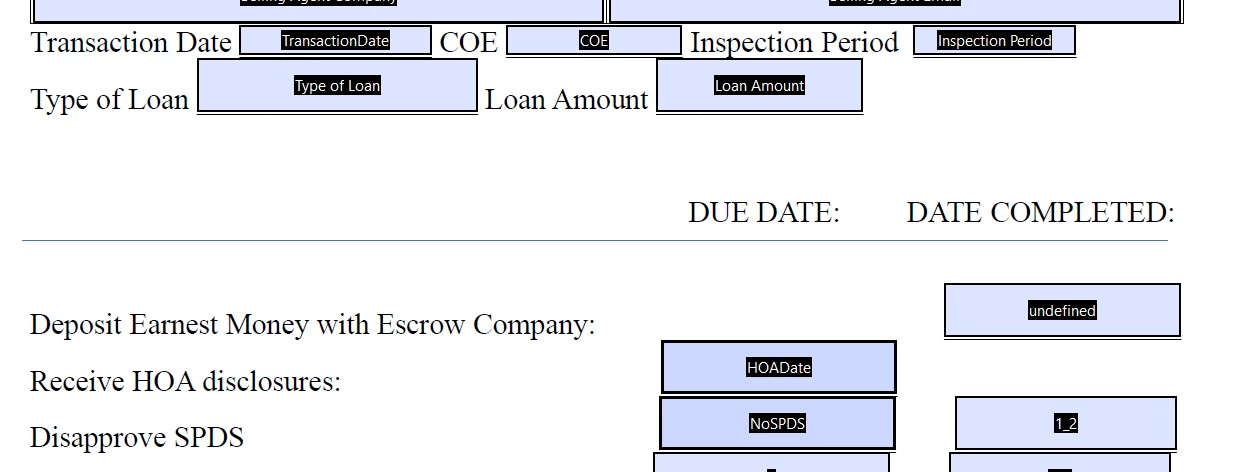
So, when the user puts an address in the Transaction date, it needs to add 5 day and autofill in the due date of HOADate and NoSPDS.  The code I have is giving me a syntax error 6 on Line 7.

This topic has been closed for replies.
Correct answer Thom Parker

So, if I just want to use the original 5 days, I can change the +5 on the NoSPDS to +0?


No, remove the second line of code altogether.  The "date" was changed once, it doesn't need to be changed again. 


Like this:


date.setDate(date.getDate() +5);
this.getField("HOADate").value = util.printd("mm/dd/yyyy",date);
this.getField("NoSPDS").value = util.printd("mm/dd/yyyy",date);


1 reply

Thom Parker
Community Expert
September 1, 2023

Please post the code you are using. 


Thom Parker - Software Developer at PDFScriptingUse the Acrobat JavaScript Reference early and often
Participating Frequently
September 1, 2023

var date = util.scand("mm/dd/yyyy",event.value);

if(event.value ==""){

this.getField("HOADate").value = "";

this.getField(”NoSPDS”).value = "";}


else {

date.setDate(date.getDate() +5);

this.getField("HOADate").value = util.printd("mm/dd/yyyy",date);

date.setDate(date.getDate() +5);

this.getField("NoSPDS").value = util.printd("mm/dd/yyyy",date);

}


This is the code I am using, it does not give me the error I was getting, but now does not return anything in the HOADate or the NoSPDS fields. 

Participating Frequently
September 1, 2023

I am thorougly confused. I have the calculation in the TransactionDate field. Should it be in the HOADate field and the NoSPDS fields? 

I put 

var date = util.scand("mm/dd/yyyy",event.value);

if(event.value ==""){

this.getField("HOADate").value = "";

this.getField(”NoSPDS”).value = "";}


else {

date.setDate(date.getDate() +5);

this.getField("HOADate").value = util.printd("mm/dd/yyyy",date);

date.setDate(date.getDate() +5);

this.getField("NoSPDS").value = util.printd("mm/dd/yyyy",date);

}

in the run custom validation under the Validate Tab and it still does not populate the fields. 

This is what I see when I run the console Javascript:

var date = util.scand("mm/dd/yyyy",event.value);
if(event.value ==""){
this.getField("HOADate").value = "";
this.getField(”NoSPDS”).value = "";}

else {
date.setDate(date.getDate() +5);
this.getField("HOADate").value = util.printd("mm/dd/yyyy",date);
date.setDate(date.getDate() +5);
this.getField("NoSPDS").value = util.printd("mm/dd/yyyy",date);
}

SyntaxError: illegal character
4:Field:Validate
SyntaxError: illegal character
4:Field:Calculate
SyntaxError: illegal character
4:Field:Validate
SyntaxError: illegal character
4:Field:Calculate
SyntaxError: illegal character
4:Field:Validate


I changed the "HOADate" to "NoSPDS" and it populated just fine.