


CheskyBevo
Participant
February 8, 2018
Answered

View Result checkbox in Adobe Acrobat PDFMaker add-in for Microsoft Outlook 2013

  • February 8, 2018
  • 1 reply
  • 3669 views

I am using the Adobe Acrobat PDFMaker add-in with Microsoft Outlook 2013.  It works just fine.  I click the "Adobe PDF" tab, then the "Convert to Adobe PDF Convert" button and the "Save Adobe PDF as File" pop-up screen appears.  I can save a PDF version of the e-mail in any folder that I specify.

However, there is a "View Result" checkbox in the lower left of the Save Adobe PDF as File" pop-up screen that is checked by default.  Is it possible to change the default so the box is unchecked?  I do not need to see the PDF rendered to the screen every time that I want to save an e-mail so I have to manually uncheck the box.  I'd like to eliminate this tedious task.

Thank you.
This topic has been closed for replies.
Correct answer AnandSri

Hello CheskyBevo,

Sorry for the delayed response and inconvenience caused. As per the description above, you want to change the default settings of the checkbox in Save PDF as file pop-up window to uncheck the box for "View Result", Is that correct?

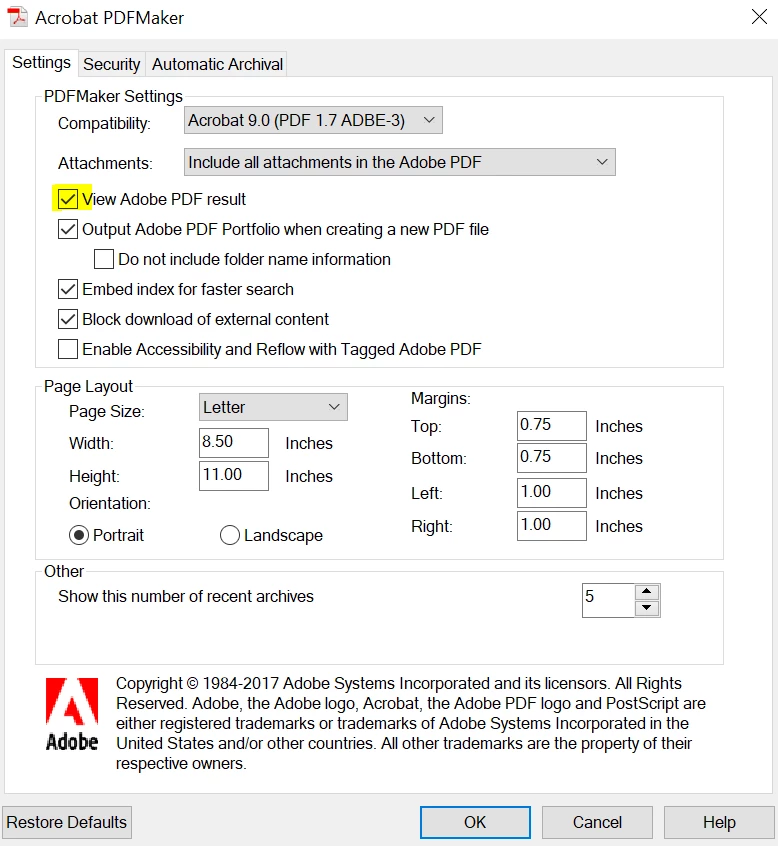
You can uncheck the option of "View Adobe PDF results" in Acrobat's Preferences by navigating to ADOBE PDF ribbon in Outlook>Change Conversion Settings>Uncheck "View Adobe PDF result">Click Ok, Close Acrobat and Outlook and check again.

If you wish to disable this option for all the users, you can use Adobe Customization Wizard and can make the changes, please refer to the following Adobe article for detailed information PDF creation: PDF printer — Acrobat Customization Wizard DC for Windows

Let us know how it goes and share your findings.

Regards,

Anand Sri.

1 reply

AnandSri
Community Manager
AnandSriCommunity ManagerCorrect answer
Community Manager
April 27, 2018

Hello CheskyBevo,

Sorry for the delayed response and inconvenience caused. As per the description above, you want to change the default settings of the checkbox in Save PDF as file pop-up window to uncheck the box for "View Result", Is that correct?

You can uncheck the option of "View Adobe PDF results" in Acrobat's Preferences by navigating to ADOBE PDF ribbon in Outlook>Change Conversion Settings>Uncheck "View Adobe PDF result">Click Ok, Close Acrobat and Outlook and check again.

If you wish to disable this option for all the users, you can use Adobe Customization Wizard and can make the changes, please refer to the following Adobe article for detailed information PDF creation: PDF printer — Acrobat Customization Wizard DC for Windows

Let us know how it goes and share your findings.

Regards,

Anand Sri.

CheskyBevo
Participant
May 3, 2018

Thank you AnandSri,

     That is exactly what I was looking for!