


Known Participant
January 30, 2025
Answered

Want Dropdown Selection to Trigger Color Change

  • January 30, 2025
  • 1 reply
  • 2184 views

Rusty Java user here. Thanks in advance for the help!


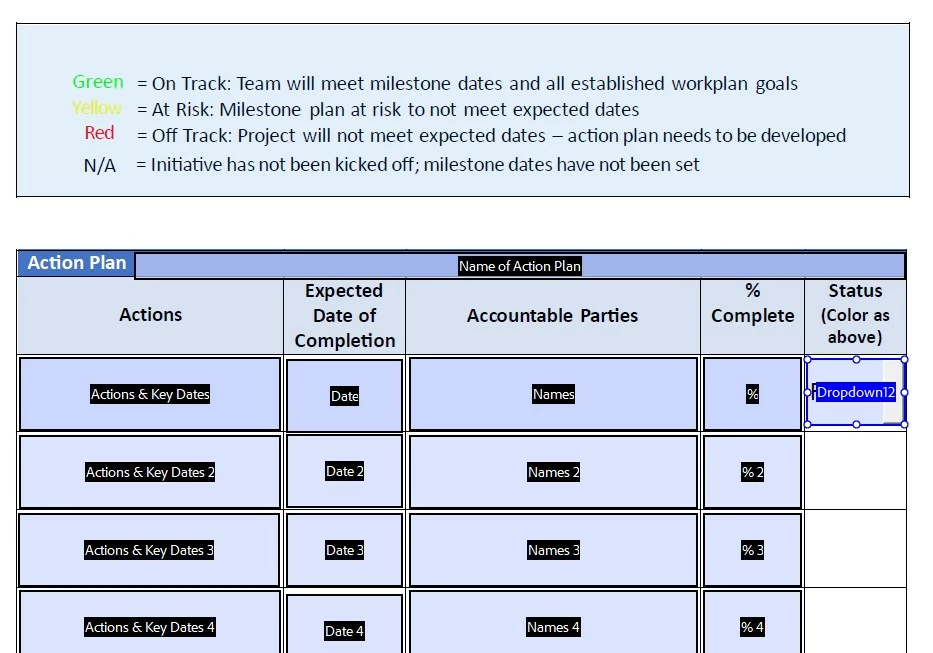
In the form below, I need the user's selection from the drop down menu (Dropdown12)  in the Status column (selections are Green, Yellow, Red, N/A) to color that box the corresponding color. I'm running this script as a custom validation script in the Validate tab. I have the "Commit selected value immediately" box checked on the Options tab. 


This script turns the dropdown menu background to the correct color (except for black which isn't doing anything), but does not turn the box itself a color. Is what I'm trying to do available in Acrobat?


Thank you!


if (event.value=="Green")event.target.fillColor=color.green;

else if (event.value=="Yellow")event.target.fillColor=color.yellow;

else if (event.value=="Red") event.target.fillColor=red;

else if (event.value=="N/A") event.target.fillColor==black;


------------------
Correct answer Nesa Nurani

Add color.before red and black:
color.red and color.black
And remove one equal sign when setting color black:
event.target.fillColor==black;

1 reply

Nesa Nurani
Nesa NuraniCorrect answer
Community Expert
January 30, 2025

Add color.before red and black:
color.red and color.black
And remove one equal sign when setting color black:
event.target.fillColor==black;

Known Participant
January 30, 2025

Thank you for correcting that! I made the change, but the only color change is still the drop down menu background when the selection is made. Their choice in the column remains in black text on the blue background. And, curiously, when the user now clicks on the other cells in the first row, the color of the cell turns from blue to red.

Known Participant
January 31, 2025

That was helpful, thank you very much! However, the row is now red no matter what color option I select in the Status row.


Sorry, in the Status Column, not row.