


Exit
  • Global community
    • Language:
      • Deutsch
      • English
      • Español
      • Français
      • Português
  • 日本語コミュニティ
  • 한국 커뮤니티
0

Want Dropdown Selection to Trigger Color Change

Community Beginner ,
Jan 30, 2025 Jan 30, 2025

Rusty Java user here. Thanks in advance for the help!


In the form below, I need the user's selection from the drop down menu (Dropdown12)  in the Status column (selections are Green, Yellow, Red, N/A) to color that box the corresponding color. I'm running this script as a custom validation script in the Validate tab. I have the "Commit selected value immediately" box checked on the Options tab. 


This script turns the dropdown menu background to the correct color (except for black which isn't doing anything), but does not turn the box itself a color. Is what I'm trying to do available in Acrobat?


Thank you!


if (event.value=="Green")event.target.fillColor=color.green;

else if (event.value=="Yellow")event.target.fillColor=color.yellow;

else if (event.value=="Red") event.target.fillColor=red;

else if (event.value=="N/A") event.target.fillColor==black;


------------------
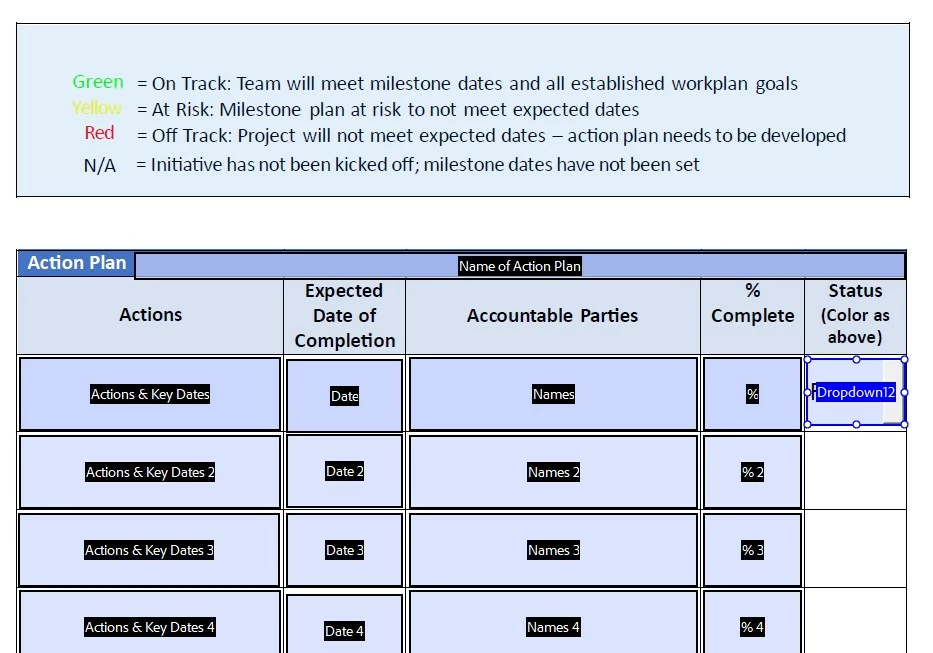
Status Screen Shot.jpg

TOPICS
How to , JavaScript , PDF forms
2.3K
Translate
Report
Community guidelines
Be kind and respectful, give credit to the original source of content, and search for duplicates before posting. Learn more
community guidelines
1 ACCEPTED SOLUTION
Community Expert ,
Jan 30, 2025 Jan 30, 2025

Add color.before red and black:
color.red and color.black
And remove one equal sign when setting color black:
event.target.fillColor==black;

View solution in original post

Translate
Report
Community guidelines
Be kind and respectful, give credit to the original source of content, and search for duplicates before posting. Learn more
community guidelines
Community Expert ,
Jan 30, 2025 Jan 30, 2025

Add color.before red and black:
color.red and color.black
And remove one equal sign when setting color black:
event.target.fillColor==black;

Translate
Report
Community guidelines
Be kind and respectful, give credit to the original source of content, and search for duplicates before posting. Learn more
community guidelines
Community Beginner ,
Jan 30, 2025 Jan 30, 2025

Thank you for correcting that! I made the change, but the only color change is still the drop down menu background when the selection is made. Their choice in the column remains in black text on the blue background. And, curiously, when the user now clicks on the other cells in the first row, the color of the cell turns from blue to red.

Translate
Report
Community guidelines
Be kind and respectful, give credit to the original source of content, and search for duplicates before posting. Learn more
community guidelines
Community Expert ,
Jan 30, 2025 Jan 30, 2025

You must disable the fields highlighting to see the fill color of the fields.

Translate
Report
Community guidelines
Be kind and respectful, give credit to the original source of content, and search for duplicates before posting. Learn more
community guidelines
Community Beginner ,
Jan 31, 2025 Jan 31, 2025

That was helpful, thank you very much! However, the row is now red no matter what color option I select in the Status row.

Translate
Report
Community guidelines
Be kind and respectful, give credit to the original source of content, and search for duplicates before posting. Learn more
community guidelines
Community Beginner ,
Jan 31, 2025 Jan 31, 2025

Sorry, in the Status Column, not row.

Translate
Report
Community guidelines
Be kind and respectful, give credit to the original source of content, and search for duplicates before posting. Learn more
community guidelines
Community Expert ,
Jan 31, 2025 Jan 31, 2025

Post the script you used or share the file if you can.

Translate
Report
Community guidelines
Be kind and respectful, give credit to the original source of content, and search for duplicates before posting. Learn more
community guidelines
Community Beginner ,
Jan 31, 2025 Jan 31, 2025

Thank you!


if (event.value=="Green")event.target.fillColor=color.green;

else if (event.value=="Yellow")event.target.fillColor=color.yellow;

else if (event.value=="Red") event.target.fillColor=color.red;

else if (event.value=="N/A") event.target.fillColor=color.black;

Translate
Report
Community guidelines
Be kind and respectful, give credit to the original source of content, and search for duplicates before posting. Learn more
community guidelines
Community Expert ,
Jan 31, 2025 Jan 31, 2025

The code is fine. Share the file if it's not working.

Translate
Report
Community guidelines
Be kind and respectful, give credit to the original source of content, and search for duplicates before posting. Learn more
community guidelines
Community Beginner ,
Feb 03, 2025 Feb 03, 2025
 
Translate
Report
Community guidelines
Be kind and respectful, give credit to the original source of content, and search for duplicates before posting. Learn more
community guidelines
Community Expert ,
Feb 03, 2025 Feb 03, 2025

Works fine for me.

Translate
Report
Community guidelines
Be kind and respectful, give credit to the original source of content, and search for duplicates before posting. Learn more
community guidelines
Community Beginner ,
Feb 03, 2025 Feb 03, 2025

It doesn't work for the other 10 people who have tried it.

Translate
Report
Community guidelines
Be kind and respectful, give credit to the original source of content, and search for duplicates before posting. Learn more
community guidelines
Community Expert ,
Feb 03, 2025 Feb 03, 2025

Where did they try it? In what application?

Translate
Report
Community guidelines
Be kind and respectful, give credit to the original source of content, and search for duplicates before posting. Learn more
community guidelines
Community Beginner ,
Feb 03, 2025 Feb 03, 2025

Hi. We're all opening it in Acrobat. The users are selecting an option in the Status column. That dropdown menu turns the selected color and upon exit the field color disappears.

Translate
Report
Community guidelines
Be kind and respectful, give credit to the original source of content, and search for duplicates before posting. Learn more
community guidelines
Community Expert ,
Feb 03, 2025 Feb 03, 2025

Did you disable the fields highlighting, as I've instructed above?

Translate
Report
Community guidelines
Be kind and respectful, give credit to the original source of content, and search for duplicates before posting. Learn more
community guidelines
Community Beginner ,
Feb 04, 2025 Feb 04, 2025

If you're talking about Apperance in the Dropdown Properties the fill color is set to nothing. Is there somewhere else this is changed? I also have "Commit Selected Value Immediately" selected on the Options tab in the Drowndown Properties.

Translate
Report
Community guidelines
Be kind and respectful, give credit to the original source of content, and search for duplicates before posting. Learn more
community guidelines
Community Expert ,
Feb 04, 2025 Feb 04, 2025

You can turn it off under Preferences ⇾ Forms ⇾ Show border hover color for fields.

Every user needs to do it on their computer.

Translate
Report
Community guidelines
Be kind and respectful, give credit to the original source of content, and search for duplicates before posting. Learn more
community guidelines
Community Beginner ,
Feb 04, 2025 Feb 04, 2025

Holy crow, I had NO idea a global preference like that needed to be adjusted, and for every user! It works! Thank you SO incredibly much. This was driving me bonkers. I appreciate you sharing your expertise and helping me accomplish this task, Nesa. Thank you! 

Translate
Report
Community guidelines
Be kind and respectful, give credit to the original source of content, and search for duplicates before posting. Learn more
community guidelines
Community Expert ,
Feb 04, 2025 Feb 04, 2025

You're welcome...

Translate
Report
Community guidelines
Be kind and respectful, give credit to the original source of content, and search for duplicates before posting. Learn more
community guidelines
Community Beginner ,
Feb 04, 2025 Feb 04, 2025
LATEST

I really appreciate your help! Thanks, again!

Translate
Report
Community guidelines
Be kind and respectful, give credit to the original source of content, and search for duplicates before posting. Learn more
community guidelines