Correct answer patrickr69834338

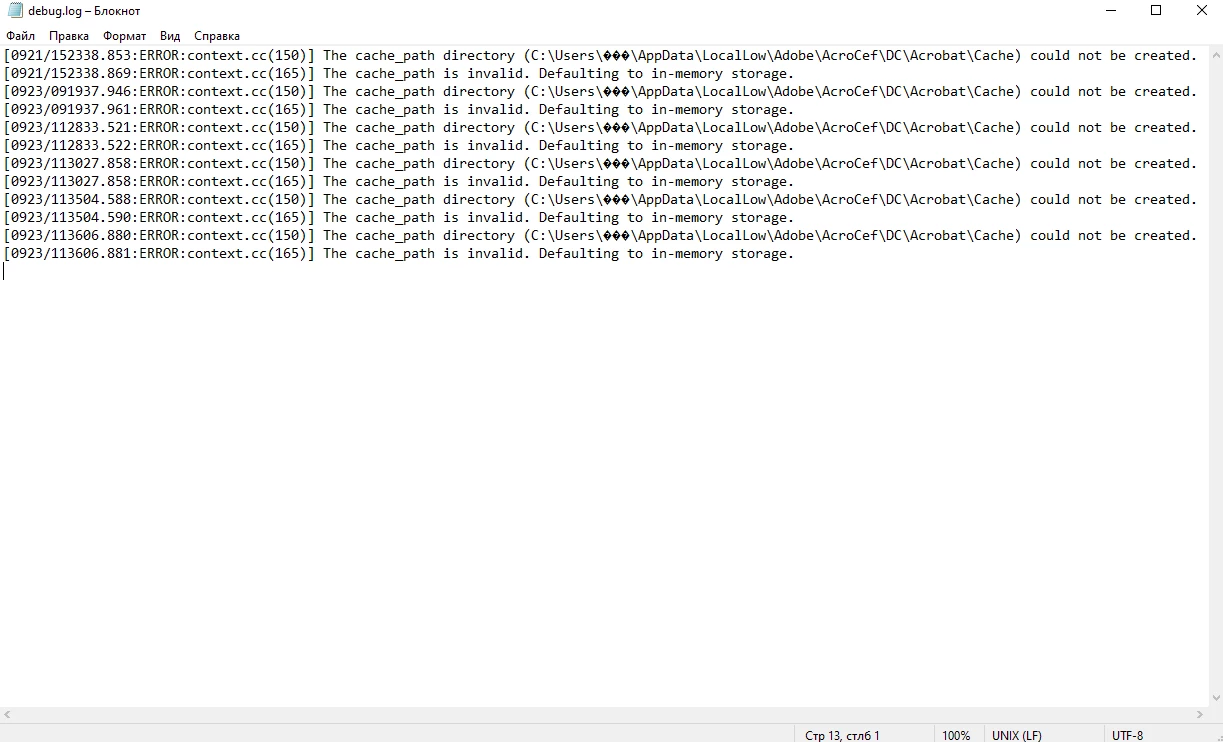
It is so crazy that a full paid software do not get any support an such a serious issue. I just found another workaround which solves the matter permanently. So for all people with special chars in their names, just create the path manually which the debug.log file is requesting. So if the debug.log file shows


The cache_path directory (C:\Users\R�der\AppData\LocalLow\Adobe\AcroCef\DC\Acrobat\Cache) could not be created.


then just create exactly that path manually, including all black question marks in the user name, and give it full access to "everyone". It works fine for me.


8 replies

New Participant
October 7, 2024

In Windows Settings/Region/Administrative/Language for non-Unicode programs/Change system locale..., check to use "Beta: Unicode UTF-8 for worldwide language support"

S_S
Community Manager
Community Manager
February 13, 2025

Hi @[Cosmo]Stranger,


Hope you are doing well. 


Thanks for writing in!


Another method here would be to recreate the cache location.


  • Open Command Prompt as Administrator:

    • Press the Windows Key and type cmd.
    • Right-click on "Command Prompt" in the search results and select Run as administrator.
  • Navigate to the Parent Directory:

    • In Command Prompt, navigate to the directory where the folder is supposed to be created.
    • Run the following command:
       
      cd C:\Users\XXX\AppData\LocalLow\Adobe\AcroCef\DC\Acrobat
      Replace XXX with a different name.
  • Create the Cache Folder:

    • Use the mkdir (make directory) command to create the Cache folder:
       
      mkdir Cache
  • Check if the Folder Was Created:

    • You can verify the folder was created by listing the directory’s contents:
       
      dir
  • Grant Permissions to the Folder:

    • If you need to make sure that the folder has proper permissions, use the icacls command. This grants full control to the current user:
       
      icacls "Cache" /grant %username%:F
      This command gives your user full control (:F) over the Cache folder.


Hope this helps.


-Souvik

New Participant
November 30, 2022

For me this was related with the following setting:


Edit - Prefernces - Security (Enhanced) - Create Protected Mode log file

After deactivating this setting, no debug.log was created on the network drive.

New Participant
May 24, 2022

Thank you @patrickr69834338 for your solution it works for me too, the debog.log file doesn't appear anymore.

But my main problem with that is the fact that Adobe Reader was completely shutting down... and making appear this debug.log file. 

Now I don't have this file anymore, but Adobe Reader is still not working, it's impossible for me to read pdf, it's shutting down after a few seconds. I've tried to uninstall/re-install completely the software but it still doesn't work.

Will one day the Adobe Team react to this topic?......... 

Participating Frequently
May 24, 2022

I think the solution only works for Adobe Acrobat Pro DC at the moment. I haven't tested it with Acrobat Reader. It's just a workaround and not a final solution. I am also still waiting for the Adobe Team to fix the problem finally. Until then, you might want to open your PDF files only in Adobe Acrobat Pro DC (if you are not absolutely dependent on Acrobat Reader).

New Participant
May 24, 2022

Yes sorry, my bad, I'm using Adobe Acrobat DC also, and your tip is working for the debug file 🙂

But the Software doesn't work since a few weeks.

That's why I am so dissapointed, I'm paying for the full Adobe Creative Cloud Suite and it's impossible for me to open pdf's.

Participating Frequently
November 19, 2021

Dear Adobe Team,


the problem still exists and there is still no update! Even no message that there is somebody working on it. Please fix it as soon as possible, or give at leats some feedback how you plan to continue on this matter.


Thanks.


Participating Frequently
December 26, 2021

What a wonderful support!


No update no answer...

Participating Frequently
January 11, 2022

Debug text is below:


[0111/142231.003:ERROR:context.cc(150)] The cache_path directory (C:\Users\XXX\AppData\LocalLow\Adobe\AcroCef\DC\Acrobat\Cache) could not be created.
[0111/142231.019:ERROR:context.cc(165)] The cache_path is invalid. Defaulting to in-memory storage.


Unfortunately, problem is existing regardless open or edit file. 

Participating Frequently
November 4, 2021

The issue still exists, which is very annoying.

Will it ever be fixed?


Participating Frequently
November 8, 2021

Dear Adobe Team,


Problem is existing for more than a month and there is no update or information about that will be fixed with next release. 


Feedback please...


Participating Frequently
October 21, 2021

I have the same issue since several weeks. I have also a special character in the user name, but re-installing Adode Acrobat DC did not help. Our network storage is quasi floated by "debug.log" files, because I need to open many PDF files per day on our network storage. The content is always the same:


[1021/093942.227:ERROR:context.cc(150)] The cache_path directory (C:\Users\R�der\AppData\LocalLow\Adobe\AcroCef\DC\Acrobat\Cache) could not be created.
[1021/093942.229:ERROR:context.cc(165)] The cache_path is invalid. Defaulting to in-memory storage.


Moreover, it is not always possible to delete that log file until I restart my computer. That's very annoying and disturbs the workflow. And to be honest, such a bug is not acceptable for daily used software which is monthly paid.


By the way, that's the second time this bug happens. It was solved a log time ago, but came back in September.


Is there any solution in work, or any work-around to fix it temporary?

Participating Frequently
October 22, 2021

I found a workaround by myself: at the very first, just open one arbitary PDF file in Acrobat DC which is locally stored on your computer, and keep it open in the background all the day. Then you can continue as usual with network stored files without having the "debug.log" file issue anymore. This works fine until you close the last local PDF file in Acrobat DC.


Anyway, I think, this workaround is not very user-friendly and the bug should be fixed by Adobe anyway and as soon as possible.

New Participant
October 6, 2021

Hello,

I've exactly the same problem.

Can you tell me if you have found a solution?

I noticed that we have "unknown characters" with the "?" in the path C:\Users\???


Thank you everybody!

New Participant
October 6, 2021

Hi,

Unfortunately, I haven't found a solution yet.

New Participant
October 20, 2021

Hi,


I had the same issue.

I have uninstalled Adobe reader dc and reinstalled from the website.

Problem solved for the end user.


Also my user had a special character in the username, namely é


Regards,

Peter

Meenakshi Negi
Community Manager
Community Manager
September 28, 2021

Hi Евгений,


Thank you for reaching out.


Please let us know if this happens only when you try to open the file from network drive. 

Check if the issue occurs with all files or with some particular ones.

Share the OS version used on the machine.


Thanks,

Meenakshi

New Participant
September 28, 2021

Yes, this happens only when opening files from a network drive.

Yes,  this issue occure with all PDF files.

I use Windows 10 Home 20H2.